SQL Fundamentals
Introduction to Relational Databases
What Is a Relational Database?
At its heart, a database is just an organized collection of data. You probably use them every day without thinking about it. Your phone's contact list is a database. A library's card catalog is a database. Even a simple shopping list is a type of database.
A relational database adds a layer of organization on top of this. Instead of just storing lists of things in isolation, it's designed to recognize and manage relationships between those lists. Think of it like a set of interconnected spreadsheets. You might have one sheet for customer names and another for their orders. A relational database allows you to link a specific order back to the customer who made it, creating a logical connection.
This structure is powerful because it keeps data tidy and efficient. You don't have to repeat a customer's address and phone number every single time they place an order. You store it once in the customer list and simply link to it. This saves space and, more importantly, prevents errors. If a customer moves, you only need to update their address in one place.
The Building Blocks
Relational databases organize data using a simple and intuitive structure. Everything is stored in tables, which look a lot like a grid or a spreadsheet.
Let's break down these components:
- Tables: A table holds information about a single subject, like
Customers,Products, orOrders. In our example, the whole grid is theCustomerstable. - Columns (or Fields): Each column represents a specific piece of information about the subject. For the
Customerstable, you'd have columns forCustomerID,Name, andEmail. A column defines the type of data it holds, like a number, text, or a date. - Rows (or Records): Each row is a single entry in the table. It contains the actual data for one specific item. In our table, the first row is the record for Alice, containing her ID, name, and email address.
Connecting the Dots with Keys
The real magic of relational databases comes from how we link these tables together. If we have another table for Orders, how do we know which customer placed which order? We do this using special columns called keys.
Primary Key
noun
A column (or set of columns) that uniquely identifies each row in a table. It cannot be empty or contain duplicate values.
Think of a primary key like a Social Security Number for each row. It’s a unique identifier that ensures you can always find the exact record you’re looking for. No two rows in the same table can have the same primary key.
To connect tables, we use a foreign key.
Foreign Key
noun
A column in one table that refers to the primary key in another table. It acts as a link or a bridge between the two tables.
By placing the customer's unique ID into the Orders table, we create a direct relationship. We can look at any order, see the CustomerID, and then use that ID to look up all the customer's details from the Customers table. This is how the "relation" in a relational database works.
Keeping Data Healthy
When designing a database, one key goal is to avoid storing the same piece of information in multiple places. For example, you wouldn't want to store a product's name and price in your Orders table. If the price changes, you'd have to find and update every single order that included that product, which is a recipe for disaster.
Instead, you'd have a Products table with the price and link to it from the Orders table. This process of organizing data to reduce redundancy and improve data integrity is called normalization.
Normalization is about making sure every piece of data has one, and only one, home. This makes your database more efficient, predictable, and easier to maintain.
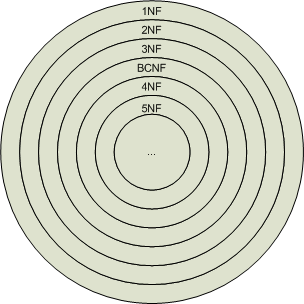
There's a formal process for normalization with different levels, or "normal forms." We won't dive into the specifics here, but the core idea is to break down large, clunky tables into smaller, more logical ones that are linked together with keys.
Managing the Database
A relational database doesn't just exist on its own. It's managed by a piece of software called a Relational Database Management System (RDBMS). This is the program that lets you create, update, and interact with the database.
You've likely heard of some of the most popular RDBMSs:
- MySQL: One of the world's most popular open-source RDBMSs, known for its reliability and ease of use. It powers a huge portion of the web, including platforms like Facebook and WordPress.
- PostgreSQL: Another powerful, open-source RDBMS that is famous for its advanced features, standards compliance, and extensibility.
- SQL Server: Developed by Microsoft, this is a commercial RDBMS widely used in corporate environments, especially those that rely on other Microsoft products.
Relational Model: The foundation of an RDBMS is based on the relational model, which organizes data into tables (relations) consisting of rows (tuples) and columns (attributes).
While these systems have their differences, they all share the same foundational principles of tables, keys, and relationships. And they all use a language called SQL (Structured Query Language) to communicate with the data, which is what we'll be exploring next.
What is the primary purpose of a relational database?
In a database table, each column is also known as a __________, and each row is known as a __________.