SQL Fundamentals for Database Management
Introduction to Databases
What Is a Database?
Think of a database as a highly organized digital filing cabinet. Instead of paper folders, you have a structured system for storing, managing, and retrieving information electronically. Its main job is to keep data safe, organized, and ready for you to access whenever you need it.
Almost every app you use relies on a database. When you check your bank balance, browse an online store, or scroll through a social media feed, you're interacting with a database. It's the engine working behind the scenes, making sure the right information gets to you quickly and reliably.
Database systems are the backbone of modern computing, enabling efficient storage, retrieval, and manipulation of data.
To manage all this information, we use a Database Management System (DBMS). It's the software that acts as an interface between you and the database, letting you add, update, or pull out data. The most common type is the Relational Database Management System, or RDBMS.
The Relational Model
The "relational" part of RDBMS means data is organized into tables, which look a lot like spreadsheets. Each table stores information about a specific type of thing, like customers, products, or orders. The real power comes from creating relationships between these tables.
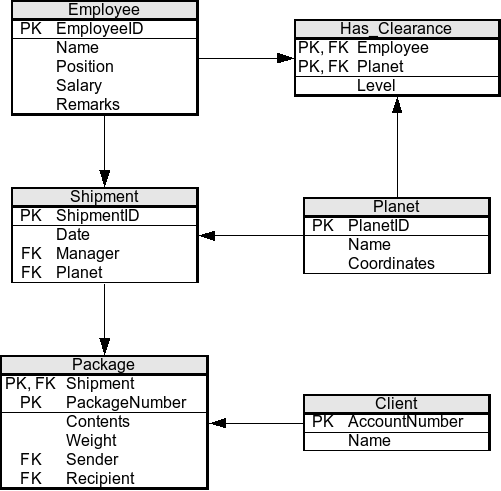
Let's break down the basic structure:
- Tables: A table is a collection of related data. For example, you might have a
Studentstable to hold information about every student at a school. - Columns: Each column in a table represents a specific piece of information, like
FirstName,LastName, orGraduationYear. Columns are also known as fields or attributes. - Rows: Each row represents a single, complete record. In our
Studentstable, one row would contain all the information for one specific student. Rows are also called records.
Building Blocks of a Table
Every column in a table is defined by a data type. This is a rule that specifies what kind of data can be stored in that column. For example, a FirstName column would have a text data type, while an Age column would have a numeric data type.
Data types are important for a few reasons. They ensure data consistency, prevent errors (like trying to perform math on a name), and help the database manage storage space efficiently.
| Data Type Category | Examples | Use Case |
|---|---|---|
| Text | VARCHAR, TEXT | Storing names, addresses, or descriptions |
| Numeric | INT (Integer), DECIMAL | Storing age, price, or quantity |
| Date/Time | DATE, TIMESTAMP | Storing birthdates or transaction times |
| Boolean | BOOLEAN | Storing true/false values, like IsActive |
Now, how do we make sure every row is unique? And how do we link tables together?
That's where keys come in.
Primary Key
noun
A column (or set of columns) that contains a unique identifier for each row in a table. It cannot have duplicate or null values.
A primary key is like a social security number or a student ID. It ensures that every record in the table can be uniquely identified. No two rows can have the same primary key.
To connect tables, we use a foreign key.
A foreign key is a column in one table that refers to the primary key of another table. This is how relationships are formed.
Imagine we have a second table called Enrollments to track which courses students are taking. Instead of re-typing a student's entire name for each course they're enrolled in, we can simply use their unique StudentID. In the Enrollments table, the StudentID column would be a foreign key that points back to the primary key in the Students table.
This simple structure of tables, keys, and relationships is the foundation of relational databases. It allows us to store complex information without duplicating data, which keeps everything efficient and consistent.
Understanding this structure is the first step to mastering how to interact with the data inside.
What is the primary purpose of a database?
In a relational database, data is organized into _______, which are made up of _______ (records) and _______ (fields).