SQL Fundamentals for Beginners
Introduction to Relational Databases
Organizing Information
Imagine running a small online store. You need to keep track of customers, the products you sell, and the orders they place. At first, a simple spreadsheet might work. But as your business grows, you'll have thousands of customers and orders. How do you make sure all that information stays accurate, organized, and easy to find?
This is where relational databases come in. A relational database is a system for storing and organizing data in a structured way. Instead of dumping everything into one giant file, it breaks information down into smaller, logical groups. The key idea is that these groups of information, or tables, can be related to one another. This structure makes it efficient to manage and query large amounts of data without creating a mess.
The Building Blocks
The fundamental components of a relational database are tables, columns, and rows. It's helpful to think of a table as a spreadsheet, but with stricter rules.
- Tables: A table holds information about a specific type of thing, like
CustomersorProducts. - Columns: Columns define the attributes for the items in a table. For a
Customerstable, you might have columns forCustomerID,FirstName,LastName, andEmail. - Rows: Each row represents a single record or item. In the
Customerstable, one row would contain the information for one specific customer.
| CustomerID | FirstName | LastName | |
|---|---|---|---|
| 101 | Anya | Sharma | anya.s@email.com |
| 102 | Ben | Carter | b.carter@email.com |
| 103 | Chloe | Davis | chloe.davis@email.com |
Each column is set up to hold a specific type of data, like a number, text, or a date. This ensures that the data is consistent. You can't put a customer's name in a CustomerID column if that column is set to only accept numbers. This structure is the first step toward reliable data.
Connecting the Dots
The real power of a relational database comes from the relationships between tables. We create these connections using keys.
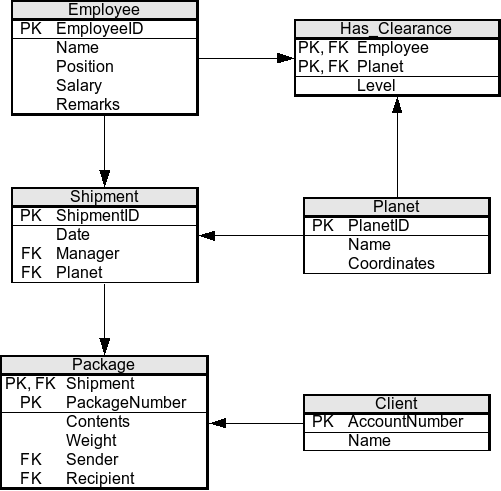
A primary key is a column that uniquely identifies each row in a table. In our Customers table, CustomerID is the primary key. No two customers can have the same CustomerID, so we always have a guaranteed way to find a specific customer.
A foreign key is a column in one table that refers to the primary key of another table. It's the link that creates the relationship. For instance, if we have an Orders table, we could include a CustomerID column in it. This CustomerID would be a foreign key that points back to the Customers table, linking each order to the customer who made it.
This system prevents data duplication. We don't need to store a customer's name and email with every single order they place. We just need their CustomerID. If a customer updates their email address, we only have to change it in one place: the Customers table. All their past and future orders will automatically be linked to the updated information.
Keeping Data Tidy
The process of organizing tables and columns to minimize redundancy is called normalization. It's a set of guidelines for designing a database that is efficient and has high data integrity, meaning the data is reliable and consistent.
For example, imagine we initially stored the product name and price directly in our Orders table. If the price of a product changes, we would have to find every single order that ever included that product and update the price. That's a recipe for errors.
Through normalization, we would instead create a separate Products table with ProductID, ProductName, and Price. The Orders table would then only need to reference the ProductID. This way, the product's price is stored in just one place. If it changes, we update it once in the Products table, and the change is reflected everywhere.
The core principle of normalization is to ensure that every piece of data is stored in only one place.
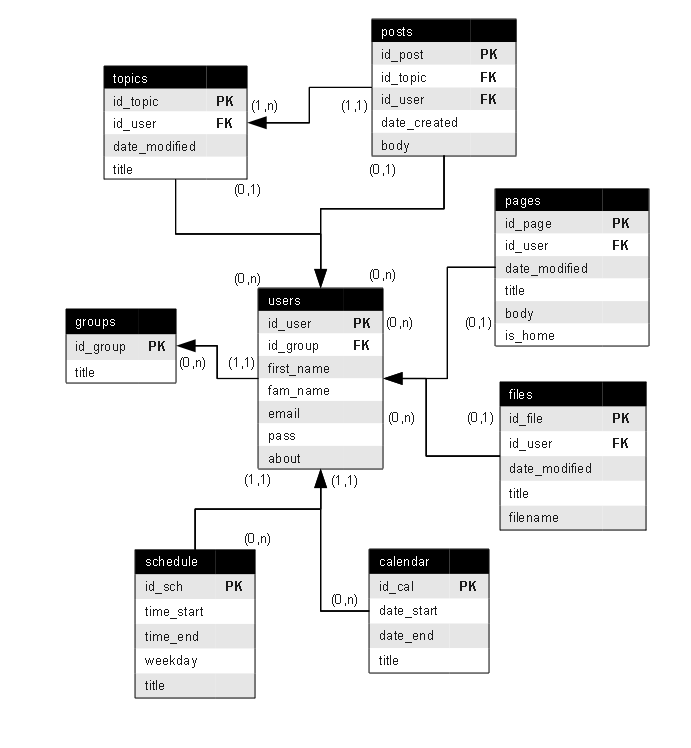
Before building a database, designers often map out the structure using an Entity-Relationship (ER) model. An ER model is like a blueprint. It visually represents the tables (entities), their columns (attributes), and how they connect to each other (relationships). This planning step helps ensure the database design is logical and efficient before any actual construction begins.
Understanding these core concepts—tables, keys, normalization, and modeling—is the foundation for working with relational databases. They provide the structure that allows powerful languages like SQL to manage data effectively.