SQL Fundamentals for Beginners
Introduction to Databases
What Is a Database?
Think of a database as a digital filing cabinet. It’s a place to store information in an organized way so you can easily find, update, and manage it later. Instead of paper files, you have digital data. This data could be anything: customer information, product inventory, user posts on a social media app, or your personal contact list.
The main purpose of a database is to keep data structured and accessible. Without one, information would be a chaotic mess. Imagine an online store trying to track millions of orders using separate text files. It would be a nightmare. Databases provide the structure needed to run almost every modern application, from banking systems to video games.
A database is an organized collection of structured information, or data, typically stored electronically in a computer system.
Types of Databases
Not all data is the same, so there isn’t just one type of database. The two main categories you'll encounter are Relational and Non-Relational.
Relational databases store data in tables, which look a lot like spreadsheets. Each piece of data is related to others through these tables. This is the most common type of database, and it's the kind you'll interact with using SQL. They are excellent for structured data where consistency is key.
Non-relational databases, often called NoSQL databases, are more flexible. They can store data in many different formats, like documents, key-value pairs, or graphs. They're often used for large-scale applications with unstructured data, like social media feeds or real-time analytics.
For now, we'll focus entirely on the relational model, as that's the foundation for learning SQL.
The Relational Model
A relational database is managed by a Relational Database Management System (RDBMS). This is the software that lets you create, update, and administer the database. Think of the RDBMS as the librarian and the database as the library itself. Popular RDBMS examples include MySQL, PostgreSQL, and Microsoft SQL Server.
Learn SQL Basics: SQL databases, like MySQL or PostgreSQL, are widely used and foundational to backend work.
Relational databases have a few key components you need to know.
Table
noun
A collection of related data organized in rows and columns. For example, you might have a table for 'Customers' and another for 'Orders'.
Record
noun
A single entry in a table, also known as a row. It represents one complete item. In a 'Customers' table, one record would be all the information for a single customer.
Field
noun
A single piece of data in a record, also known as a column. It defines the type of data for all records in the table. For instance, 'FirstName', 'Email', and 'JoinDate' would be fields in a 'Customers' table.
Here’s how these parts fit together in a simple Users table:
| UserID | FirstName | LastName | |
|---|---|---|---|
| 1 | Alice | Smith | alice@example.com |
| 2 | Bob | Johnson | bob@example.com |
| 3 | Charlie | Brown | charlie@example.com |
In this example:
- The entire structure is the table.
- Each numbered line (e.g., Alice's info) is a record (row).
- Each header (
UserID,FirstName,LastName,Email) represents a field (column).
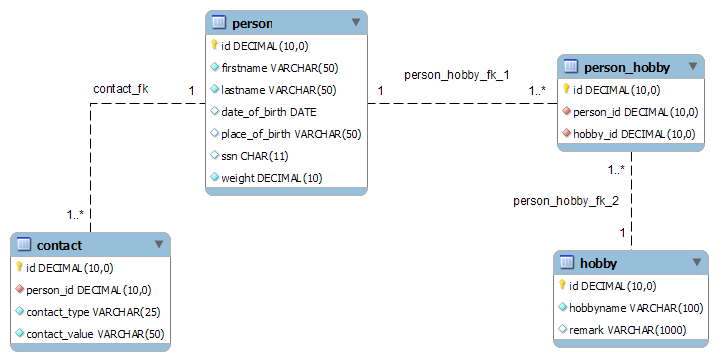
This simple, table-based structure is incredibly powerful. It keeps data organized, reduces duplication, and ensures information is consistent across an entire application. Understanding these building blocks is the first step to mastering how to interact with data.