SQL Fundamentals
Introduction to SQL
The Language of Data
Databases are everywhere, silently powering websites, apps, and businesses. But how do we talk to them? How do we ask them to store, find, or update information? We use a special language called SQL.
SQL
noun
Stands for Structured Query Language. It's the standard programming language used to communicate with and manage data in a relational database.
Think of SQL as a universal translator for databases. Whether you're working with customer records, inventory, or website user data, SQL provides a consistent way to interact with it. You write commands, called queries, that tell the database exactly what you want to do.
SQL (Structured Query Language) is a standard programming language used for managing and manipulating relational databases.
Organizing Information
SQL is designed to work with relational databases. The name sounds complex, but the idea is simple. A relational database organizes information into tables, much like a spreadsheet.
Imagine a digital filing cabinet for a small bookstore. This cabinet is your database.
Inside, you have different drawers, one for 'Books' and another for 'Customers'. Each drawer is a table.
When you open the 'Books' drawer, you find neatly organized folders. Each folder represents a single book—this is a row.
Finally, each folder contains specific pieces of information written on a form: Title, Author, and Price. These categories are the columns.
Every piece of data has a specific place in this structure. This organization is what makes it possible for SQL to quickly find and work with exactly the information you need.
Getting Started
To start using SQL, you need a database system installed on your computer. This program, called a Relational Database Management System (RDBMS), is what actually stores the data and runs your SQL queries. Two of the most popular free options are MySQL and PostgreSQL.
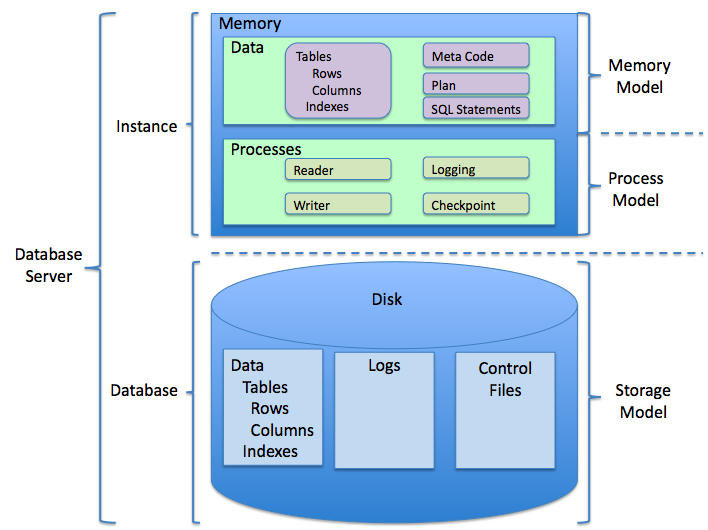
Once you install a system like MySQL, you typically interact with it through a command-line interface. You connect to the database server, select a specific database to work with, and then you can start writing queries.
# Connect to MySQL server as the root user
mysql -u root -p

-- After entering password, you're in the MySQL monitor
-- The '>' indicates it's ready for a command

-- Show all existing databases
SHOW DATABASES;

-- Switch to a specific database to work on it
USE bookstore;

-- Show all the tables inside the 'bookstore' database
SHOW TABLES;
Don't worry about memorizing these commands right now. The key takeaway is that you use a database program to manage your data, and you use SQL as the language to tell that program what to do.
Ready to check your understanding?
What is the primary purpose of the SQL language?
In the common analogy of a database as a filing cabinet, what does a single 'drawer' (e.g., the 'Books' drawer) represent?
With these core concepts, you're ready to start exploring the basic commands that make SQL so powerful.