SQL Fundamentals
Introduction to Databases
What Is a Database?
At its heart, a database is just an organized collection of data. Think of it like a digital filing cabinet. Instead of manila folders and paper, you have digital structures that store, manage, and let you retrieve information quickly and efficiently. Businesses use them to track customer orders, hospitals use them to manage patient records, and your favorite social media app uses them to store your posts and connections.
The main purpose of a database is to bring order to information. Without one, data would be a chaotic mess, saved in random files and spreadsheets with no consistent format. A database ensures that data is stored in a structured way, making it easy to find, update, and analyze. This organization is handled by a special piece of software.
Database Management System
noun
Software that interacts with users, other applications, and the database itself to capture and analyze data. A DBMS allows for the definition, creation, querying, updating, and administration of databases.
Simply put, a Database Management System (or DBMS) is the gatekeeper. It's the tool you use to talk to the database, telling it what to save, what to change, and what to show you. There are many different types of databases, each with its own way of organizing information.
Types of Databases
Databases come in several flavors, but most fall into two main categories: relational and NoSQL.
Relational databases are the most common. They organize data into tables, which look a lot like spreadsheets. Each table has rows and columns, and the relationships between different tables are strictly defined. This rigid structure ensures data is consistent and reliable. They've been the standard for decades and are used for everything from banking to e-commerce.
NoSQL databases are more flexible. The name stands for "Not Only SQL." They store data in formats other than tables, such as documents, key-value pairs, or graphs. This makes them great for handling large amounts of unstructured data, like social media posts or sensor data, where the format might change over time.
For now, our focus will be on relational databases, as they provide the foundation for understanding structured data and the SQL language used to interact with it.
The Relational Model
The relational model was a breakthrough because it provided a standard, logical way to view data. The entire system is built on a few simple, powerful concepts: tables, rows, and columns.
Think of a table as a single spreadsheet in a workbook. Each spreadsheet is dedicated to one specific type of thing, like 'Customers' or 'Products'.
Let's break down these components using a Customers table as an example.
| CustomerID | FirstName | LastName | |
|---|---|---|---|
| 1 | Maria | Anders | maria.a@email.com |
| 2 | Ana | Trujillo | ana.t@email.com |
| 3 | Antonio | Moreno | antonio.m@email.com |
Tables: A table is the main building block. It holds data about a single subject. In our example, the entire structure, including all the customer information, is the Customers table.
Columns: A column (also called a field or attribute) is a vertical entry in a table that contains a specific category of information for all records. In the Customers table, CustomerID, FirstName, LastName, and Email are the columns. Each column has a defined data type, like a number, text, or date.
Rows: A row (also called a record) is a single, horizontal entry in a table. It represents one complete item. The first row in our table is the record for Maria Anders, containing her ID, first name, last name, and email.
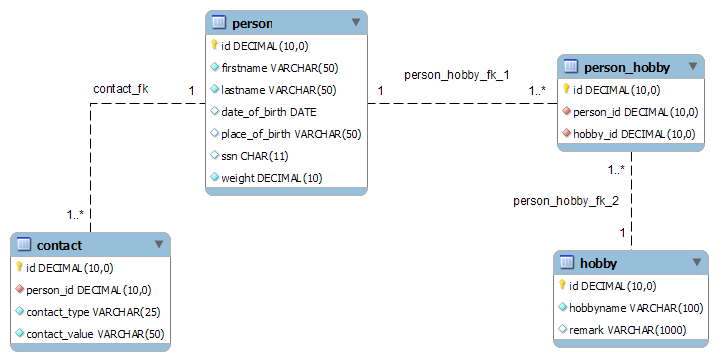
The power of the relational model comes from establishing relationships between these tables. For instance, we could have another table for Orders. Each order would be linked back to a specific customer in the Customers table using their CustomerID. This prevents us from having to repeat customer details for every single order they place.
A Relational Database Management System (RDBMS) is the software that manages all of this, enforcing the rules and relationships to keep the data clean and consistent. Popular examples include MySQL, PostgreSQL, and SQL Server. These are the systems you'll use SQL to communicate with.
Now, let's test your understanding of these core database concepts.
What is the primary purpose of a database?
Which type of database organizes data into tables with rows and columns, similar to a spreadsheet?
With these basics in mind, you're ready to see how we can use a specific language to interact with and pull information from these structured databases.