SQL Fundamentals
Introduction to Databases
What Is a Database?
At its core, a database is simply an organized collection of data. Think of it as a digital filing cabinet, but far more powerful and efficient. Instead of paper folders, you have structured containers that allow you to store, retrieve, update, and manage huge amounts of information with incredible speed.
Every time you use an ATM, book a flight, or shop online, you're interacting with a database. They are the invisible backbone of modern applications, ensuring data is kept safe, consistent, and accessible.
The software that manages these databases is called a Database Management System, or DBMS. It acts as an intermediary between the user and the actual data, handling all the complex tasks of data storage and retrieval.
The Relational Model
While there are several ways to organize a database, one model has become the standard for most applications over the past few decades: the relational model. A database that uses this model is called a relational database, and it's managed by a Relational Database Management System (RDBMS).
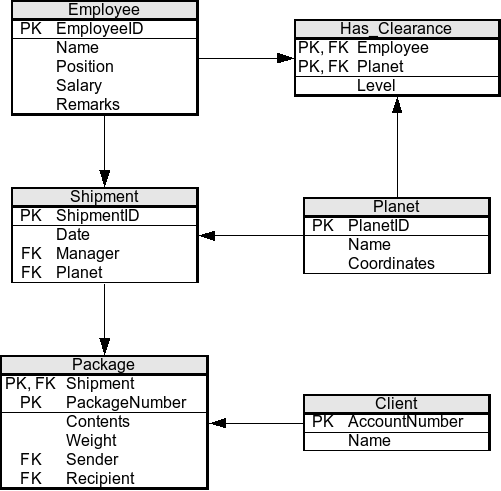
The beauty of the relational model lies in its simplicity. It organizes data in a way that's easy for humans to understand and for computers to work with. It's based on the mathematical concept of a "relation," which you can think of as a table.
Relational Model: The foundation of an RDBMS is based on the relational model, which organizes data into tables (relations) consisting of rows (tuples) and columns (attributes).
Building Blocks of a Table
Every relational database is made up of tables, and each table has a consistent structure. Let's break down the three fundamental components.
Table
noun
A collection of related data organized in a grid of rows and columns. For example, you might have a table for customers, another for products, and a third for orders.
Column
noun
A vertical entity in a table that contains all information of one specific type. Each column has a name, like 'FirstName' or 'Price'. Columns are also called attributes.
Row
noun
A horizontal entity in a table representing a single, complete record. For instance, one row in a 'Customers' table would hold all the information for one specific customer. Rows are also called records or tuples.
Here’s a simple example of a Students table:
| StudentID | FirstName | LastName | Major |
|---|---|---|---|
| 101 | Sarah | Chen | Biology |
| 102 | David | Rodriguez | Computer Science |
| 103 | Emily | Jones | English |
In this table, StudentID, FirstName, LastName, and Major are the columns. Each line of student data is a row.
How Data Is Organized
A data model is a blueprint for how data is structured and related. Before the relational model became popular, two other models were common.
Hierarchical Model: This model organizes data in a tree-like structure. Each record has a single parent, like folders and files on a computer. It's rigid but fast for navigating down a specific path.
Network Model: An evolution of the hierarchical model, this structure allows a record to have multiple parent records. This creates a more flexible, web-like structure but also adds complexity.
The relational model, however, proved to be the most versatile. It doesn't rely on physical pointers or paths. Instead, it uses the data itself to link tables together. This makes the database structure flexible and easier to modify without breaking the entire system.
Understanding this structure is the first step to mastering SQL. The commands you will learn are designed specifically to interact with data organized in these tables, rows, and columns.
What is the primary function of a Database Management System (DBMS)?
The relational model organizes data into a structure that is analogous to a collection of...
Now that you have a solid grasp of what a database is and how relational databases work, you're ready to start learning the language used to communicate with them.