SQL Fundamentals
Introduction to Databases
What is a Database?
Think of a database as a highly organized digital filing cabinet. It’s a structured way to store, manage, and retrieve information. Instead of random piles of paper, you have perfectly labeled folders and files, making it easy to find exactly what you need, when you need it.
Almost every app or website you use relies on a database. When you log into social media, the app checks a database to verify your password. When you shop online, the products you see are pulled from a database. They are the invisible backbone of the digital world, ensuring data is kept safe, organized, and accessible.
The Relational Model
There are many types of databases, but the most common is the relational database. The name comes from the way it organizes data: in tables that can be related to one another.
Imagine you own a small online store. You need to keep track of your customers and the orders they place. With a relational database, you wouldn't just cram all that information into one giant spreadsheet. Instead, you'd create separate tables for separate things, like one for customers and another for orders. The "relation" is the link you create between them.
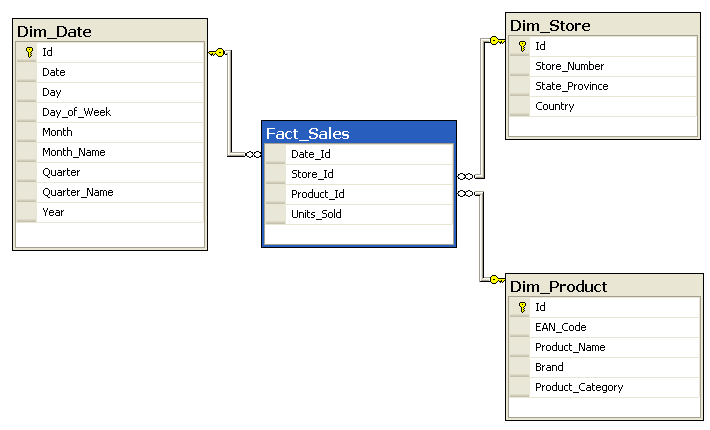
This system, formally known as a Relational Database Management System (RDBMS), is what we'll be focusing on. It’s the foundation for SQL (Structured Query Language), the language used to communicate with these databases.
Tables, Rows, and Columns
The basic building blocks of a relational database are tables, which are made up of columns and rows.
- A table holds information about a single subject, like
CustomersorProducts. - A column defines a specific piece of information for that subject, like
FirstNameorPrice. - A row represents a single, complete record in the table. Each row is one customer or one product.
Think of a table as a spreadsheet, where columns are the headers and rows are the individual entries.
Here’s what a simple Customers table might look like:
| CustomerID | FirstName | LastName | |
|---|---|---|---|
| 1 | Maria | Rodriguez | m.rod@email.com |
| 2 | David | Chen | dchen@email.com |
| 3 | Aisha | Khan | a.khan@email.com |
In this table, CustomerID, FirstName, LastName, and Email are the columns. Each person's information forms a distinct row.
Keys Connect Everything
So how do we link a customer to their order? We use special columns called keys. Keys are the magic that makes the "relational" part of a relational database work.
Primary Key
noun
A column (or set of columns) that contains a unique identifier for each row in a table. It cannot have duplicate values or be empty (NULL).
Now let's introduce a table for Orders. Notice it has its own primary key, OrderID, to uniquely identify each order.
| OrderID | CustomerID | OrderDate | Amount |
|---|---|---|---|
| 101 | 2 | 2023-10-26 | $45.50 |
| 102 | 1 | 2023-10-26 | $19.99 |
| 103 | 2 | 2023-10-27 | $8.75 |
But how do we know who placed which order? Look at the CustomerID column in the Orders table. It contains values that match the CustomerIDs in our Customers table. This is our link, and it's called a foreign key.
Foreign Key
noun
A column in one table that refers to the primary key in another table. It acts as a cross-reference, creating a link between the two tables.
Using this relationship, we can easily tell that David Chen (CustomerID 2) placed two orders, and Maria Rodriguez (CustomerID 1) placed one. This structure prevents us from having to repeat customer details for every single order, keeping our data clean and efficient.
This simple but powerful system of tables and keys is the core concept behind all relational databases. Understanding it is the first major step toward mastering SQL.
What is the primary purpose of a database?
In a relational database, what is the term for a single, complete record of information, such as all the details for one specific customer?
Now you know the fundamental building blocks of a relational database. Next, we'll start exploring how to talk to these databases using SQL.