SQL Fundamentals
Introduction to Databases
What's a Database?
A database is essentially a digital filing cabinet. It’s an organized collection of information, designed to be easily accessed, managed, and updated. Think of a library. The books are the data, and the catalog system that tells you where to find each book is the database. Without that system, finding a specific book would be a chaotic mess.
The main purpose of a database is to bring order to information. It stores data in a structured way, so you can quickly find the exact piece of information you need, whether it's a customer's address, a product's price, or a student's grade.
Databases turn raw data into useful, accessible information.
There are many types of databases, but one of the most common is the relational database.
Relational Databases
A Relational Database Management System (RDBMS) organizes data into a series of tables. The “relational” part is key: these tables can be linked together based on shared data. This structure is incredibly powerful because it allows you to connect different pieces of information without duplicating them.
Imagine you run an online store. You could have one table for customer information, another for product details, and a third for orders. Instead of typing out a customer's full address on every single order they make, you can simply link the order to that customer's entry in the customer table. It's efficient and keeps your data clean.
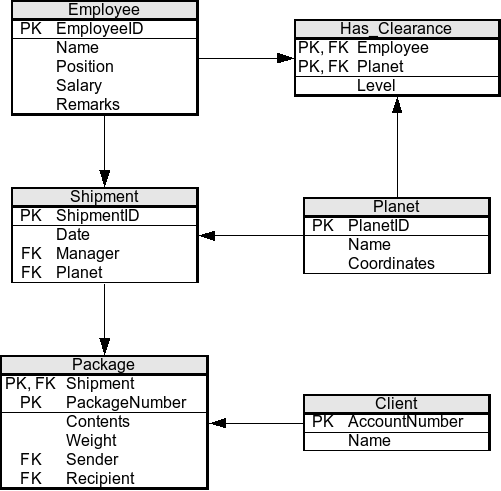
The Building Blocks
Relational databases are built on a simple and intuitive structure: tables made of columns and rows. If you’ve ever used a spreadsheet, you're already familiar with the basic concept.
Table
noun
A collection of related data held in a structured format within a database. Each table represents a single subject, like 'Employees' or 'Products'.
Column
noun
A vertical entity in a table that contains all information of one specific type. Also known as a field or attribute. For example, a 'Products' table might have columns for 'ProductName', 'Price', and 'StockQuantity'.
Row
noun
A single record in a table, representing a complete set of information for one item. Also known as a record or tuple. In a 'Products' table, each row would represent one unique product.
Let's look at a simple example of a table for Authors.
| AuthorID | FirstName | LastName | BirthYear |
|---|---|---|---|
| 1 | J.R.R. | Tolkien | 1892 |
| 2 | George | Orwell | 1903 |
| 3 | Jane | Austen | 1775 |
| 4 | C.S. | Lewis | 1898 |
Here, the entire structure is the table. AuthorID, FirstName, LastName, and BirthYear are the columns. Each line of data, like the one for J.R.R. Tolkien, is a row.
Keeping Data Organized
In our Authors table, how can we guarantee that we can always find a specific author, even if two authors share the same name? We need a way to uniquely identify every single row. This is where primary keys come in.
A primary key is a column (or set of columns) that contains a unique identifier for each row in a table. Think of it like a Social Security Number for your data.
A primary key has two strict rules:
- It must be unique. No two rows in the same table can have the same primary key value.
- It cannot be empty. Every row must have a value for the primary key column. This is often referred to as being
NOT NULL.
In the Authors table above, AuthorID is the primary key. It’s a simple, unique number assigned to each author, ensuring we can always pinpoint the exact record we need.
But what about connecting tables? Imagine we have a second table for Books.
| BookID | Title | PublicationYear | AuthorID_FK |
|---|---|---|---|
| 101 | The Hobbit | 1937 | 1 |
| 102 | 1984 | 1949 | 2 |
| 103 | Pride and Prejudice | 1813 | 3 |
| 104 | The Lord of the Rings | 1954 | 1 |
To link a book to its author, we use a foreign key. A foreign key is a column in one table that refers to the primary key of another table. In the Books table, AuthorID_FK is a foreign key that points to the AuthorID primary key in the Authors table.
This relationship allows us to efficiently query the database. For example, we can easily find all books written by J.R.R. Tolkien by looking for books where the AuthorID_FK is 1. This system avoids data redundancy and ensures that information is consistent across the entire database.
Now let's check your understanding of these core concepts.
What is the primary purpose of a database?
In a relational database, the rows of a table are also known as records, and the columns are known as __________.
Understanding these fundamentals—tables, rows, columns, and keys—is the first step toward mastering how to interact with databases to store and retrieve information.