SQL Fundamentals
Introduction to Databases
What's a Database?
Think about your phone's contact list. It's a collection of names, phone numbers, and maybe email addresses, all neatly organized. You can quickly search for a person, add a new contact, or update a number. In a nutshell, that's a database: an organized collection of data.
Databases are digital filing cabinets. Their main job is to store information in a structured way so that it's easy to find, manage, and retrieve. While a simple spreadsheet can store data, a database is far more powerful. It's designed to handle huge amounts of information, ensure data is accurate, and allow many people to access it at once without causing problems.
A database is a structured collection of data, designed for efficient storage, retrieval, and management.
Relational Databases
The most common type of database is a relational database. The name sounds complex, but the idea is simple. It organizes data into tables that can be linked, or related, to one another.
Imagine you run an online store. You could have one table for your customer information and another for all the orders they've placed. Instead of repeating a customer's address and phone number for every single order, the Orders table simply references the customer in the Customers table. This keeps the data clean, avoids duplication, and makes updates much easier. If a customer moves, you only have to change their address in one place.
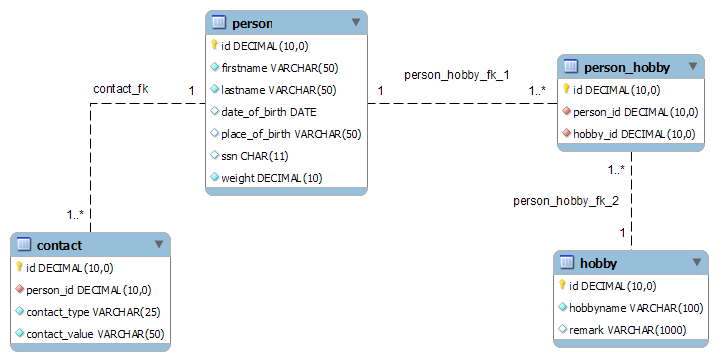
The Building Blocks
Relational databases have three main components that work together.
Table
noun
A collection of related data held in a structured format within a database. It consists of columns and rows.
Each table in a database holds information about a single subject, like Students, Courses, or Products. Think of it as a single sheet in a spreadsheet file.
Column
noun
A vertical set of data values of a particular type, one for each row of a table. Also known as a field.
Columns define the categories of information stored in a table. For a Products table, you might have columns for ProductID, ProductName, Price, and StockQuantity.
Row
noun
A single, implicitly structured data item in a table. It represents a single record.
A row contains the actual data for one specific item in the table. Here's what a simple Students table might look like:
| StudentID | FirstName | LastName | Major |
|---|---|---|---|
| 101 | Alice | Smith | Psychology |
| 102 | Bob | Johnson | Biology |
| 103 | Charlie | Williams | Computer Science |
In this example, StudentID, FirstName, LastName, and Major are the columns. Each line of student information is a row.
The Database Manager
So how do we actually interact with these databases? We use special software called a Relational Database Management System, or RDBMS.
An RDBMS is the program that lets you create, read, update, and delete data in a relational database. It's the engine that runs everything behind the scenes, managing data storage, security, and integrity. Think of it as the librarian for the digital library. You tell the librarian what you need, and they handle the details of finding and retrieving the book for you.
Popular examples of RDBMS software include MySQL, PostgreSQL, Microsoft SQL Server, and Oracle Database. They all use SQL as the language to communicate with the database.
Understanding this basic structure of tables, rows, and columns is the first step. It provides the foundation for learning how to use SQL to ask the database interesting questions.