SQL Fundamentals
Introduction to SQL
The Language of Data
Databases are everywhere. They store your contacts, track your online orders, and power the apps you use every day. But how do we communicate with them? We use a special language called SQL.
SQL, or Structured Query Language, is designed to "talk" to databases.
Think of a massive, perfectly organized library. You wouldn't just wander around hoping to find the right book. You'd go to the librarian and make a specific request, like "I need the book on Roman history by Mary Beard." The librarian knows exactly where to find it.
SQL is that librarian. It's a standard language for requesting, adding, updating, and organizing information stored in most databases. Whether you're a software developer, a data analyst, or a business owner, SQL is the tool you use to interact with your data.
A Brief History
SQL wasn't born overnight. Its story begins in the 1970s at IBM. A computer scientist named Edgar F. Codd published a groundbreaking paper on a new way to organize data: the relational model. His idea was to store information in simple tables, much like spreadsheets, with rows and columns.
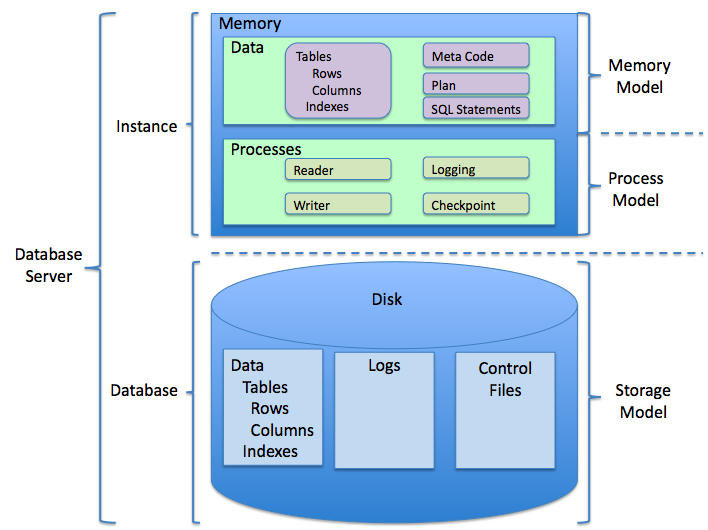
This was a revolutionary concept, but there was one problem. How would people actually get data in and out of these new "relational databases"? Two other IBM researchers, Donald D. Chamberlin and Raymond F. Boyce, developed a language to do just that. They originally called it SEQUEL (Structured English Query Language), but it was later shortened to SQL.
The language was so effective that it quickly became the standard. Today, even though technology has changed dramatically, the core principles of SQL remain the same. It's the trusted, universal language for working with structured data.
Telling a Database What You Want
One of the most powerful things about SQL is that it's a declarative language. This sounds technical, but the idea is simple. You declare what you want, not how to get it.
Imagine you're ordering a pizza. You tell the person at the counter, "I'd like a large pepperoni pizza." You don't tell them how to mix the dough, how to slice the pepperoni, or what temperature to set the oven. You just state the final result you want.
SQL works the same way. You write a query that describes the data you need, such as "Show me all customers from California who signed up last month." You don't need to specify which files to open, how to scan through them, or how to connect different pieces of information. The database management system (DBMS) figures out the most efficient way to execute your request and deliver the results.
This makes working with data much simpler and more intuitive.
This focus on the what instead of the how is a cornerstone of SQL's design and a major reason for its lasting success.
How Data is Organized
SQL is built on the relational model. This model organizes data into collections of tables, which are also known as relations.
Each table has a specific topic, like Customers, Products, or Orders. A table is made up of rows and columns.
- Columns (also called fields or attributes) define what kind of data the table holds. For a
Customerstable, you might have columns forCustomerID,FirstName,LastName, andEmail. - Rows (also called records or tuples) represent individual entries. Each row in the
Customerstable would hold the information for one specific customer.
| CustomerID | FirstName | LastName | |
|---|---|---|---|
| 1 | Maria | Anders | maria.a@email.com |
| 2 | Ana | Trujillo | ana.t@email.com |
| 3 | Antonio | Moreno | antonio.m@email.com |
The power of the relational model comes from connecting, or relating, these tables. For example, an Orders table wouldn't repeat all the customer's information. Instead, it would just include the CustomerID. Using this shared ID, you can easily look up the customer's details from the Customers table whenever you need them. This keeps data organized, efficient, and easy to manage.
Ready to test your knowledge?
What was the original name for the language we now know as SQL?
The text describes SQL as a "declarative" language. What does this mean in practice?
Understanding these core concepts provides the foundation for learning to write SQL queries and manage databases effectively.