SQL Fundamentals
Introduction to Databases
What Is a Database?
At its heart, a database is just an organized collection of data. Think of it like a digital filing cabinet or a massive, well-organized library. Instead of storing paper files or books, it stores information electronically. This makes it incredibly fast and efficient to find, update, and manage huge amounts of information.
Almost every app you use, from social media to online banking, relies on a database. When you post a photo, check your account balance, or book a flight, a database is working behind the scenes to store that information and show it to you when you need it. The main purpose is to keep data safe, organized, and easily accessible.
A database provides a structured way to store information, ensuring data is consistent and reliable.
Relational Databases
There are many types of databases, but the most common one is the relational database. You’ll work with these most of the time when using SQL. A relational database stores data in a way that recognizes relationships between different pieces of information. It’s managed by a piece of software called a Relational Database Management System, or RDBMS.
The key idea is that data isn't just dumped into one giant folder. Instead, it's organized into separate tables that can be linked together. Imagine a store's database. You might have one table for customer information and another for product information. By creating a relationship between them, you can easily see which customers bought which products.
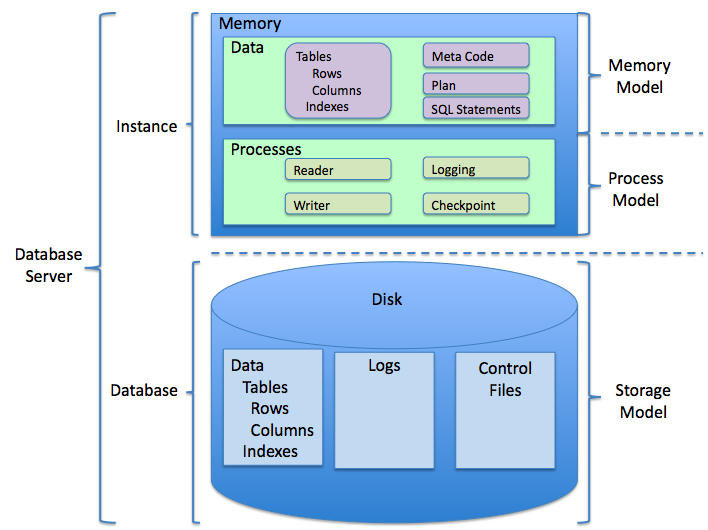
The Building Blocks
Relational databases are built with three simple components: tables, rows, and columns. This structure is often called a schema.
Table: A collection of related data, like a single spreadsheet. A database can contain many tables. For example, you could have a
Userstable and aProductstable.Column: A specific piece of information within a table, like a column header in a spreadsheet. In a
Userstable, you might have columns forUserID,FirstName, andRow: A single record or entry in a table. Each row in the
Userstable would represent one unique user.
Let's look at a simple example of a table named Employees.
| EmployeeID | FirstName | LastName | Department |
|---|---|---|---|
| 101 | Maria | Garcia | Sales |
| 102 | Ben | Carter | Marketing |
| 103 | Priya | Singh | Engineering |
In this example:
- The entire structure is the
Employeestable. EmployeeID,FirstName,LastName, andDepartmentare the columns.- The line with information for Maria Garcia is one row. So is the line for Ben Carter.
This simple, grid-like structure is the foundation of all relational databases. It's an intuitive and powerful way to organize data, which is why it's been the standard for decades. By keeping data in distinct tables, we avoid duplicating information and ensure everything stays consistent. Understanding this structure is the first step to mastering SQL, the language we use to communicate with these databases.