SQL for Finance Essentials
Introduction to SQL
What Is SQL?
SQL stands for Structured Query Language. It's the special language used to communicate with databases. Think of it like learning French to talk to someone in Paris. If you want to ask a database for information, you need to speak its language, and that language is SQL.
SQL (Structured Query Language) is the backbone of data management.
With SQL, you can ask a database to show you specific data, add new information, update what's already there, or remove information you no longer need. It’s the tool for managing all the data that powers websites, apps, and businesses.
How Databases Store Information
SQL is most commonly used with relational databases. That might sound technical, but the concept is simple. A relational database organizes data into tables, which are a lot like spreadsheets.
Each table stores information about a specific type of thing, like customers, products, or orders. The tables themselves are made up of columns and rows.
- Columns define the categories of information (like
Name,Email,Price). - Rows represent the individual records (like one specific customer or product).
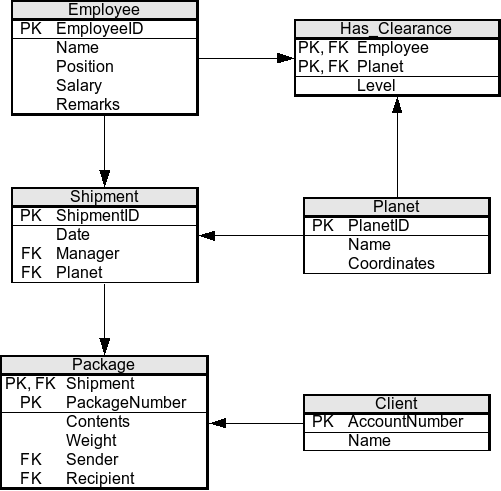
Imagine a table called Employees. It would have columns for EmployeeID, FirstName, LastName, and Position. Each row in that table would be a unique employee, with their own specific information filling out those columns.
Your First Queries
The most common action in SQL is retrieving data. You do this with a SELECT statement. This command tells the database what information you want to see.
The
SELECTstatement is used to query the database and retrieve data that matches criteria that you specify.
The basic structure of a query involves telling the database which columns you want to SELECT and which table you want to get them FROM. Let's say we have a table named Customers.
-- Select all data from the Customers table
SELECT *
FROM Customers;
In this example, the asterisk (*) is a wildcard that means "all columns." So, this query asks the database to show us every column from every row in the Customers table.
But what if you only want to see specific information? Instead of the asterisk, you can list the exact columns you need.
-- Select just the name and email for each customer
SELECT Name, Email
FROM Customers;
Often, you don't need every single record in a table. You can filter the results by adding a WHERE clause. This sets a condition that a row must meet to be included in the results.
-- Select the names of customers from California
SELECT Name
FROM Customers
WHERE State = 'California';
This query retrieves the names from the Customers table, but only for the rows where the State column has the value 'California'. Notice that text values like 'California' must be enclosed in single quotes.
What is the primary purpose of SQL (Structured Query Language)?
In a database table about cars, the 'Color', 'Make', and 'Model' would be examples of what?
That's the core idea of SQL: simple, readable commands that let you have a conversation with your data.