SQL Basics for Beginners
Database Fundamentals
What Is a Database?
Think of a database as a highly organized digital library. Instead of having thousands of books scattered on the floor, they're neatly arranged on shelves, categorized by genre, author, and subject. This structure makes it incredibly fast to find exactly what you're looking for.
A simple text file or a spreadsheet can hold information, but they struggle as the amount of data grows. Imagine trying to manage a list of a million customers in a single text document. It would be slow, prone to errors, and nearly impossible to search efficiently. Databases are designed to handle vast amounts of information with speed and reliability.

To manage this digital library, we use a special piece of software called a Database Management System (DBMS). One of the most popular types is a Relational Database Management System, or RDBMS. MySQL, which we'll be learning about, is a powerful and widely-used RDBMS.
The key idea behind a relational database is that it stores data in a way that recognizes relationships between different pieces of information. For example, it can link a customer to all the orders they've placed.
The Anatomy of a Database
Relational databases organize data into tables. A table is like a single spreadsheet in a workbook. Each table stores a specific type of information, such as 'Customers', 'Products', or 'Orders'.
Every table is made up of two fundamental components:
-
Columns: These are the vertical categories that define what kind of information the table holds. For a 'Customers' table, you might have columns for
CustomerID,FirstName,LastName, andEmail. -
Rows: These are the horizontal entries that represent a single record. Each row contains the actual data for one specific customer, filling in the details for the columns.
| CustomerID | FirstName | LastName | |
|---|---|---|---|
| 1 | Maria | Anders | maria.a@email.com |
| 2 | Ana | Trujillo | ana.t@email.com |
| 3 | Antonio | Moreno | antonio.m@email.com |
In the table above, CustomerID, FirstName, LastName, and Email are columns. Each person's complete entry, like the one for Maria Anders, is a row.
Structure Is Everything
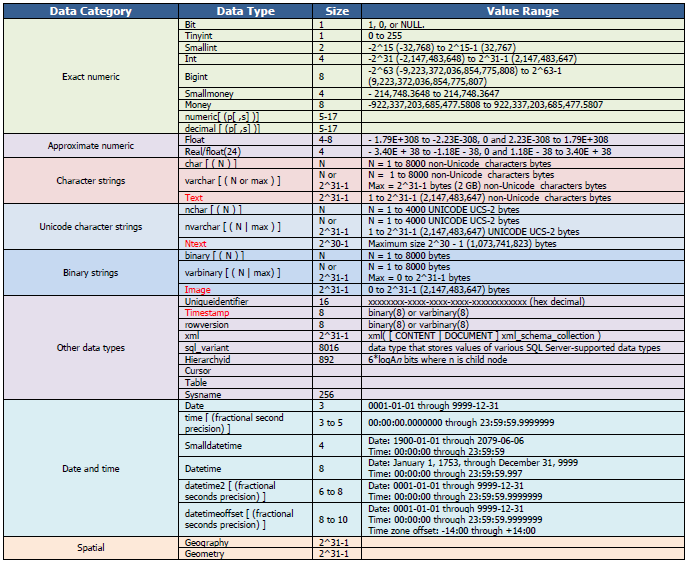
One reason databases are so powerful is that every column is assigned a specific data type, which sets a rule for what kind of information can be stored in it. For instance, a FirstName column would be a text type, while a CustomerID would be a number (integer) type. A SignupDate column would be a date type.
This strictness ensures data consistency. You can't accidentally store a person's name in a date column. It also helps the database operate more efficiently because it knows exactly how much storage space to reserve for each piece of data.
To keep everything uniquely identifiable, tables almost always have a . A primary key is a column (or set of columns) whose value is unique for every single row. In our 'Customers' table, CustomerID would be the primary key. No two customers can have the same ID, just like no two students at a school have the same student ID number.
This unique identifier is crucial. It prevents duplicate records and serves as the main hook for connecting data across different tables.
Now that we've covered the basic building blocks, let's test your understanding.
What is the primary advantage of using a database over a simple text file for managing a large amount of customer information?
In a 'Products' table, you have categories for ProductID, ProductName, and Price. What are these categories called?
Understanding these core concepts—databases, RDBMS, tables, rows, columns, and primary keys—provides the foundation for everything else you'll do with SQL.