SQL and Mongoose Integration for Data Management
Introduction to Databases
What Is a Database?
Think of a massive library. It contains thousands of books, but you can find a specific one quickly thanks to the card catalog or digital search system. The books are organized by genre, author, and title. A database does the same job, but for data.
A database is simply an organized collection of information. Its purpose is to store, manage, and retrieve data efficiently. Instead of books, it holds customer details, product inventories, or user posts. And instead of a librarian, it has a management system to keep everything in order and secure.
Essentially, a database turns a chaotic pile of information into a structured, searchable resource.
Relational Databases
The most common type of database is a relational database. The name sounds complex, but the idea is straightforward. It organizes data into tables, which you can think of as spreadsheets. Each table stores a specific type of information, like a list of customers or a catalog of products.
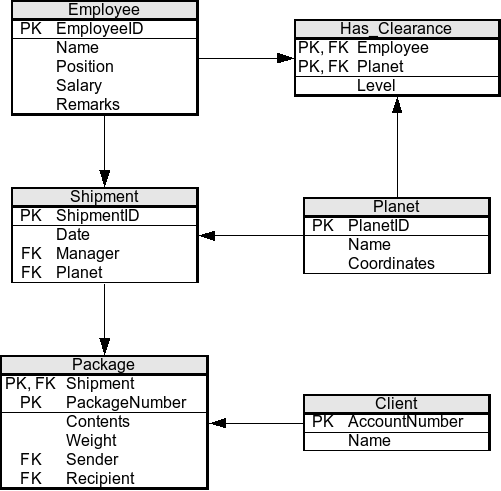
The “relational” part means these tables can be linked to each other. Imagine you have one table for customer information and another for their orders. A relational database lets you connect a customer to all the orders they've placed. This interconnected structure prevents you from having to duplicate information everywhere and keeps the data consistent.
The Building Blocks
Every relational database is built from a few simple components: tables, columns, and rows.
Table
noun
A collection of related data organized in rows and columns. A database can contain many tables. For example, an e-commerce site might have tables for Customers, Products, and Orders.
Column
noun
A vertical field in a table that contains a specific type of information for every record. In a Customers table, you might have columns for CustomerID, FirstName, LastName, and Email.
Row
noun
A single record or entry in a table. It contains the specific data for one item. A row in the Customers table would represent one unique customer, containing their ID, first name, last name, and email.
Here’s what a simple Customers table might look like:
| CustomerID | FirstName | LastName | |
|---|---|---|---|
| 1 | Maria | Garcia | m.garcia@example.com |
| 2 | Chen | Wei | chen.wei@example.com |
| 3 | Fatima | Ahmed | f.ahmed@example.com |
In this table, CustomerID, FirstName, LastName, and Email are the columns. Each person's information makes up a single row.
Organizing and Finding Data
This structured approach makes finding information incredibly powerful. Because the data is organized so neatly, we can ask the database very specific questions. For example, we could ask it to retrieve "the email address for the customer with the last name 'Garcia'" or "all customers who signed up last week."
To keep things straight, each row in a table has a unique identifier called a primary key. In our Customers table, the CustomerID is the primary key. No two customers can have the same CustomerID, just like no two citizens can have the same social security number. This key is also used to connect, or relate, data across different tables. For instance, an Orders table would include a CustomerID column to link each order back to the person who made it.
This simple but powerful structure is the foundation of how most applications, from social media sites to online stores, manage their data.
What is the primary purpose of a database?
What does the "relational" in "relational database" refer to?