Spreadsheet Cell Mastery
Understanding Cells
The Basic Building Block
Every spreadsheet is a grid made up of individual boxes called cells. Think of a spreadsheet as a giant grid of mailboxes. Each mailbox has a unique address, and you can put something inside it. In a spreadsheet, each cell is the intersection of a vertical column (labeled with letters like A, B, C) and a horizontal row (labeled with numbers like 1, 2, 3).
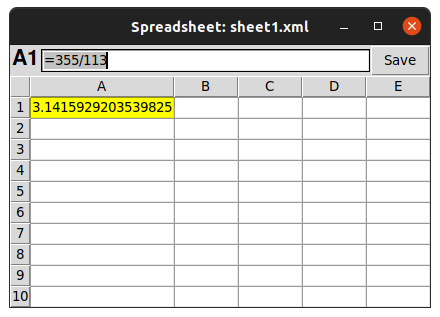
The address of a cell is its column letter followed by its row number. The cell in the very top-left corner is always A1.
Moving Around
To work with a cell, you first need to select it. The easiest way is to click on it with your mouse. The selected cell, often called the active cell, will have a border around it. You can also use the arrow keys on your keyboard to move from one cell to another.
You can also select a group of cells, called a range. To do this, click on the first cell you want, hold down the mouse button, and drag to the last cell. Alternatively, you can click the first cell, hold down the Shift key, and then click the last cell in the range. All the cells in between will be selected.
Entering and Editing Data
Once a cell is selected, you can start typing to enter data into it. This can be text, numbers, or dates. When you're done, press Enter or Return, and your cursor will typically move to the cell below.
What if you need to change what's in a cell? You have a couple of options. You can double-click the cell to place your cursor directly inside it for editing. Or, you can select the cell with a single click and then edit its contents in the formula bar, which is the long input field usually located just above the column letters.
| A | B | C | |
|---|---|---|---|
| 1 | Item | Quantity | Price |
| 2 | Apples | 12 | $0.50 |
| 3 | Bread | 1 | $3.25 |
| 4 | Milk | 1 | $2.75 |
Now that you understand the basics of cells, let's test your knowledge.
What is the individual box called that makes up the grid of a spreadsheet?
How is a cell's unique address determined in a spreadsheet?