Software Infrastructure Essentials
Introduction to Databases
What Is a Database?
At its core, a database is just an organized collection of data. Think of a digital address book. It stores names, phone numbers, and addresses in a structured way so you can easily find the information you need. Databases do the same thing, but on a much larger scale for applications and businesses.
The main purpose of a database is to store, retrieve, and manage data efficiently, reliably, and securely.
Without databases, your favorite apps couldn't save your profile, e-commerce sites couldn't track orders, and banks couldn't manage your account balance. They are the backbone of modern software, providing a persistent memory for information.
Two Main Flavors
Databases come in two main categories: relational and non-relational. The choice between them depends on the type of data you're storing and how you plan to use it.
Relational databases are like spreadsheets, organizing data into tables with rows and columns. Non-relational databases use more flexible models, like documents or graphs.
Relational Databases (SQL)
These are the most traditional type. They store data in tables, and each table has a strict schema, meaning the structure of the data is defined upfront. For example, a Customers table would have columns like CustomerID, FirstName, and Email. Each row represents a single customer.
The real power comes from the relations between tables. An Orders table wouldn't repeat all the customer's information for each order. Instead, it would simply include the CustomerID to link back to the Customers table. This is efficient and keeps data consistent. These databases use Structured Query Language (SQL) to manage and query data.
Non-Relational Databases (NoSQL) As applications evolved, so did their data needs. Non-relational databases, often called NoSQL databases, were created for large-scale, flexible data storage. Instead of tables, they might use:
- Document stores: Data is stored in flexible, JSON-like documents. A single document can contain all information about one item, like a user's profile and their posts.
- Key-value stores: The simplest model, where data is stored as a key (like a word) and a value (like its definition).
- Graph stores: Perfect for data with complex relationships, like social networks, where you want to map connections between people.
// Example of a user profile in a document database
{
  "userId": "user123",
  "username": "alex",
  "email": "alex@example.com",
  "interests": ["hiking", "reading", "coding"],
  "posts": [
    { "postId": "p01", "title": "My first hike" },
    { "postId": "p02", "title": "Favorite books" }
  ]
}
The Database Manager
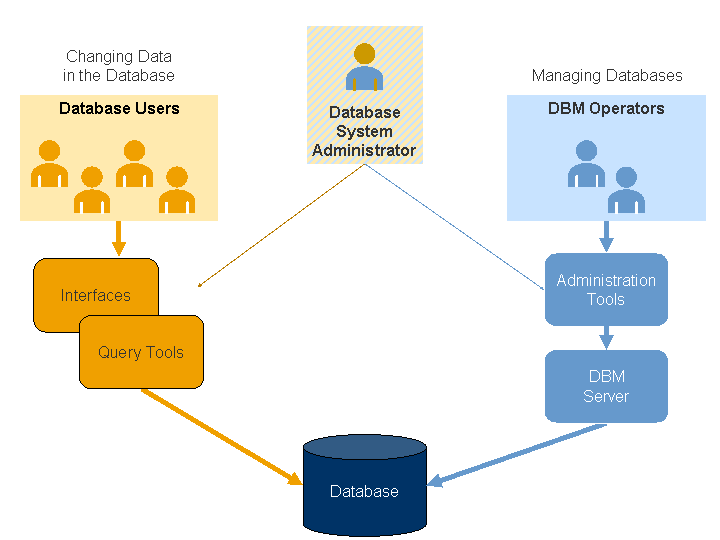
You don't interact with a database directly. You use a Database Management System (DBMS). A DBMS is the software that sits between you (or your application) and the database itself. It handles all the complex work.
Think of a DBMS as a librarian for your data. The librarian finds books for you, puts them back in the right place, and ensures the library is secure and organized.
The DBMS is responsible for crucial tasks like:
- Data Definition: Defining the structure of the data and tables.
- Data Manipulation: Inserting, updating, deleting, and retrieving data.
- Security: Controlling who can access or modify the data.
- Concurrency: Managing simultaneous access from multiple users without causing conflicts.
Designing the Blueprint
Before you can store data, you need a plan. Data modeling is the process of creating a blueprint for how your data will be organized. You decide what information you need to store (entities like 'Customer' or 'Product') and how those pieces of information relate to each other (a 'Customer' places an 'Order'). A good model ensures your data is logical and easy to work with.
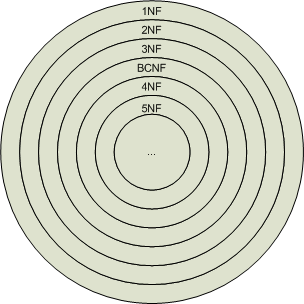
A key part of data modeling for relational databases is normalization. This is the process of organizing columns and tables to minimize data redundancy. The goal is to ensure that each piece of information is stored in only one place.
For example, instead of storing a customer's address with every single order they make, normalization dictates you store the address once in a customer table and link to it from the orders table.
Normalization helps prevent data inconsistencies. If a customer's address changes, you only have to update it in one place, not across dozens of order records. This keeps your data clean, reliable, and efficient to manage.
With these fundamentals, you have a solid starting point for understanding how data is structured and managed in almost any software application.