Software Development Systems and Architecture
Professional Workflow Standards
Branching for Speed vs. Stability
Branching strategies are more than just a way to keep your work separate. They're a team's philosophy on how to build, test, and release software. The model you choose directly impacts your team's speed and the stability of your codebase. Two dominant strategies represent opposite ends of this spectrum: Gitflow and Trunk-Based Development.
First, there's , a highly structured workflow. It uses a collection of long-running branches to manage the development process: a master branch for official releases, a develop branch for integrating features, and supporting branches for features, releases, and urgent hotfixes. Each type of branch has a specific purpose and strict rules about how it can interact with others.
This structure provides a clear separation of concerns and is excellent for projects with long, planned release cycles. The downside is its complexity. Merging can become a significant event, and the distance between feature development and production code can be large.
On the other hand, (TBD) simplifies this dramatically. There is only one main branch, often called main or trunk. Developers work on short-lived feature branches that are merged into the trunk frequently, often multiple times a day. The key is that these changes are small and integrated continuously.
This model thrives on a high degree of automation. Robust testing is essential to ensure the trunk always remains stable and deployable. TBD is the preferred model for teams practicing CI/CD, as it eliminates long-lived branches that can drift far from the main codebase, making integration painful.
| Feature | Gitflow | Trunk-Based Development |
|---|---|---|
| Primary Goal | Stability & version management | Velocity & continuous delivery |
| Branch Lifetime | Long-lived (develop, release) | Short-lived (hours or days) |
| Merge Complexity | High; large, infrequent merges | Low; small, frequent merges |
| Release Cycle | Scheduled, versioned releases | Continuous, on-demand releases |
| Best For | Mobile apps, enterprise software | Web services, SaaS products |
Frameworks for Building Software
Just as branching models provide a strategy for code, a Software Development Lifecycle (SDLC) provides a high-level framework for the entire process of creating software, from idea to maintenance. The choice of SDLC reflects a team's values around planning, flexibility, and collaboration.
The oldest model is Waterfall, a linear and sequential approach. Each phase—requirements, design, implementation, testing—must be fully completed before the next begins. It’s rigid and doesn't handle change well, making it unsuitable for most modern projects where requirements evolve.
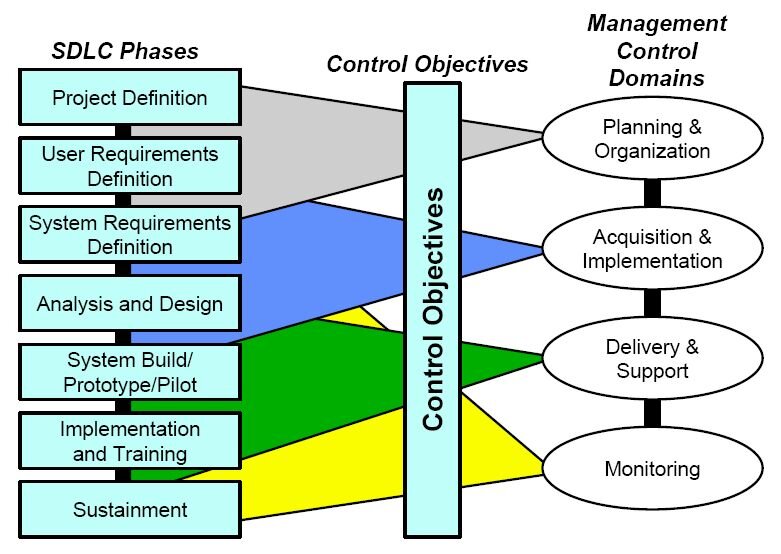
In response to Waterfall's rigidity, Agile methodologies emerged. Agile is an iterative approach that focuses on breaking down large projects into smaller, manageable chunks called sprints. It values customer collaboration, rapid feedback, and the ability to adapt to changing requirements. Scrum and Kanban are popular frameworks within the Agile umbrella.
DevOps is a further evolution, extending Agile principles to bridge the gap between development (Dev) and IT operations (Ops). The goal is to shorten the development lifecycle and provide continuous delivery with high software quality. DevOps culture emphasizes automation, collaboration, and measurement, creating a tight feedback loop that allows teams to build, test, and release software faster and more reliably.
Working Together Effectively
No matter the branching model or SDLC, modern software development is a team sport. The tools and processes teams use for collaboration are critical. The cornerstone of this is the Pull Request (PR), also known as a Merge Request.
A Pull Request is more than just a request to merge code. It's the start of a conversation. It's a formal proposal to incorporate a set of changes into a branch, and it serves as the venue for a crucial process: the code review.
A code review is a systematic examination of source code by one or more peers. The primary goal is to find and fix mistakes early, but its benefits go much deeper. Reviews improve overall code quality, ensure adherence to coding standards, and serve as a powerful knowledge-sharing tool. Junior developers learn from senior feedback, and senior developers gain new perspectives. It creates collective code ownership, reducing the risk of having a single point of failure if one person leaves the team.
Documentation and Environment
Two final pillars of professional workflow are often overlooked but are essential for scaling teams and projects: documentation and environment standardization.
Great code is not self-documenting. Professional documentation explains the why behind the code, its architecture, and how to use it. A well-written README.md file is the front door to your project. It should tell a new contributor everything they need to get started: what the project does, how to install its dependencies, how to run tests, and how to contribute.
For larger projects, manual documentation isn't enough. Tools like for Python or Javadoc for Java can automatically generate comprehensive API documentation directly from comments in the source code. This practice, known as docstrings, keeps documentation in sync with the code it describes.
# Example of a Python docstring for Sphinx

def calculate_area(radius):
    """Calculate the area of a circle.

    This function takes a radius and returns the area,
    calculated using the formula A = πr².

    :param radius: The radius of the circle.
    :type radius: int or float
    :return: The area of the circle.
    :rtype: float
    """
    return 3.14159 * radius ** 2
Finally, standardizing local development environments prevents the classic "it works on my machine" problem. Using tools to define a consistent setup ensures that every developer is working with the same dependencies, settings, and code style.
- Dotfiles: These are configuration files (like
.gitconfigor.bashrc) that can be shared and version-controlled to sync settings across a team. - IDE Configs: Files like
.vscode/settings.jsoncan be committed to a repository to share recommended editor settings and extensions. - Pre-commit Hooks: These are scripts that run automatically before a commit is created. They can enforce code style with tools like
blackorprettier, run linters to catch errors, and even run a quick subset of tests, ensuring that only quality code enters the repository.
A team is working on a project with very stable, well-defined requirements that are not expected to change. They need a highly structured, sequential process where one phase is completed before the next begins. Which Software Development Lifecycle (SDLC) model best fits this scenario?
Which branching strategy is characterized by multiple long-running branches like master and develop, and is well-suited for projects with scheduled, planned release cycles?
Adopting these professional standards moves you from simply writing code to engineering software. They create a foundation for building robust, maintainable systems in a collaborative environment.