Share Internet Connection Between PCs
Networking Basics
The Rules of the Road
When you send a text message, your phone doesn't just fling words into the air, hoping they land on your friend's screen. There's a complex, invisible system at work, governed by a strict set of rules. Computer networking is all about these rules, which allow different devices to talk to each other reliably. Without them, the internet would be a chaotic mess of lost data.
To make sense of this complexity, engineers created a framework called the Open Systems Interconnection (OSI) model. It's not a physical thing, but a concept that divides the massive job of network communication into seven smaller, manageable layers. Think of it like an assembly line for data.
Each layer has a specific job. The Application Layer is where your browser lives. The Physical Layer is the actual hardware, like cables and wires. As your data travels down this stack on its way out, each layer adds a bit of information, like wrapping a gift in multiple layers of paper. The most important layers for our purposes are in the middle.
Your Digital Address
Every device connected to a network needs a unique address, just like every house on a street. In the digital world, this is called an IP address (Internet Protocol address). It's the key component of the Network Layer (Layer 3).
An IP address, like 192.168.1.10, is a set of four numbers separated by periods. It has two parts: the network address and the host address. The network part is like your street name, identifying the local network the device is on. The host part is like your house number, identifying the specific device on that network.
To separate these two parts, computers use a subnet mask. It's another set of four numbers, like
255.255.255.0, that tells the computer which part of the IP address is the network and which part is the host.
This system of dividing a large network into smaller ones is called subnetting. It helps organize traffic and improve efficiency, like creating smaller postal codes within a large city.
Directing Traffic
Now that we have addresses, we need a way to deliver data between them. This is where switches and routers come in.
Switch
noun
A device that operates at the Data Link Layer (Layer 2). It connects devices within the same local network, like an office building's mailroom sorting mail for different floors. It uses unique hardware (MAC) addresses to send data directly to the correct device.
A switch is smart about local deliveries. If your PC wants to send a file to the printer down the hall, the switch makes sure that data goes straight to the printer, not to every other computer on the network.

Router
noun
A device that operates at the Network Layer (Layer 3). It connects different networks together, like the main city post office that sends mail to other cities and countries. It uses IP addresses to forward data packets toward their final destination.
A router is the gateway to the outside world. It sits at the edge of your local network and makes decisions about where to send data that's destined for another network, like the internet. When you visit a website, your router forwards your request out to the vast network of the internet, and when the website's data comes back, the router directs it to your computer.
How It All Connects
The core set of rules that governs most of this traffic is called TCP/IP (Transmission Control Protocol/Internet Protocol). TCP works at the Transport Layer (Layer 4), ensuring data arrives reliably and in the correct order. IP works at the Network Layer (Layer 3), handling the addressing and routing. Together, they form the backbone of the internet.
The way these devices are physically or logically arranged is called a network topology. You might see a star topology, where all devices connect to a central switch, which is common in homes and offices. Another is a bus topology, where devices connect to a single shared cable.
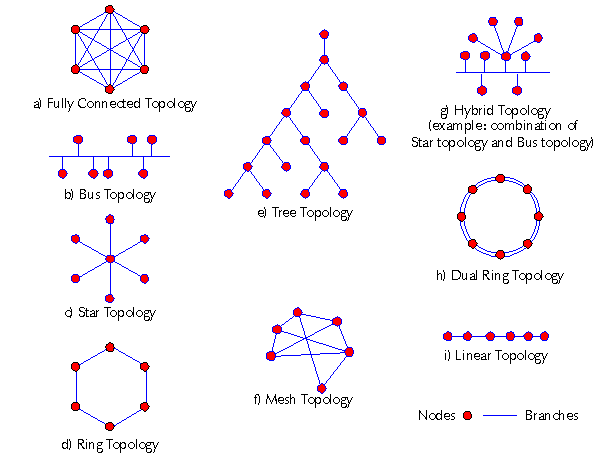
Understanding these pieces—the OSI model, IP addresses, switches, and routers—is the first step to building any network, even one as simple as connecting two PCs together.
What is the primary purpose of the OSI model in computer networking?
Which device is primarily responsible for forwarding data packets between different networks, such as your home network and the internet?