Self-Publishing with Amazon KDP
Introduction to KDP
What is Kindle Direct Publishing?
Kindle Direct Publishing, or KDP, is Amazon's self-publishing platform. It allows anyone to publish ebooks and paperback books for free and sell them to a global audience on Amazon. Think of it as a direct bridge between you, the author, and millions of potential readers.
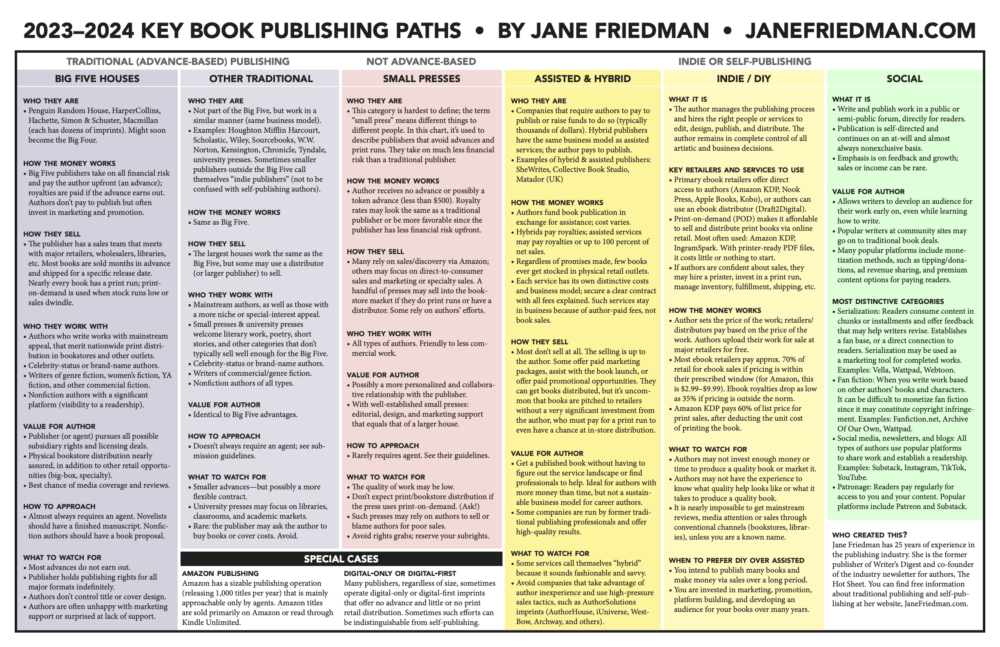
Before platforms like KDP, getting a book published was a long process that involved finding a literary agent and securing a deal with a traditional publishing house. KDP changed the game by putting the power directly into the hands of creators. You can upload your manuscript, create a cover, and have your book available for sale worldwide, often in just a few days.
Amazon KDP is a powerful platform that allows writers to share their stories, knowledge, and ideas with millions of readers worldwide.
Why Use KDP?
The biggest benefit of using KDP is its massive reach. By publishing on Amazon, your book is listed on the world's largest online bookstore. But there are other key advantages, too.
First, you maintain control. You keep the rights to your book and have the final say on everything from the content to the cover design. Second, it’s fast. Traditional publishing can take years, while KDP lets you publish your book in as little as 72 hours. Finally, there are no upfront costs to publish. KDP is free to use; Amazon simply takes a percentage of your sales as a royalty.
Creating Your Account
Getting started with KDP is straightforward. If you already have an Amazon account for shopping, you can use that to sign in. If not, you'll need to create a new one.
To start, just go to kdp.amazon.com and sign in or create your account.
Once you're in, you'll need to complete your account information. This is a one-time setup that includes:
- Author/Publisher Information: Your name, address, and phone number.
- Getting Paid: Your bank account details so Amazon can pay you your royalties.
- Tax Information: A short tax interview to determine your tax status. This is required for everyone, regardless of location.
It's important to fill this out accurately, but the platform guides you through each step. Once your account is set up, you won't have to do it again for future books.
Navigating the Dashboard
After setting up your account, you’ll land on the KDP dashboard. This is your command center for publishing and tracking your books. It looks simple, but it’s packed with useful features.
Here are the main sections you'll use:
- Bookshelf: This is the heart of your dashboard. It’s where you’ll see all the books you’ve published or are currently working on. From here, you can start a new book, edit an existing one, or manage your titles.
- Reports: This tab is where you track your sales. You can see how many books you've sold, monitor your earnings in real-time, and view historical sales data. It’s a great tool for understanding what’s working.
- Marketing: Once your book is live, this section provides tools and tips to help you promote it. You can create ads, run price promotions, and enroll in special programs to boost visibility.
- Community: This connects you with other KDP authors. It includes forums where you can ask questions, share experiences, and learn from others in the self-publishing world.
Take some time to click around and get familiar with the layout. Understanding where everything is will make the publishing process much smoother when you're ready to upload your book.
What is the primary function of Kindle Direct Publishing (KDP)?
True or False: To publish on KDP, you must pay an upfront fee to Amazon.