Securing and Probing SSH Port 22
Discovering Open Ports
Knocking on Digital Doors
Every security assessment begins with reconnaissance. Before you can check for vulnerabilities, you need to know what's actually running on a network. Think of it like a physical security check on a building. You wouldn't just test the front door; you'd walk the perimeter, checking every window, side entrance, and delivery bay to see what's locked and what isn't.
Port scanning is the digital equivalent of that perimeter walk. It's the process of systematically sending requests to a range of ports on a host to see which ones respond. Each open port represents a potential entry point because it's tied to a service or application running on the machine.
Port scanning helps you to gather information about a given target, know the services running behind specific ports, and the vulnerabilities attached to them.
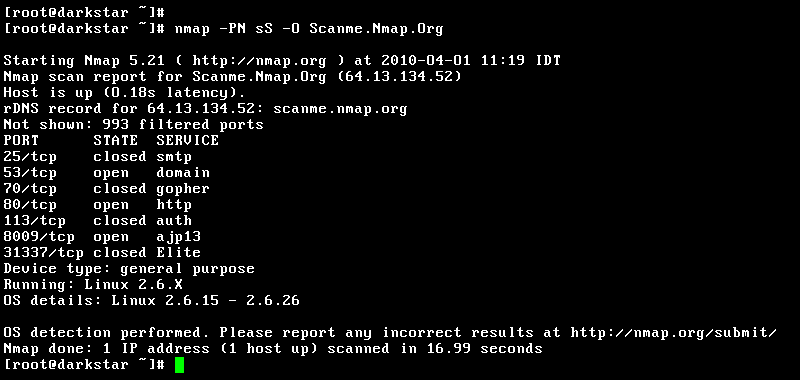
One of the most powerful and widely used tools for this job is , short for Network Mapper. It's a free, open-source utility that can discover hosts and services on a computer network, creating a detailed map of what's available. By sending specially crafted packets to a target machine and analyzing the responses, Nmap can deduce which ports are open, what services are running on them, and even what operating system the target is using.
Scanning for Services
At its core, scanning involves checking the two main transport layer protocols: TCP and UDP. A TCP scan is like trying to make a phone call. If someone answers (completing the handshake), you know the line is open. A UDP scan is more like sending a letter. You don't get a confirmation of receipt, so Nmap often has to infer the port's state based on the lack of a response, which can be less reliable but is necessary for services that use UDP.
For our purposes, we're interested in finding a very specific door: port 22. This port is the standard listening port for the protocol, more commonly known as SSH. Because SSH is the primary way system administrators remotely and securely manage servers, finding an open port 22 is a significant first step.
To perform a basic TCP connect scan with Nmap, you can use the -sT flag. This command attempts a full three-way handshake with the target ports.
nmap -sT [target_ip]
If you only want to check for SSH, you can make the scan faster and more targeted by specifying the port with the -p flag.
# This command tells Nmap to only scan port 22 on the target machine.
nmap -p 22 [target_ip]
Interpreting the Results
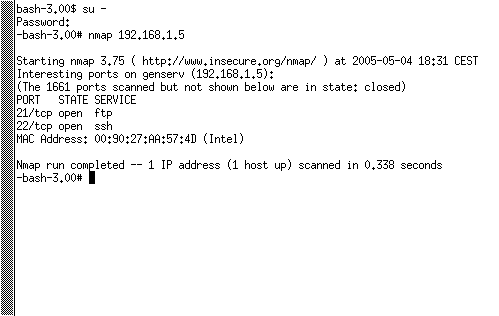
When the scan finishes, Nmap provides a list of scanned ports and their states. Understanding these states is key to interpreting the results.
| State | Meaning |
|---|---|
OPEN | An application is actively accepting connections on this port. |
CLOSED | The port is accessible, but there is no application listening on it. |
FILTERED | Nmap cannot determine if the port is open because a firewall is blocking it. |
Finding an OPEN state on port 22 confirms that an SSH service is running and accessible from your location. A CLOSED state means the host is online, but the SSH service isn't running. A FILTERED state is more ambiguous; it tells you that a firewall or similar network device is in the way, which is itself a valuable piece of information. It means security measures are in place, but it doesn't confirm whether the SSH service is running behind that firewall.
With the knowledge that port 22 is open, the next logical step in a security assessment is to investigate the SSH service itself. Is it configured securely? Is it running an outdated, vulnerable version? This is where the assessment moves from simple discovery to active probing and analysis.
In the context of a security assessment, why is port scanning analogous to a physical security check of a building's perimeter?
An Nmap scan on port 22 of a target server returns the state FILTERED. What is the most accurate interpretation of this result?