Secure Your Home Network
Home Network Basics
The Heart of Your Network
Your home network is a small, private world of interconnected devices. At the center of this world is your router. Think of it as the air traffic controller for all your internet data. It has two primary jobs: it connects your entire home to the wider internet, and it directs traffic between all the devices within your home.

Most home routers are actually three devices in one: a router, a switch, and a wireless access point.
A switch is like a digital post office for your local network. When a device wants to send something to another device on the same network, the switch makes sure it goes directly to the right recipient without bothering everyone else. The multiple ethernet ports on the back of your router are part of its built-in switch.
A wireless access point (AP) does the same job as a switch, but for devices connected via Wi-Fi. It broadcasts a wireless signal that your phone, laptop, and smart TV can connect to, bringing them into the local network without needing a physical cable.
Every Device Needs an Address
For devices to communicate, they need to know where to send information. On a network, this is handled by IP addresses. An IP address is a unique identifier assigned to each device, much like a street address for a house.
IP Address
noun
A unique string of numbers separated by periods that identifies each computer using the Internet Protocol to communicate over a network.
Your router automatically assigns a private IP address to every device that connects to your home network. These usually look something like or . The first parts of the address (e.g., ) identify the network itself, while the last part identifies the specific device.
This division of a network into smaller pieces is called subnetting. While complex in large corporate networks, the concept is simple at home. Your router creates a single subnet for all your devices. This keeps your private network traffic separate from the public internet, acting as a basic digital fence for your home.
| Device | Assigned IP Address |
|---|---|
| Laptop | 192.168.1.10 |
| Smartphone | 192.168.1.12 |
| Smart TV | 192.168.1.15 |
| Router (Gateway) | 192.168.1.1 |
The Language of the Internet
Even with addresses, devices need a common language to talk. The internet's language is a set of rules called the TCP/IP protocol suite. The two most important parts are TCP (Transmission Control Protocol) and IP (Internet Protocol).
IP is responsible for addressing and routing. It's like the postal service, figuring out the best path to get a letter from one address to another. But it doesn't guarantee the letter will arrive.
TCP adds reliability. It works on top of IP to make sure data arrives correctly. If you're downloading a file, TCP breaks it into smaller pieces called packets, numbers them, sends them, and checks that they all arrive at the other end. If any are missing or damaged, it requests them again until the entire file is perfectly reassembled. It's like sending a numbered manuscript page by page and getting a confirmation call after each one is received.
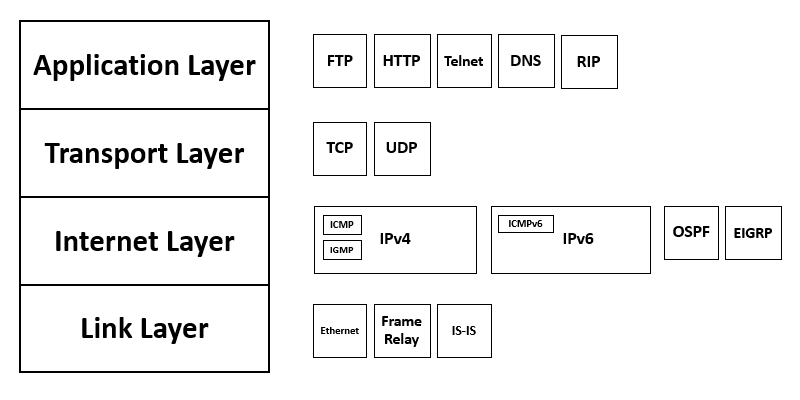
Together, TCP and IP ensure that data not only gets to the right address but also arrives intact and in the correct order.
Now that you know the key players in your home network—the hardware, the addressing system, and the communication rules—you have a solid foundation for understanding how it all works. Let's review these core concepts.
What is the primary role of a router in a home network?
In a home network, the built-in __________ allows wired devices to communicate with each other, while the __________ handles wireless connections.
Understanding these fundamentals is the first step toward managing and securing your own digital space.