RxJS Subject Deep Dive
Introduction to RxJS
What is RxJS?
RxJS, or Reactive Extensions for JavaScript, is a library for composing asynchronous and event-based programs using observable sequences. Think of it as a toolkit for handling data that arrives over time, like user clicks, keyboard inputs, or data from an API.
At its core, RxJS helps you manage streams of data. A data stream can be anything from a sequence of mouse clicks to the results of a network request. Instead of dealing with these events one by one with callbacks, RxJS lets you treat them as a single, manageable collection.
The Core Concepts
To understand RxJS, you need to grasp three key concepts: Observables, Observers, and Subscriptions. A good analogy is subscribing to a newspaper.
Observable: This is the publisher of the newspaper. It's responsible for creating and sending out the news (the data). The publisher doesn't just send papers into the void; it only sends them to people who have subscribed.
Observer: This is you, the reader. You subscribe to the newspaper and have a set of instructions for what to do when it arrives: read it (next), notice if it's torn or unreadable (error), and know when the subscription period ends (complete).
Subscription: This represents the connection between you and the publisher. When you subscribe, you get a subscription. This connection stays active until you decide to cancel it, at which point the newspapers stop coming.
An Observable represents a stream of data over time. An Observer consumes that data. A Subscription links them together.
Let's look at these pieces more closely.
Observables and Observers
An Observable is a blueprint for a data stream. It's lazy, meaning it won't start producing data until someone subscribes to it. When you create an Observable, you define the logic for how it will generate values. This logic is executed for each Observer that subscribes.
An Observer is an object with up to three methods that listen for different types of notifications from the Observable:
next(): This method is called whenever the Observable emits a new value.error(): This method is called if something goes wrong and the Observable needs to stop with an error.complete(): This method is called when the Observable has successfully finished emitting all its values.
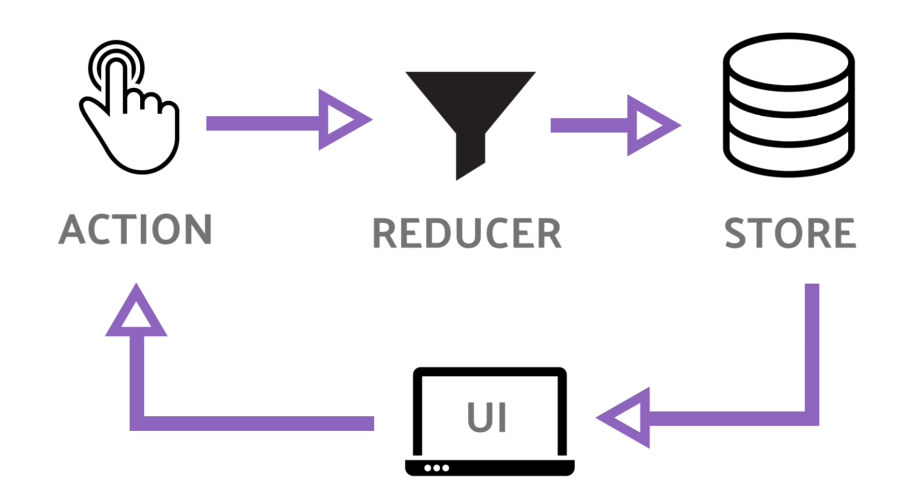
Once an Observable calls error() or complete(), it will not emit any more values. The stream is considered finished. Let's see how this works in code.
import { Observable } from 'rxjs';

// Create a new Observable that emits three numbers, then completes.
const myObservable = new Observable(subscriber => {
  console.log('Observable logic starts');
  subscriber.next(1);
  subscriber.next(2);
  subscriber.next(3);
  subscriber.complete();
});

// Create an Observer object to handle the data.
const myObserver = {
  next: value => console.log('Received value:', value),
  error: err => console.error('An error occurred:', err),
  complete: () => console.log('Stream has completed.')
};

// Subscribe to the Observable with the Observer.
console.log('Before subscribing');
myObservable.subscribe(myObserver);
console.log('After subscribing');
Running this code will log 'Before subscribing', then the Observable's values and completion message, and finally 'After subscribing'. This shows that the Observable's logic runs synchronously when subscribed to.
The Observer Pattern
RxJS is built on a classic software design principle called the Observer Pattern. In this pattern, an object, known as the "subject," maintains a list of its dependents, called "observers." The subject automatically notifies all observers of any changes to its state.
In RxJS, the Observable is the subject, and the Observer is, well, the observer. When you call myObservable.subscribe(myObserver), you are registering the observer to receive updates from the observable. The Observable then pushes values to the Observer by calling its next(), error(), and complete() methods.
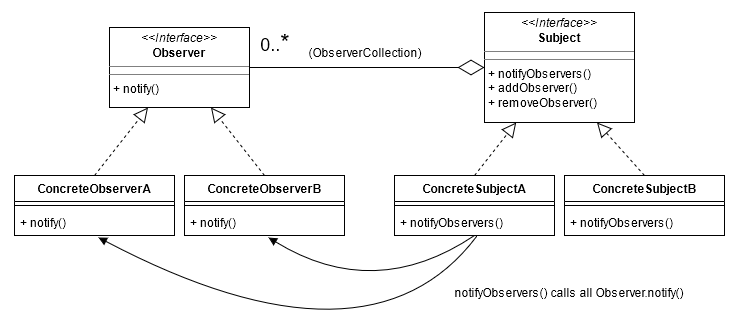
This pattern is incredibly useful for decoupling parts of your application. The data producer (Observable) doesn't need to know anything about the data consumer (Observer), other than that it has the right methods to be notified.
Managing Subscriptions
When you subscribe to an Observable, you get back a Subscription object. This object represents the ongoing execution and has an important method: unsubscribe().
In simple cases like our newspaper example, the Observable completes on its own. But what about streams that never end, like mouse clicks or data from a WebSocket? If you don't clean up your subscription, it can lead to memory leaks in your application.
Calling unsubscribe() tears down the subscription, releasing memory and stopping the observer from receiving any more notifications.
import { interval } from 'rxjs';

// 'interval(1000)' creates an Observable that emits a number every second.
const myObservable = interval(1000);

const subscription = myObservable.subscribe({
  next: value => console.log(value)
});

// After 5.5 seconds, we unsubscribe to stop the emissions.
setTimeout(() => {
  console.log('Unsubscribing!');
  subscription.unsubscribe();
}, 5500);
This is the fundamental flow of RxJS. You create an Observable to represent a stream of data, an Observer to process that data, and use subscribe() to connect them. In the next section, we'll look at a special type of Observable called a Subject.