Rust Multithreading Essentials
Introduction to Rust Threads
Running Code in Parallel
Most computer programs execute their instructions in order, one after the other. Imagine a single cook in a kitchen making a meal. They chop the vegetables, then boil the pasta, then make the sauce. Each step happens sequentially.
But what if you had more than one cook? One could chop vegetables while another starts the sauce. This parallel work gets the meal ready much faster. In programming, this is achieved with threads. A thread is like an independent cook that can work on a task at the same time as other cooks.
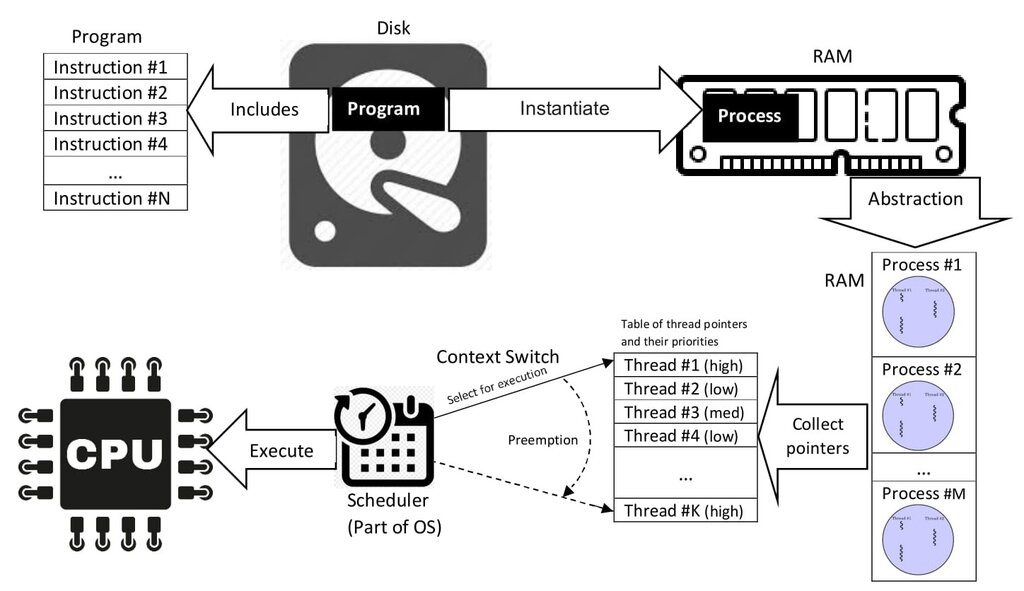
By splitting work across multiple threads, a program can perform several operations simultaneously. This is especially useful for tasks that can be done independently, like processing data or handling multiple user requests at once.
Spawning a New Thread
Rust's standard library provides a simple way to create new threads. You can use the std::thread::spawn function, which takes a closure—an anonymous function—containing the code you want to run on the new thread.
use std::thread;
use std::time::Duration;

fn main() {
    thread::spawn(|| {
        for i in 1..10 {
            println!("hi number {} from the spawned thread!", i);
            thread::sleep(Duration::from_millis(1));
        }
    });

    for i in 1..5 {
        println!("hi number {} from the main thread!", i);
        thread::sleep(Duration::from_millis(1));
    }
}
When you run this code, you might notice something odd. The output might be jumbled, or the spawned thread might not even finish printing all its numbers. This happens because the main thread doesn't wait for the spawned thread. Once the main thread finishes its own loop, the program exits, terminating any other threads along with it.
Waiting for Threads to Finish
To fix this, we need to explicitly tell the main thread to wait for its spawned threads to complete. The thread::spawn function returns a value called a JoinHandle. Think of this handle as a remote control for the thread.
You can call the .join() method on this handle. This method blocks the current thread's execution until the thread associated with the handle has finished. It's like the head chef waiting at the door until all the other cooks have finished their tasks before closing the kitchen for the night.
use std::thread;
use std::time::Duration;

fn main() {
    let handle = thread::spawn(|| {
        for i in 1..10 {
            println!("hi number {} from the spawned thread!", i);
            thread::sleep(Duration::from_millis(1));
        }
    });

    for i in 1..5 {
        println!("hi number {} from the main thread!", i);
        thread::sleep(Duration::from_millis(1));
    }

    handle.join().unwrap();
}
Now, the main thread will wait for the spawned thread to finish its loop before the program exits. The .unwrap() is there to handle a potential error if the thread panics, which is a topic for another time.
What if you need to use a variable from the main thread inside the new thread? Rust's ownership rules come into play here. To give the new thread ownership of the data it needs, you use the move keyword before the closure.
use std::thread;

fn main() {
    let v = vec![1, 2, 3];

    let handle = thread::spawn(move || {
        println!("Here's a vector: {:?}", v);
    });

    handle.join().unwrap();
}
The move keyword forces the closure to take ownership of the values it uses from its environment. In this case, it moves the vector v into the spawned thread. This is a key safety feature. Rust ensures that the data will live as long as the thread needs it, preventing situations where a thread tries to access data that has already been deallocated by the main thread.
Handling concurrent programming safely and efficiently is another of Rust’s major goals.
Time to check your understanding.
What is the primary benefit of using multiple threads in a program?
When you call std::thread::spawn, what happens if the main thread finishes its work before the spawned thread does, and you haven't used a JoinHandle?
With spawn and join, you have the basic tools to start building concurrent programs in Rust.