Round Robin Scheduling Explained
Introduction to CPU Scheduling
The CPU's To-Do List
Imagine a chef in a busy kitchen. Orders are flying in for appetizers, main courses, and desserts. The chef can only cook one dish at a time, so they need a system to decide what to work on next. Do they handle the quickest orders first? The ones that came in earliest? This is the same challenge your computer's Central Processing Unit (CPU) faces every second.
The CPU is the brain of your computer, but it can typically only execute one instruction at a time. Yet, you can browse the web, listen to music, and receive email notifications all at once. This illusion of multitasking is made possible by the operating system's CPU scheduler. The scheduler's job is to decide which process gets to use the CPU and for how long. It rapidly switches between processes, giving each a tiny slice of the CPU's attention. This happens so fast that it feels like everything is running simultaneously.
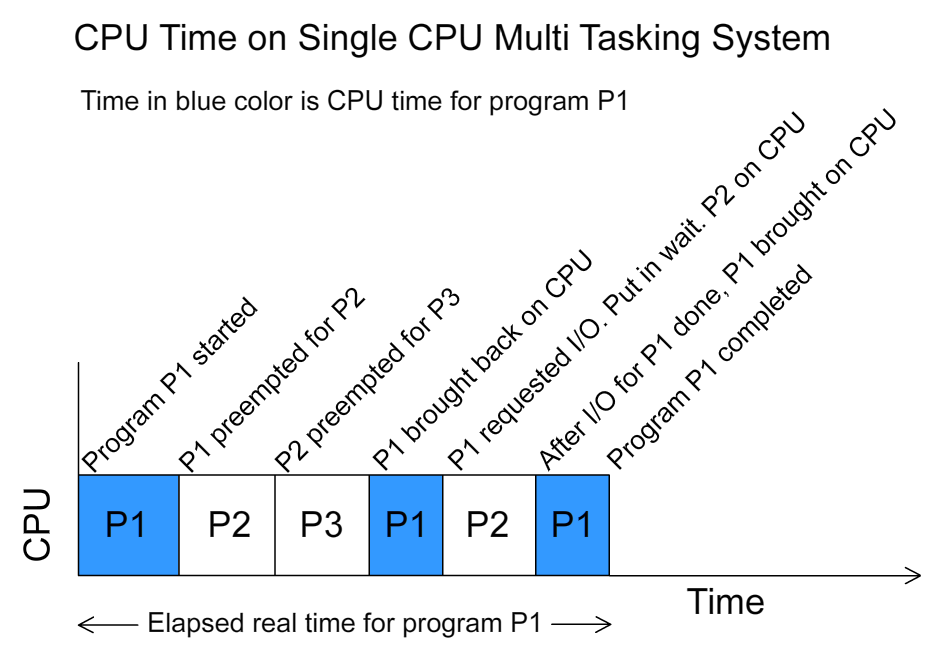
Without a scheduler, you'd have to wait for one program to finish completely before you could start another. It's the fundamental component that makes modern, interactive computing possible.
Judging the Scheduler's Performance
Not all scheduling systems are created equal. We can measure how well a scheduler is doing its job using a few key metrics. A good scheduler tries to balance these criteria to create a smooth user experience and an efficient system.
| Criteria | What It Measures | Why It Matters |
|---|---|---|
| CPU Utilization | The percentage of time the CPU is busy. | We want to keep the CPU working as much as possible. An idle CPU is a wasted resource. |
| Throughput | The number of processes completed per unit of time. | Higher throughput means more work is getting done. |
| Turnaround Time | The total time from a process's start to its finish. | This is what a user perceives as the total time to get a task done. Shorter is better. |
| Waiting Time | The total time a process spends waiting in the ready queue. | Minimizing wait time is key to an efficient system. It's pure overhead. |
| Response Time | The time from when a request is made until the first response appears. | For interactive applications, this is critical. It's the measure of how “snappy” a system feels. |
Think about it like waiting in line at a grocery store. The store wants to keep its cashiers (CPUs) busy (high utilization) and check out as many customers per hour as possible (high throughput). As a customer, you care about your total time in the store (turnaround time), how long you stood in line (waiting time), and how quickly the cashier greets you once you get to the front (response time).
Common Scheduling Strategies
Programmers have developed many different algorithms to schedule processes, each with its own strengths and weaknesses. Here are a few of the most common approaches.
First-Come, First-Served (FCFS) This is the simplest method. Processes are handled in the order they arrive, just like a queue at the bank. It's fair, but it can be inefficient. If a very long process arrives first, all other processes, even very short ones, have to wait.
Shortest Job Next (SJN) This algorithm looks at all the processes in the queue and picks the one that will take the least amount of time to complete. This is great for maximizing throughput and minimizing average waiting time. The challenge is knowing exactly how long a job will take before it starts.
Priority Scheduling Each process is assigned a priority, and the scheduler always runs the process with the highest priority. This is useful for ensuring that critical system tasks get immediate attention over less important user applications. The risk is that low-priority processes might never get to run at all.
Round Robin (RR) This algorithm is designed for time-sharing systems. It gives each process a small, fixed amount of CPU time called a time slice. If the process isn't done by the end of its time slice, it's sent to the back of the line to wait for its next turn. This ensures that every process gets a chance to run, making the system feel responsive.
Each of these strategies offers a different way to solve the scheduling puzzle. The choice of algorithm depends on the goals of the operating system, whether it's for a high-powered server, a personal desktop, or a real-time embedded device.
What is the primary role of the CPU scheduler in an operating system?
Imagine a program starts, runs, and completes. The total time from the start of the program to its completion is 18 seconds. During that period, the program was waiting in line for the CPU for 10 seconds. What does the 18-second figure represent?