React Fundamentals for Beginners
Introduction to React
What Is React?
React is a JavaScript library for building user interfaces. Think of it like a set of advanced LEGO bricks for web developers. Instead of building a webpage from scratch with raw HTML and JavaScript, you can use React's pre-built, customizable pieces to assemble complex UIs quickly and efficiently.
Created and maintained by Facebook, React's primary job is to manage what the user sees on the screen. When data changes in an application—like when you get a new message or a stock price updates—React automatically updates the relevant parts of the page without needing to reload everything. This makes web applications feel faster and more responsive.
In short, React helps developers build modern, interactive user interfaces by breaking them down into smaller, manageable pieces.
Why Use React?
Before tools like React, building dynamic web applications often involved directly manipulating the Document Object Model (DOM)—the tree-like structure of a webpage. As applications grew, this direct manipulation could become incredibly complex and slow. A small data change might require developers to write a lot of manual code to find and update every part of the UI that depends on it.
React solves this problem with two key ideas: a declarative approach and a component-based structure.
Declarative Approach: Instead of telling the browser how to update the UI step-by-step (imperative), you simply tell React what the UI should look like based on the current data (declarative). When the data changes, React figures out the most efficient way to update the view to match it. This makes your code more predictable and easier to debug.
Component-Based Structure: React encourages you to break your UI into small, reusable pieces called components. A button, a search bar, or a user profile card can all be individual components. Each component manages its own logic and appearance, making your code cleaner and more organized.
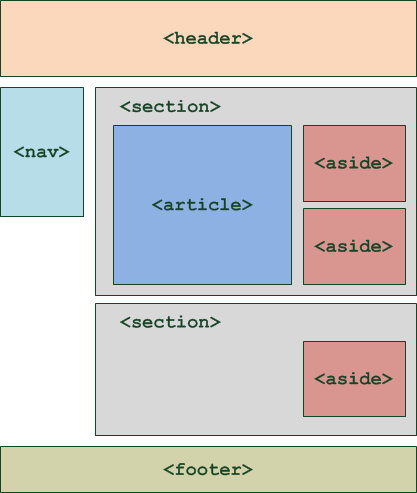
This structure means you can build a component once and reuse it anywhere you need it. If you need to change how a button looks, you only have to update the button component, and the change will apply everywhere it's used.
The Virtual DOM
One of React's most powerful features is its use of a Virtual DOM. The actual DOM, which your browser uses to display a webpage, is slow to update. Changing it directly can cause performance issues, especially in applications with a lot of moving parts.
React creates a lightweight copy of the real DOM in memory—this is the Virtual DOM. When you make a change, React first updates this virtual copy. Then, it compares the new virtual version with the old one, figures out the exact differences, and updates only those specific parts of the real DOM. This process, called "reconciliation," is much faster than re-rendering the entire page.
Think of it like having a blueprint of your house. Instead of demolishing and rebuilding a room to move a window, you'd first mark the change on the blueprint, then tell the builders to only knock down the one wall needed.
This clever approach is why React applications feel so fast and smooth. It minimizes direct interactions with the slow, real DOM, leading to a much better user experience.
Ready to check your understanding? Let's see what you've learned about React's core concepts.
What is the primary role of the React library?
React's declarative approach means you tell it what the UI should look like, and React figures out how to update it.
Now that you understand what React is and the problems it solves, you're ready to see how it works in practice. Next, we'll dive into JSX and start building our first components.