React Fundamentals
Introduction to React
What is React?
React is a JavaScript library for building user interfaces. Think of it as a toolbox for creating the parts of a website or app that users see and interact with, like buttons, forms, and navigation menus.
Instead of building a whole webpage in one go, React encourages you to break it down into small, reusable pieces called components. Imagine them like LEGO bricks; you build individual bricks (a search bar, a user profile) and then assemble them to create a complete structure.
This component-based approach makes your code much easier to manage, debug, and reuse across different parts of your application.
The Virtual DOM
Web browsers use a structure called the Document Object Model (DOM) to represent a webpage. When something on the page changes—say, you click a button and a new item appears in a list—the browser has to update this DOM. Manipulating the real DOM directly can be slow and inefficient, especially for complex applications with lots of moving parts.
React solves this problem with something called the virtual DOM. It's a lightweight copy of the real DOM that exists only in memory.
When the data in your application changes, React first updates the virtual DOM. Then, it compares this new virtual DOM with the previous version to figure out the most efficient way to update the real DOM. This process, called "diffing," means that React only changes what absolutely needs to be changed, making your application feel much faster and more responsive.
One-Way Data Flow
In React, data has a clear and predictable path. It flows in one direction, from parent components down to child components. Think of it like a waterfall: water always flows downwards, never back up.
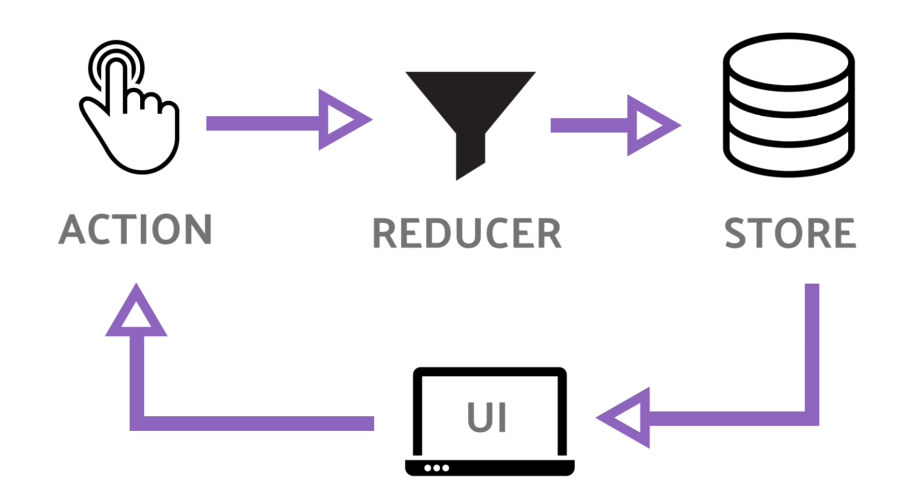
This unidirectional data flow makes it easier to understand how your application works. When something goes wrong, you can trace the data from its source (the parent) down through the components to find the source of the problem. This predictability is a key reason why developers love working with React.
Setting Up Your Environment
Ready to get started? The quickest way to create a new React application is with a tool called Create React App. It sets up a complete development environment for you with just a few commands.
You'll need to have Node.js and npm (Node Package Manager) installed on your computer. They come together when you download Node.js from its official website. Once that's done, you can create your first app.
npx create-react-app my-first-react-app

cd my-first-react-app

npm start
Here’s what these commands do:
npx create-react-app my-first-react-appcreates a new directory calledmy-first-react-appwith all the necessary files and configurations.cd my-first-react-appmoves you into the newly created project directory.npm startruns the application in development mode and opens it in your web browser. You'll see a default React welcome page.
That's it! You now have a working React application running on your local machine.
Time for a quick check to see what you've learned.
What is the primary purpose of the React library?
How does React's virtual DOM improve application performance?
Now that you have a grasp of what React is and its core concepts, you're ready to start building your first components.