React for Angular Developers
React Fundamentals
Building User Interfaces
React is a JavaScript library for building user interfaces. Its main job is to help you create what the user sees and interacts with in a web browser. Instead of treating a webpage as one giant, monolithic document, React encourages you to break it down into small, independent, and reusable pieces. This is called a component-based architecture.
Components are the fundamental building blocks of any React application.
Think of it like building with LEGO bricks. You don't start with a single, massive block of plastic. You start with individual bricks—a 2x4 red brick, a 1x2 blue brick, a clear window piece. Each brick has its own properties and can be combined with others to create something complex, like a house or a spaceship.
In React, these "bricks" are components. A button is a component. A search bar is a component. A user profile card is a component. You can build these small components first, make sure they work perfectly on their own, and then assemble them into larger components, like a navigation bar or a full page.
Writing with JSX
React components are typically written using a special syntax called JSX, which stands for JavaScript XML. It might look like HTML, but it's actually a blend of JavaScript and HTML-like tags. This lets you write your component's structure and logic in the same file in a very readable way.
Here’s what a simple Welcome component looks like in JSX:
function Welcome(props) {
  return <h1>Hello, {props.name}</h1>;
}
The <h1> tag isn't a string or HTML. It's JSX. The curly braces {props.name} let you embed a JavaScript expression directly inside the markup. When your code is compiled, tools like Babel convert this JSX into regular JavaScript function calls that browsers can understand.
JSX makes your code more declarative and easier to visualize, because the code for your component's structure lives right next to the code for its behavior.
The Virtual DOM
Updating what's on a webpage can be slow. The browser's Document Object Model (DOM) is a tree-like structure of all the elements on a page. Changing it directly—say, updating text or adding an item to a list—can force the browser to recalculate layouts and repaint the screen, which is computationally expensive.
React solves this problem with the Virtual DOM.
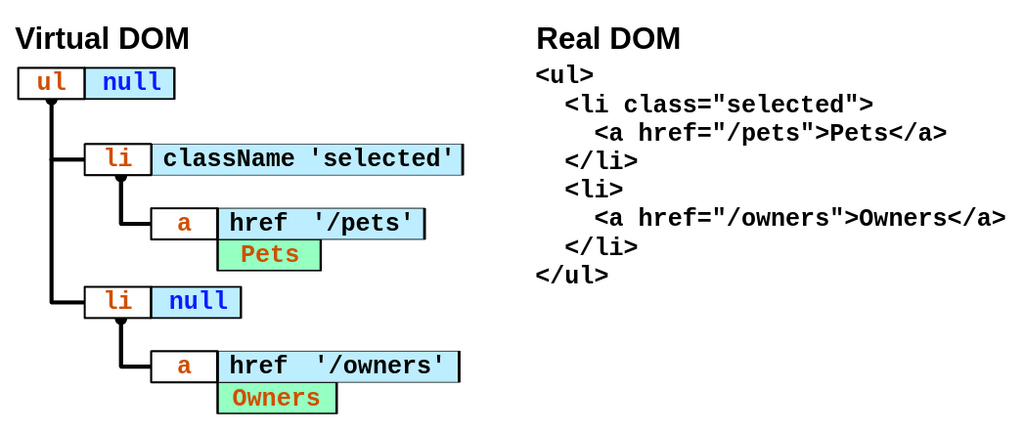
The Virtual DOM is a lightweight copy of the real DOM that exists only in memory. When a component's data changes, React doesn't immediately touch the real DOM. Instead, it follows a more efficient process:
- Update: React creates a new Virtual DOM tree that reflects the change.
- Compare: It compares this new tree with the previous Virtual DOM tree. This comparison process is called "diffing."
- Patch: React calculates the minimum number of changes needed to bring the real DOM in line with the new Virtual DOM. It then updates only those specific elements in the real DOM.
This approach is much faster because React avoids unnecessary manipulations of the actual DOM, batching updates and applying them in the most efficient way possible.
Declarative vs Imperative
This leads to one of React's core principles: it's declarative. You tell React what you want the UI to look like for any given state, and React handles the how of updating the DOM to match that state. You declare the final result, and React figures out the steps to get there.
This is different from imperative programming, where you would manually write step-by-step instructions. For example, to add an item to a list imperatively, you'd write code to: find the list element, create a new list item element, set its text, and append it to the list. With React, you simply add the new item to your data array, and the UI updates automatically.
| Imperative (The "How") | Declarative (The "What") |
|---|---|
"I need you to get the <ul> element, then create an <li>, set its text to 'New Item', and finally append it to the <ul>." | "This list should display these five items." |
| Manually manipulating the DOM. | Describing the desired UI based on data. |
This declarative style makes your code more predictable, easier to debug, and simpler to reason about as your application grows.
Time to check your understanding of these core concepts.
What is the primary purpose of React?
What is JSX?
By understanding components, JSX, and the Virtual DOM, you have a solid foundation for building applications with React. These core ideas are what make it such a powerful and popular tool for UI development.