R Programming Fundamentals
Introduction to R
What Is R?
R is a programming language created specifically for statistics and data analysis. Think of it like a specialized workshop full of tools designed for one job: making sense of numbers. While a general-purpose language like Python is a versatile Swiss Army knife, R is the expert's toolkit for statistical computing and creating insightful data visualizations.
R is a versatile, open source programming language that was specifically designed for data analysis.
It began in the 1990s as a project by two professors in New Zealand, Ross Ihaka and Robert Gentleman. They wanted to create a better, more accessible tool for their statistics students. They named it R, partly as a play on the name of its predecessor, the S language, and partly after their own first names.
Why Is R So Popular?
R's popularity in data science, academia, and business comes from its powerful features and dedicated community. It excels at everything from simple data cleaning to complex statistical modeling. One of its standout features is its ability to produce high-quality graphics and plots with just a few lines of code. If you've ever seen a detailed, publication-ready chart in a scientific paper, there's a good chance it was made with R.
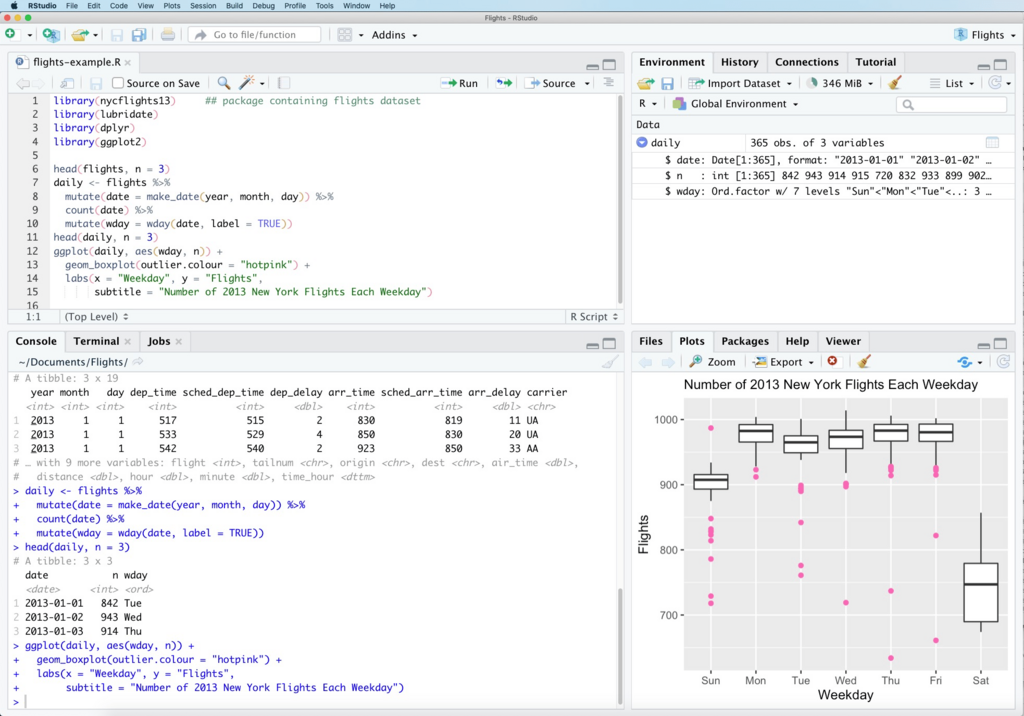
A huge reason for R's success is that it's open-source. This means it's completely free for anyone to use, modify, and share. This spirit of collaboration has led to a massive, active community of users who contribute fixes, answer questions, and create new tools.
These tools are shared as "packages" through a central repository called CRAN (The Comprehensive R Archive Network). There are thousands of packages available, offering specialized functions for just about any data-related task you can imagine, from analyzing genetic sequences to modeling financial markets.
Setting Up Your Workspace
To get started with R, you'll need two things: R itself, which is the programming language, and RStudio, which is an integrated development environment, or IDE.
Think of R as the engine of a car and RStudio as the dashboard. The engine does all the work, but the dashboard gives you a user-friendly way to control it, with organized windows for your code, plots, variables, and help files. While you can use R without RStudio, it's highly recommended for a smoother experience.
Here’s how to install both:
-
Install R: First, you must install the R language itself. Go to the CRAN website and download the correct version for your operating system (Windows, macOS, or Linux). Follow the installation instructions.
-
Install RStudio: Once R is installed, head over to the Posit website (the company that makes RStudio). Download the free RStudio Desktop version and install it. RStudio will automatically detect your R installation.
Always install R first, then RStudio. RStudio needs R to function, but R does not need RStudio.
Once both are installed, you can open RStudio to start writing your first R scripts. You're now ready to begin exploring the world of data analysis.
What is the primary purpose for which the R programming language was created?
What is the relationship between R and RStudio?