Python String Fundamentals
String Basics
What is a String?
In programming, we work with more than just numbers. We often need to handle text, like names, messages, or addresses. A piece of text in code is called a string. Think of it as a sequence of characters strung together, just like beads on a necklace.
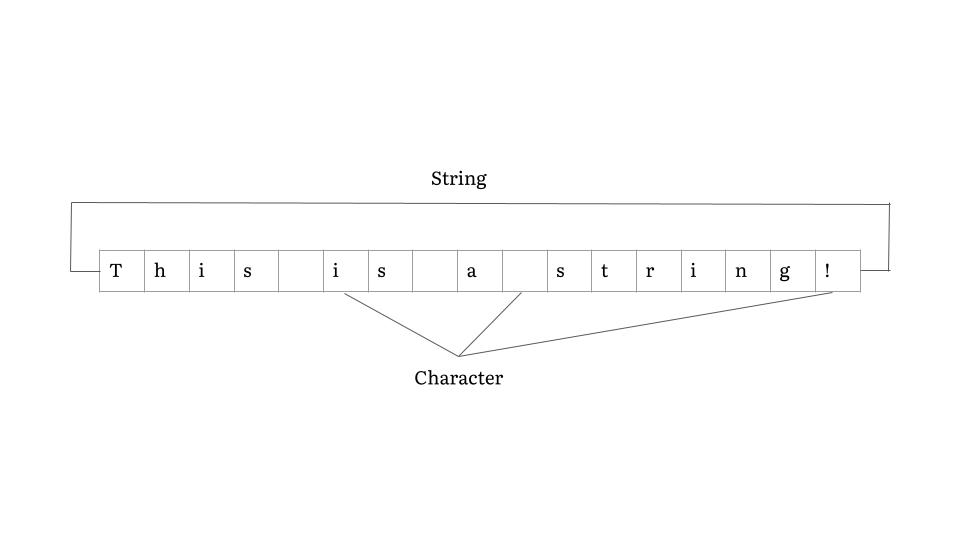
Strings are one of the most fundamental data types in Python. They are how you represent and work with any kind of textual information. From the “Hello, World!” you print to the screen to complex data read from a file, strings are everywhere.
Creating Strings in Python
To tell Python that a sequence of characters is a string, you need to wrap it in quotes. Python is flexible and gives you a few options: single quotes, double quotes, or triple quotes.
The most common ways to create a string are with single (') or double (") quotes. For the most part, you can use them interchangeably.
# Using single quotes
print('Hello, world!')

# Using double quotes
print("Hello, world!")
So why have both? The main reason is convenience. If your string contains an apostrophe (which is a single quote), you can wrap the whole string in double quotes to avoid confusion.
# This works perfectly
print("It's a beautiful day.")
Conversely, if your string needs to contain quotation marks, you can wrap it in single quotes.
# This also works perfectly
print('She said, "Hi there!"')
What about text that spans multiple lines, like a poem or an address? For this, Python offers triple quotes. You can use three single quotes (''') or three double quotes (""") to create multi-line strings. Everything between the opening and closing triple quotes becomes part of the string, including the line breaks.
address = """
123 Python Lane
Codeville, CA 90210
USA
"""

print(address)
This feature is a direct result of the design philosophy of Python's creator, Guido van Rossum, who prioritized code readability. Multi-line strings make it easy to embed blocks of text directly into your code without messy formatting tricks.
Handling Special Characters
Sometimes you need to put characters in a string that are hard to type directly or that have a special meaning. For example, how do you add a tab or a new line in the middle of a string? You use an —a short code that starts with a backslash (\).
When Python sees a backslash inside a string, it knows that the next character has a special meaning. Here are some of the most common escape sequences:
| Sequence | Meaning |
|---|---|
\n | Newline |
\t | Tab |
\' | Single quote |
\" | Double quote |
\\ | Backslash |
Let's see them in action. The \n sequence is perfect for splitting a string across multiple lines without using triple quotes.
# The \n creates a line break
print("First line\nSecond line")
The \t sequence inserts a tab, which is useful for aligning text into columns.
# The \t creates a tab space
print("Name:\tAlice\nAge:\t30")
Using \' or \" also lets you include quotes inside a string when you don't want to alternate between single and double quotes.
# Using an escape sequence for a single quote
print('It\'s a beautiful day.')
Now you know what strings are and how to create them. This is the first step to manipulating all kinds of text data in your programs.
Ready to check your understanding?
In programming, what is a string?
Which of the following is the primary reason Python allows strings to be created with single quotes ('') or double quotes ("")?
With these fundamentals down, you're ready to start exploring the powerful ways Python can work with text.