Python Programming Fundamentals
Python Basics
Getting Python Ready
Before you can write any Python code, you need to have the Python interpreter installed on your computer. The interpreter is a program that reads your Python code and runs it. The best place to get it is from the official Python website, python.org. Download the latest version for your operating system—whether it's Windows, macOS, or Linux—and follow the installation instructions.
During installation, make sure to check the box that says "Add Python to PATH." This small step makes it much easier to run Python from your computer's command line or terminal, which is a common way developers interact with their tools.
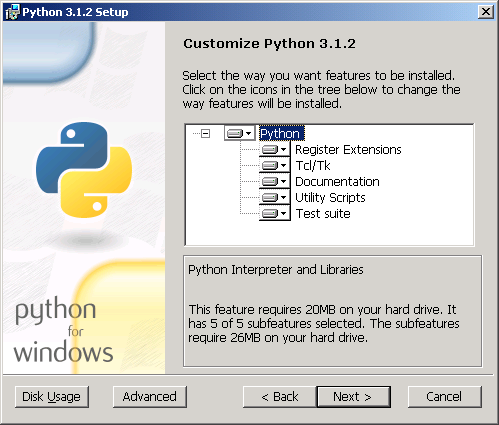
Once installed, you'll also have a simple programming environment called IDLE (Integrated Development and Learning Environment). It's a great place to start writing your first lines of code.
Syntax and Indentation
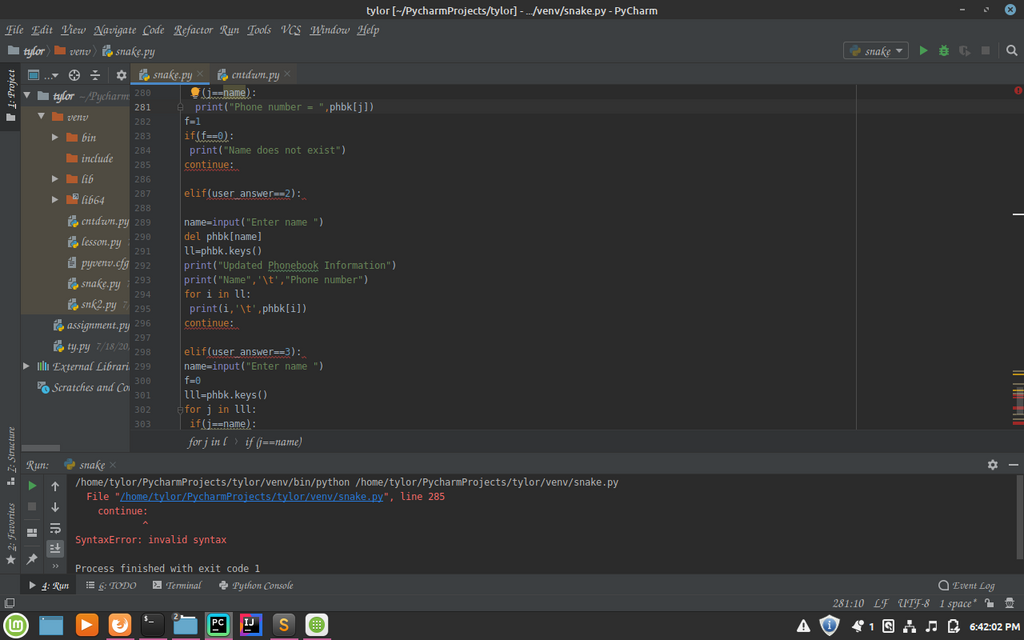
Python's syntax is designed to be readable and clean. Unlike many other programming languages that use brackets or keywords to define blocks of code, Python uses indentation—the spaces at the beginning of a line.
In Python, whitespace is not just for looks; it's a part of the syntax and has meaning. This rule forces code to be formatted in a consistent, easy-to-read way.
The standard is to use four spaces for each level of indentation. Most code editors can be configured to insert four spaces when you press the Tab key. Getting indentation wrong is a common source of errors for beginners.
Variables and Data
A variable is like a labeled box where you can store information. You give the box a name and put something inside it. You can create a variable by choosing a name and using the equals sign (=) to assign it a value.
# Assigning the number 10 to a variable named 'score'
score = 10

# Assigning a piece of text to a variable named 'player_name'
player_name = "Alex"
The type of information you store determines the variable's data type. Python has several built-in data types, but let's start with the most common ones.
| Data Type | Description | Example |
|---|---|---|
int | Integer, a whole number. | 42 |
float | Floating-point number, a number with a decimal. | 3.14159 |
str | String, a sequence of characters (text). | "Hello, Python!" |
bool | Boolean, represents either True or False. | True |
Python is dynamically typed, which means you don't have to declare the data type of a variable. Python figures it out automatically based on the value you assign.
Basic Input and Output
Programs need to communicate. The simplest way for a program to show information is by printing it to the screen. In Python, you use the print() function for this.
print("Hello, world!")

message = "Welcome to the game."
print(message)

To get information from the user, you can use the input() function. It displays a prompt to the user and waits for them to type something and press Enter.
# Ask the user for their name and store it
name = input("What is your name? ")

# Greet the user by name
print("Hello, " + name + "!")
One important thing to know is that input() always gives you back a string. If you need to treat the input as a number, you have to convert it first using functions like int() or float().
age_string = input("How old are you? ")
age_number = int(age_string) # Convert the string to an integer

years_until_100 = 100 - age_number
print("You will be 100 in", years_until_100, "years.")
Working with Operators
Operators are special symbols that perform operations on variables and values. Python has several types of operators.
Arithmetic operators are used for mathematical calculations.
| Operator | Name | Example |
|---|---|---|
+ | Addition | x + y |
- | Subtraction | x - y |
* | Multiplication | x * y |
/ | Division | x / y |
% | Modulus (remainder) | x % y |
** | Exponentiation | x ** y |
Comparison operators are used to compare two values, resulting in a Boolean (True or False).
a = 10
b = 5

print(a > b)   # Prints: True
print(a == 10) # Prints: True (== checks for equality)
print(b != 5)  # Prints: False (!= checks for inequality)
Logical operators (and, or, not) are used to combine conditional statements.
x = 12

# Checks if x is greater than 10 AND less than 20
print(x > 10 and x < 20)  # Prints: True

# Checks if x is 10 OR less than 5
print(x == 10 or x < 5)   # Prints: False
What is the official source for downloading the Python interpreter, and what is a crucial step during installation for easier command-line use?
In Python, code blocks (like the body of a loop or function) are defined by indentation, not by brackets or keywords.
With these building blocks—setting up your environment, understanding syntax, using variables, handling input/output, and applying operators—you're ready to start writing simple but powerful Python scripts.