Python Programming Fundamentals
Python Basics
Setting Up Your Workspace
Before you can start coding, you need to install Python on your computer. You can download the latest version from the official Python website, python.org. The installation process is straightforward, much like installing any other application.

Once installed, you can start writing Python code immediately using its interactive interpreter. This is a tool that reads and executes your code one line at a time. To open it, just search for "Python" on your computer and open the application. You'll see a window with a >>> prompt, which means Python is ready to take your commands.
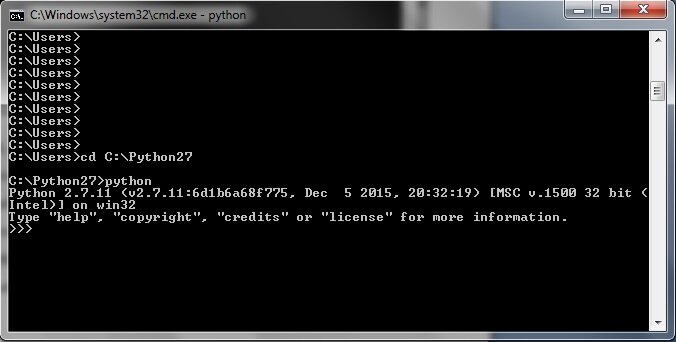
This interactive mode is great for testing small snippets of code and seeing immediate results. It's like having a conversation with the computer.
Syntax and Indentation
One of Python's most famous features is its clean and readable syntax. It's designed to be uncluttered and look a lot like plain English.
Unlike many programming languages that use braces {} or keywords to group code, Python uses indentation. This means the amount of whitespace at the beginning of a line is very important. While we won't get into complex code blocks just yet, it's a core concept to remember. Consistent indentation makes Python code easy to read for everyone.
Rule of thumb: Use four spaces for each level of indentation.
You can also leave comments in your code to explain what it does. Python ignores anything on a line that follows a hash symbol (#). Comments are for you and other programmers, not for the computer.
# This is a comment. Python will ignore this line.
print("Hello, World!") # This part is also a comment.
Storing Information
In programming, we need a way to store and manage information. We do this using variables. A variable is like a labeled box where you can keep a piece of data. You can give a variable a name and then refer to that name to get the data back.
Creating a variable in Python is simple. You just choose a name, use the equals sign (=), and provide the value you want to store.
message = "Hello, Python learner!"
user_age = 25
pi = 3.14
Here, message, user_age, and pi are variable names. They store different types of data.
Python has several built-in data types. The most common ones you'll use at first are:
- Strings: Textual data, wrapped in quotes.
"Hello" - Integers: Whole numbers.
25,-10,0 - Floats: Numbers with decimal points.
3.14,-0.5
Python is dynamically typed, which means you don't have to declare the data type of a variable. Python figures it out automatically based on the value you assign.
Input and Output
A program isn't very useful if it can't communicate with the user. In Python, we use two main functions for this: print() to display output and input() to get input from the user.
We've already seen the print() function. It takes any value you give it and displays it on the screen. You can print variables, raw text, or a combination.
planet = "Earth"
print("Welcome to planet", planet)
To get information from the user, we use the input() function. It shows the user a prompt (a message you write) and waits for them to type something and press Enter. The text the user enters is then returned as a string, which you can store in a variable.
# Ask the user for their name and store it in a variable
user_name = input("What is your name? ")

# Greet the user by name
print("Hello,", user_name, "!")
When you run this code, it will first display "What is your name? ". After you type your name and hit Enter, it will print a personalized greeting. This simple interaction is a fundamental building block for creating more complex and interactive programs.
Let's check your understanding of these core concepts.
In Python's interactive interpreter, what does the >>> prompt indicate?
How does Python group blocks of code, unlike many other languages that use braces {}?
You've now covered the essential first steps of Python programming. You know how to set up your environment, write simple commands, store data in variables, and interact with a user.