Python Programming Fundamentals
Python Setup
Installing Python
First things first, you need to get Python onto your computer. The best place to get it is from the official source: python.org. Head to the downloads page and grab the latest version for your operating system, whether it's Windows, macOS, or Linux.
The installation process is straightforward. On Windows, a wizard will guide you. There's one crucial step: make sure to check the box that says "Add Python to PATH." This lets you run Python from your computer's command line, which is a powerful tool you'll use later. On macOS and Linux, the process is usually even simpler.

Your Coding Environment
You can write Python code in a simple text editor, but it's much easier with an Integrated Development Environment (IDE). An IDE is a special application that gives you tools to write, run, and debug your code all in one place. It often includes features like syntax highlighting, which colors your code to make it more readable, and error checking.
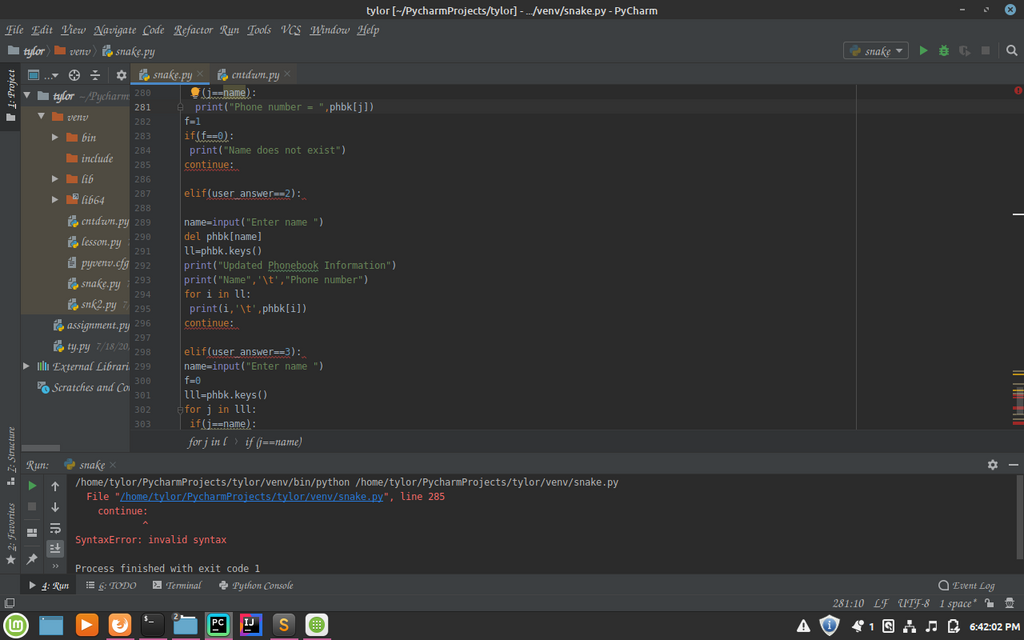
There are many IDEs to choose from. Some run on your desktop, like VS Code or PyCharm. Others run in your web browser, which means no setup is required. For beginners, web-based options like Google Colab, Jupyter Notebook, and Kaggle are fantastic. They let you write and run code in small, manageable chunks, making it easy to experiment and see immediate results.
For this course, a web-based notebook like Google Colab is recommended. It's free and requires no installation.
Python's Building Blocks
Now that you have a place to write code, let's look at the basic syntax. Think of syntax as the grammar rules of a programming language. Getting these fundamentals down is the key to writing code that works.
Variable
noun
A storage location with a specific name that holds a value. You can change the value of a variable.
Variables are like labeled boxes where you can store information. You give a box a name and put something inside it. To create a variable in Python, you just choose a name, use the equals sign (), and provide a value.
# Assigning a value to a variable
user_name = "Alice"
user_age = 30

# You can print the value to see it
print(user_name)
print(user_age)
The information you store comes in different forms, or data types. Python automatically detects the type of data you're using. The most common types are:
- Strings: Text, enclosed in single or double quotes.
"Hello, world!" - Integers: Whole numbers.
42 - Floats: Numbers with a decimal point.
3.14 - Booleans: Represents truth values, either
TrueorFalse.
Programs often need to make decisions. That's where conditionals come in. Using if, elif (else if), and else, you can tell your program to run certain blocks of code only when a specific condition is met.
temperature = 75

if temperature > 80:
    print("It's a hot day!")
elif temperature < 60:
    print("It's a bit chilly.")
else:
    print("The weather is nice.")
Sometimes you need to repeat an action multiple times. Loops are perfect for this. A for loop repeats a block of code for each item in a sequence, while a while loop repeats as long as a condition is true.
# A 'for' loop iterates over a sequence
for number in [1, 2, 3]:
    print(number)

# A 'while' loop runs as long as a condition is true
count = 0
while count < 3:
    print("Still counting!")
    count = count + 1
Handling Errors
No one writes perfect code all the time. You'll inevitably run into errors, and that's okay. A common type is a syntax error, which is like a typo or grammar mistake in your code. Python will usually point out the line where the mistake is.
Other errors happen while the program is running, like trying to divide by zero. You can handle these gracefully using a try...except block. Python will try to run the code in the try block. If an error occurs, it will run the code in the except block instead of crashing.
numerator = 10
denominator = 0

try:
    result = numerator / denominator
    print(result)
except ZeroDivisionError:
    print("You can't divide by zero!")
This prevents your program from stopping unexpectedly and allows you to give helpful feedback to the user.
When installing Python on Windows from python.org, which option is crucial to check for running Python from the command line?
What is the primary purpose of an Integrated Development Environment (IDE)?
With these basics, you're ready to start writing your first simple Python programs. You have the tools to install Python, a place to write code, and the fundamental syntax to bring your ideas to life.