Python Programming Fundamentals
Python Basics
Setting Up Your Workspace
Before you can start writing Python code, you need to set it up on your computer. Python is a programming language, and like any language, it has its own set of rules and grammar. To use it, you need an interpreter—a program that reads your Python code and translates it into instructions the computer can understand.
You can download the official Python interpreter from the Python website. The installation is straightforward and also includes a simple development environment called IDLE (Integrated Development and Learning Environment). Think of IDLE as a basic text editor and interpreter combined, perfect for getting started.
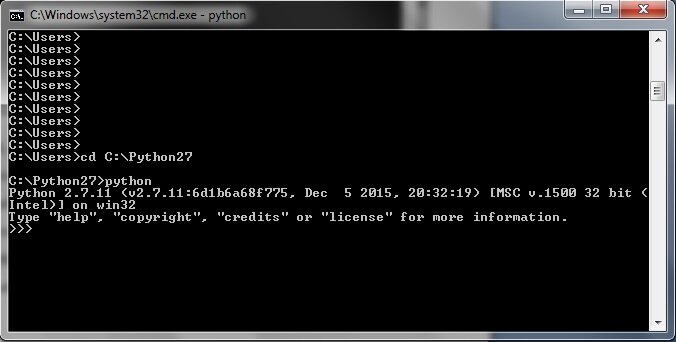
Once installed, you can open your computer's command line or terminal, type python, and press Enter. You'll see a >>> prompt. This is the interactive Python shell, where you can type commands one by one and see immediate results. It's a great place to experiment.
Python's Simple Rules
Python is known for its clean and readable syntax. It's designed to be uncluttered, which helps you focus on the problem you're trying to solve rather than getting lost in complex symbols.
One of the most unique features of Python is how it uses indentation. In many other languages, indentation is just for looks. In Python, it's mandatory. It's how Python knows which lines of code belong together in a block. You typically use four spaces for each level of indentation.
In Python, whitespace isn't just for readability—it's part of the syntax itself.
For now, since we're writing simple, single-line commands, you won't need to worry much about indentation. But it's a core concept to remember as you move forward.
Storing and Using Information
Programs need to store information to do anything useful. In programming, we use variables for this. A variable is like a labeled box where you can store a piece of information. You give the box a name, and you can put things in it, take things out, or change what's inside.
To create a variable in Python, you just choose a name, use the equals sign (=), and provide a value.
name = "Alice"
age = 30
price = 19.99
is_student = True
The information you store has a specific data type. In the example above, "Alice" is a string (text), 30 is an integer (a whole number), 19.99 is a float (a number with a decimal), and True is a boolean (a true/false value).
| Data Type | Description | Example |
|---|---|---|
str | Textual data (string) | "Hello" |
int | Whole numbers (integer) | 100 |
float | Numbers with a decimal point | 3.14 |
bool | True or False values | True |
Making Things Happen with Operators
Once you have data in variables, you can perform operations on it using operators. These are the symbols that perform actions, like addition or comparison.
Arithmetic operators work just like they do in math.
x = 10
y = 3

print(x + y)  # Addition -> 13
print(x - y)  # Subtraction -> 7
print(x * y)  # Multiplication -> 30
print(x / y)  # Division -> 3.33...
print(x % y)  # Modulo (remainder) -> 1
print(x ** y) # Exponent -> 1000
Comparison operators are used to compare two values. The result of a comparison is always a boolean value: True or False.
a = 5
b = 8

print(a == b) # Equal to -> False
print(a != b) # Not equal to -> True
print(a < b)  # Less than -> True
print(a >= 5) # Greater than or equal to -> True
Interacting with Your Program
Programs aren't very useful if they can't communicate. Python gives you simple functions for input and output.
To display information, you use the print() function. You can give it text, variables, or a combination of both.
location = "world"
print("Hello,", location)
To get information from the user, you use the input() function. It shows the user a prompt and waits for them to type something and press Enter. Whatever the user types is returned as a string.
# Ask the user for their name
user_name = input("What is your name? ")

# Print a personalized greeting
print("Nice to meet you,", user_name, "!")
Now that you've got the essentials, it's time to check your understanding.
What is the primary role of a Python interpreter?
In Python, indentation is mandatory and is used to define blocks of code.
You now have a solid foundation in Python's core elements. With variables, operators, and basic I/O, you can start writing simple but functional programs.