Python Programming Essentials
Environment and Syntax
Setting Up Your Workspace
Before writing any Python, you need the interpreter. This is the program that reads and executes your code. The most common one is , the original implementation written in C. You can download it directly from the official Python website. Most operating systems, especially Linux and macOS, come with a version of Python pre-installed, but it's often best to install the latest stable version yourself to ensure you have all the new features and security updates.
While you can write Python in any plain text editor, an Integrated Development Environment (IDE) or a good code editor makes life much easier. They offer features like syntax highlighting, code completion, and debugging tools. Popular choices include Visual Studio Code (VS Code) with the Python extension, and PyCharm. Both are excellent and the choice often comes down to personal preference.

Python's Unique Syntax
The first thing that strikes programmers coming from languages like C++, Java, or JavaScript is Python's lack of curly braces {} to define code blocks. Instead, Python uses indentation. The amount of whitespace at the beginning of a line is significant. This isn't just for style; it's a hard rule of the syntax. Code that is part of the same block must be indented at the same level.
A standard indentation is four spaces. While you can use tabs, the official style guide strongly recommends using spaces to avoid issues across different editors.
This rule enforces clean, readable code. Let's look at a simple conditional statement:
# This is a comment in Python

weather = "sunny"

if weather == "sunny":
    print("It's a nice day for a walk.") # This line is inside the if block
    print("Don't forget sunglasses!") # This is also inside the if block
else:
    print("Maybe stay inside.") # This is inside the else block

print("Have a good day!") # This line is outside of any block
The consistency enforced by significant whitespace is a core tenet of Python's philosophy. For more guidelines on writing clean Python code, the community relies on , the official style guide. It covers everything from indentation to line length and naming conventions.
Dynamic Typing and Variables
Python is a dynamically typed language. This means you don't need to declare the type of a variable when you create it. The interpreter figures out the type at runtime. For example, a variable can hold an integer, and later, it can be reassigned to hold a string.
my_variable = 10      # my_variable is an integer
print(my_variable)

my_variable = "Hello" # Now it's a string
print(my_variable)
It's helpful to think of variables in Python not as boxes containing values, but as labels pointing to objects in memory. When you write x = 10, you're creating an integer object with the value 10 and making the label x point to it. If you then write y = x, you're not copying the value; you're just creating a new label y that points to the exact same integer object.
Running Your Code
There are two primary ways to execute Python code: through a script file or in an interactive session.
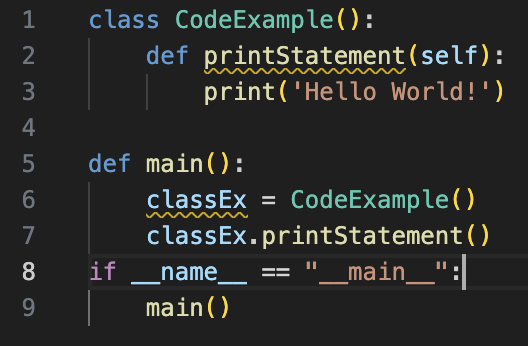
- Script Execution: You can save your code in a file with a
.pyextension, likemyscript.py. Then, you run it from your terminal using the commandpython myscript.py. This is how you'll run most of your applications.
- Interactive Session (): For quick tests or exploring ideas, you can use the interactive Python shell. Just type
pythonin your terminal, and you'll get a>>>prompt. Here, you can type Python code one line at a time and see the result immediately. It's a fantastic tool for learning and debugging.
$ python
Python 3.10.4 (main, Apr  2 2022, 09:04:19) [GCC 11.2.0] on linux
Type "help", "copyright", "credits" or "license" for more information.
>>> print("Hello, interactive world!")
Hello, interactive world!
>>> 2 + 2
4
>>> exit()
On Unix-like systems, you can also make Python scripts executable directly. By adding a shebang line like #!/usr/bin/env python3 at the very top of your script and making the file executable (with chmod +x yourscript.py), you can run it just by typing ./yourscript.py.
What is the name of the original and most common Python interpreter, which is written in the C programming language?
How are code blocks, such as the body of a conditional statement or a loop, defined in Python?