Python PDF OCR and Page Analysis
Introduction to OCR
Turning Pictures into Words
Have you ever taken a picture of a document, hoping to copy the text later, only to realize you have to retype everything by hand? It’s a common frustration. You have an image of the text, but your computer just sees pixels, not actual letters or words. This is where Optical Character Recognition, or OCR, comes in.
Optical Character Recognition
noun
A technology that converts different types of documents, such as scanned paper documents, PDFs, or images captured by a digital camera, into editable and searchable text data.
OCR technology scans an image, identifies the characters within it, and translates them into a machine-readable format. Suddenly, that static photo of a report becomes a Word document you can edit, or a scanned receipt becomes data you can plug into a spreadsheet. It bridges the gap between the physical and digital worlds of text.
How It Works
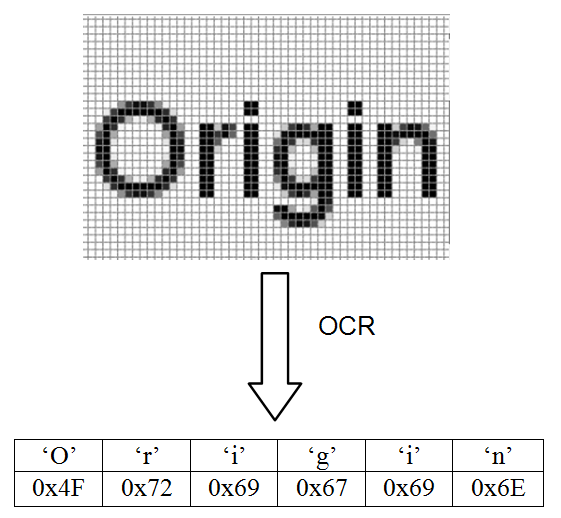
At its core, OCR is about pattern recognition. The software analyzes the light and dark areas of an image to identify the shapes of individual characters. Think of it like a very advanced game of connect-the-dots. The system looks for specific features—loops, lines, curves, and intersections—that define each letter and number.
For example, it learns that a circle on top of a vertical line is likely a 'p' or a 'P'. It distinguishes between an 'O' (a closed loop) and a 'C' (an open one). This process is called feature extraction. By recognizing these fundamental patterns, the software makes an educated guess about which character it's seeing.
In short, OCR acts as a digital translator, reading images and speaking text.
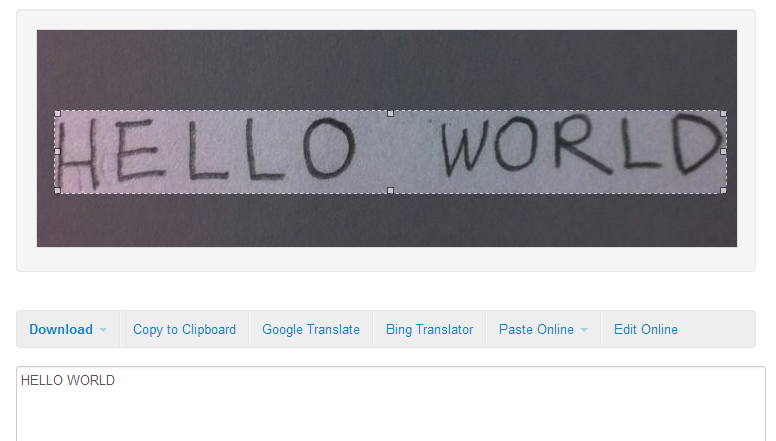
Early OCR systems had to be trained on a specific font. Modern systems are much more sophisticated. They often use artificial intelligence and machine learning to recognize a huge variety of fonts and even handwriting, improving their accuracy over time by learning from vast amounts of data.
Common Uses and Challenges
OCR is more common than you might think. It’s the technology that lets you deposit a check by taking a picture with your phone. It powers apps that translate foreign signs in real-time. Libraries and companies use it to digitize massive archives of books, invoices, and historical records, making them searchable for the first time.
But it's not a perfect technology. OCR systems face several challenges that can affect their accuracy:
-
Image Quality: A blurry, skewed, or poorly lit photo is hard for software to read, just as it is for a human. Creases and shadows on a page can also cause errors.
-
Font and Style: Unusual or highly stylized fonts can confuse the system. While modern OCR is good with standard fonts, it can struggle with decorative scripts or handwriting.
-
Language Support: Each language has its own unique characters and accents. An OCR system designed for English might not work for Japanese or Arabic without specific training.
-
Document Layout: Complex layouts with columns, tables, and images can be tricky. The software has to correctly identify the blocks of text and read them in the proper order.
Despite these hurdles, OCR technology is constantly improving, making it an essential tool for turning static images into dynamic, useful data.
What is the primary function of Optical Character Recognition (OCR) technology?
OCR software identifies characters by analyzing their fundamental patterns, such as loops, lines, and curves. This process is known as __________.