Python Fundamentals
Python Basics
Setting Up Your Workspace
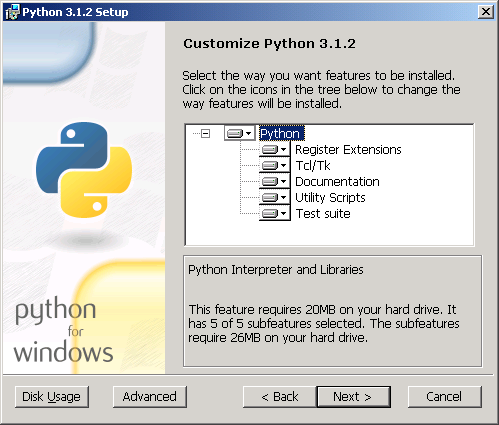
Before you can write any Python code, you need to install the Python interpreter. Think of the interpreter as a translator. You write instructions in Python, and the interpreter translates them into a language your computer can understand and execute. The best place to get it is from the official source: python.org.
Once installed, you'll have access to a program called IDLE (Integrated Development and Learning Environment). When you open it, you’ll see a window called the Python Shell. This is an interactive environment where you can type Python commands one at a time and see the results immediately. The >>> prompt is your cue to start typing.
Your First Conversation
Let's start with a classic programming tradition: making the computer say hello. In Python, we use the print() function to display information on the screen. A function is just a named command that performs a specific action. The information you want it to display goes inside the parentheses.
print("Hello, World!")
When you type that into the shell and press Enter, the computer will respond with:
Hello, World!
Notice the quotation marks. They tell Python that Hello, World! is a piece of text, not a command it should try to understand. This piece of text is called a string.
Python's syntax is designed to be clean and readable. Unlike many other languages, it uses indentation (the spaces at the beginning of a line) to structure code. While we won't see its full power yet, it's a core rule to remember.
Storing Information
Programming is all about working with data. To keep track of data, we store it in variables. A variable is like a labeled box where you can put a piece of information. You can create a variable and give it a value using the assignment operator, which is the equals sign (=).
# The variable 'message' now holds the string "Welcome to Python!"
message = "Welcome to Python!"

# The variable 'user_age' holds the number 30
user_age = 30

# The variable 'price' holds the number 19.99
price = 19.99
Here, message, user_age, and price are the variable names. You can choose almost any name you want, but it's best to pick names that describe the data they hold. Once a variable is created, you can use its name to access its value. For example, print(message) would display "Welcome to Python!" on the screen.
variable
noun
A storage location with a specific name, which holds a known or unknown quantity of information referred to as a value.
In the example above, we saw three fundamental types of data.
| Data Type | Description | Example |
|---|---|---|
| String | A sequence of characters, like text. | "Hello, World!" |
| Integer | A whole number, without a fractional part. | 30 |
| Float | A number with a decimal point. | 19.99 |
Interacting with Users
Besides displaying output with print(), you can also get input from a user. The input() function prompts the user to type something and captures what they enter. This allows your programs to be interactive.
# The text inside input() is the prompt shown to the user.
user_name = input("What is your name? ")

# Greet the user by name.
print("Hello, " + user_name)
When this code runs, it will first display "What is your name? ". The program then pauses and waits for you to type a response and press Enter. Whatever you type is stored as a string in the user_name variable. Finally, it combines the string "Hello, " with the name you entered and prints the complete greeting.
The + symbol here is used to concatenate, or join, the two strings together.
What is the primary role of the Python interpreter?
In the Python Shell, what does the >>> symbol indicate?
You've just taken your first steps into Python. You've set up your environment, written your first line of code, and learned how to work with basic data. This foundation is the key to building more complex and powerful programs.