Python for Data Science and Machine Learning Mastery
Python Basics
The Building Blocks of Code
At its heart, programming is about storing and manipulating information. The most basic way we store information is in a variable. Think of a variable as a labeled box where you can keep a piece of data. You give the box a name, and you can put something inside it.
# Let's create some variables

age = 30
pi = 3.14159
name = "Alice"
is_learning = True
Each piece of data has a type. Python is smart about guessing the type, but it's good to know the main ones:
- Integers are whole numbers, like
30. - Floats are numbers with a decimal point, like
3.14159. - Strings are sequences of text, wrapped in quotes, like
"Alice". - Booleans represent truth values. They can only be
TrueorFalse.
You can check the type of any variable using the built-in
type()function. For example,type(age)would tell you that the variableageis an integer.
Making Decisions and Repeating Yourself
Code doesn't just run from top to bottom. Often, you need it to make decisions or repeat actions. This is called control flow.
The most common way to make a decision is with an if statement. It checks if a condition is true and runs a block of code only if it is. You can also provide alternative paths with elif (else if) and else.
temperature = 25

if temperature > 30:
    print("It's a hot day!")
elif temperature < 10:
    print("It's a cold day.")
else:
    print("The weather is pleasant.")
What if you need to do something over and over? That's where loops come in. A for loop is perfect for iterating through a sequence of items, like a list of numbers or words.
# This loop will print each number from 0 to 4
for i in range(5):
    print(i)
Another type is the while loop, which keeps running as long as a certain condition remains true. You just have to be careful not to create an infinite loop!
Organizing Your Code
As your programs get more complex, you'll want to organize your code into reusable pieces. Functions are the primary way to do this. A function is a named block of code that performs a specific task. You can "call" it whenever you need that task done, saving you from writing the same code again and again.
# Define a function to greet someone
def greet(name):
    return f"Hello, {name}!"

# Call the function
message = greet("Bob")
print(message)  # Output: Hello, Bob!
Sometimes you need functions that other people have already written. These are often bundled into modules. A module is simply a file containing Python definitions and statements. You can bring these into your program using the import statement. Python comes with many useful built-in modules, like math for mathematical operations.
# Import the math module
import math

# Use a function from the module
result = math.sqrt(64)
print(result)  # Output: 8.0
Handling the Unexpected
Things don't always go as planned. Your code might try to divide by zero or open a file that doesn't exist. These events are called exceptions, and if you don't handle them, they will crash your program.
Python provides a way to gracefully manage these situations using try and except blocks. You put the code that might cause an error in the try block, and the code to run if an error occurs in the except block.
try:
    result = 10 / 0
except ZeroDivisionError:
    print("You can't divide by zero!")

print("Program continues...")
Without the try...except block, the program would have crashed at the division. Instead, it prints a helpful message and continues running.
Your Interactive Workspace
When working with data, you often want to experiment and see results immediately. This is where Jupyter Notebooks shine. A Jupyter Notebook is an interactive environment that lets you write and run code in small chunks, called cells. You can also include text, images, and visualizations right alongside your code.
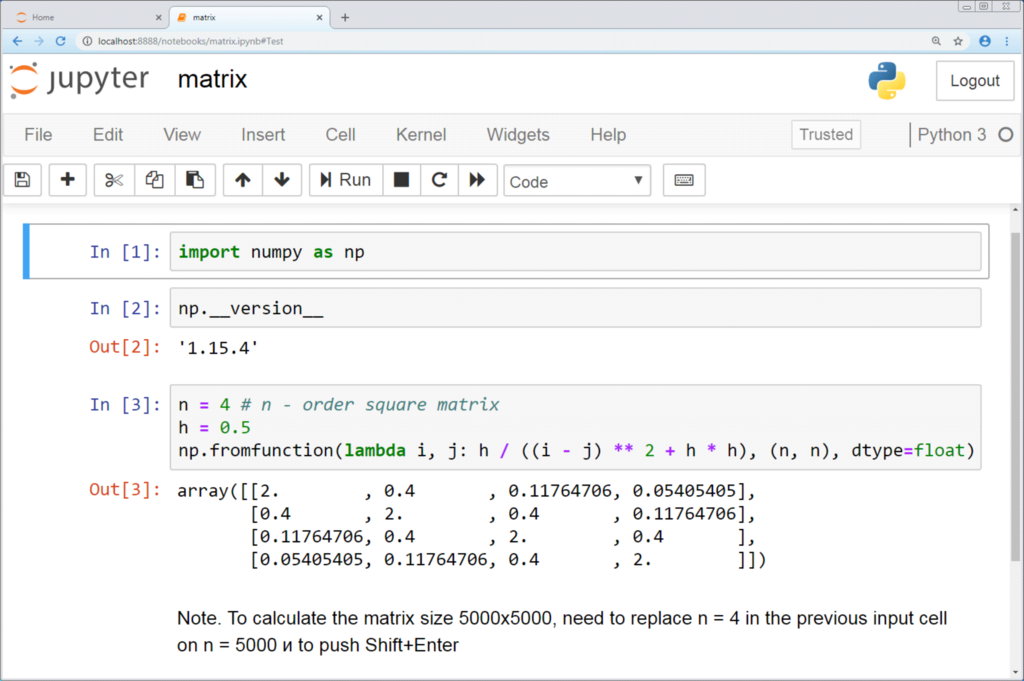
This makes notebooks perfect for exploratory data analysis, where you can test ideas one step at a time. You can run a cell, see the output, make a change, and run it again instantly. This interactive workflow is a cornerstone of modern data science.
Now, let's test your understanding of these core concepts.
What is the data type of the value 10.5 in Python?
A for loop is generally used to iterate over a fixed sequence of items, whereas a while loop is used when a loop should continue as long as a certain condition is met.
With these fundamentals, you have the foundation to start exploring the powerful world of Python for data science.