Python for Artificial Intelligence Mastery
Advanced Data Structures
Beyond Standard Lists
You're already familiar with Python's lists and dictionaries. They're great for many tasks, but when it comes to the heavy-duty number crunching required in AI, they can be slow and memory-hungry. This is where NumPy comes in. It provides a powerful array object that is much faster and more efficient for numerical operations.
A NumPy array, or ndarray, is a grid of values, all of the same type. Think of it as a supercharged list. Because every element is the same type and stored in a contiguous block of memory, NumPy can perform mathematical operations on the entire array at once. This process is called and it avoids the slow, explicit loops you'd need with standard Python lists.
import numpy as np

# A standard Python list
python_list = [1, 2, 3, 4, 5]

# A NumPy array
numpy_array = np.array(python_list)

# Multiplying each element by 2
# With a list, you need a loop or list comprehension
list_doubled = [x * 2 for x in python_list]

# With NumPy, it's a single, fast operation
array_doubled = numpy_array * 2

print(array_doubled)
# Output: [ 2  4  6  8 10]
Smart Arithmetic with Broadcasting
NumPy's power isn't just in operating on arrays of the same size. is a powerful mechanism that allows NumPy to perform arithmetic on arrays of different shapes. The smaller array is "broadcast" across the larger array so that they have compatible shapes.
Imagine you have a 3x3 array of numbers and you want to add a single column of numbers to each column of the matrix. Broadcasting handles this elegantly. It conceptually stretches the smaller array to match the shape of the larger one without actually using extra memory.
import numpy as np

A = np.array([[1, 2, 3],
              [4, 5, 6],
              [7, 8, 9]])

b = np.array([10, 20, 30])

# Add b to each row of A. NumPy broadcasts b.
result = A + b

print(result)
# Output:
# [[11 22 33]
#  [14 25 36]
#  [17 28 39]]
Managing Data with Pandas
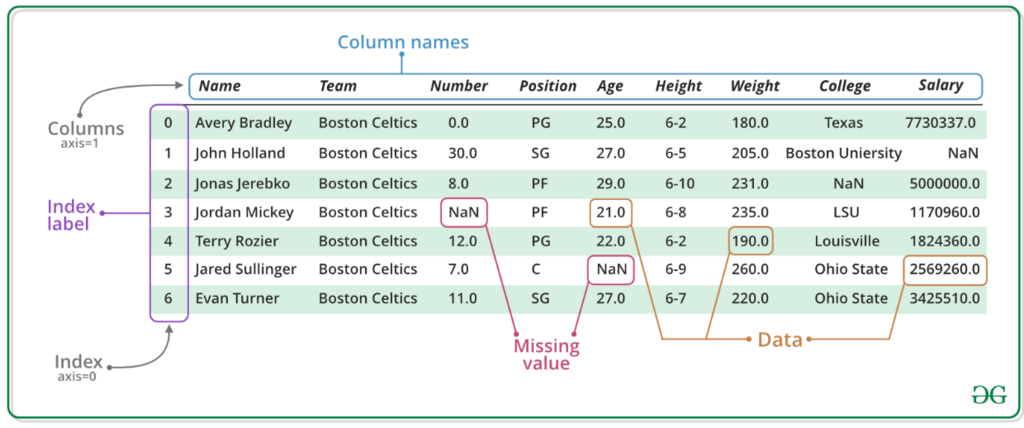
While NumPy is great for raw numbers, real-world data is often messy and tabular, with mixed data types and missing values. This is where the Pandas library shines. Its primary data structure is the DataFrame, a two-dimensional table with labeled rows and columns, much like a spreadsheet.
DataFrames are built on top of NumPy arrays, so they inherit much of their speed and efficiency. But they add powerful features for data cleaning, transformation, and analysis. You can select columns, filter rows based on conditions, and handle missing data with ease. Just like with NumPy, performing vectorised operations on DataFrame columns is vastly more efficient than iterating row by row.
Preparing Data for AI Models
A huge part of building an AI model is data preparation, or feature engineering. Raw data is rarely in the right format for a machine learning algorithm. We need to clean it, transform it, and sometimes create new features from existing ones.
Two common tasks are handling missing data and encoding categorical variables.
Handling Missing Data
Datasets often have missing values, represented in Pandas as NaN (Not a Number). Most machine learning models can't handle these, so we need a strategy. We could drop rows or columns with missing values, but that might discard valuable information. A better approach is often imputation: filling in the missing values with a substitute, like the mean, median, or mode of the column.
import pandas as pd
import numpy as np

data = {'Temperature': [25, 27, np.nan, 22, 28],
        'Humidity': [60, 65, 70, np.nan, 75]}
df = pd.DataFrame(data)

# Fill missing temperature with the mean of the column
mean_temp = df['Temperature'].mean()
df['Temperature'].fillna(mean_temp, inplace=True)

print(df)
#    Temperature  Humidity
# 0         25.0      60.0
# 1         27.0      65.0
# 2         25.5      70.0
# 3         22.0       NaN
# 4         28.0      75.0
Encoding Categorical Variables
Machine learning models are mathematical, so they need numbers as input, not text. Categorical features, like 'Country' or 'Product Category', must be converted into a numerical format. This is called feature encoding.
A common technique is one-hot encoding, where each category is converted into a new column. The column contains a 1 if the row belongs to that category, and a 0 otherwise. This avoids creating a false sense of order between categories, which could mislead the model.
| City | Is_Sydney | Is_Melbourne | Is_Brisbane |
|---|---|---|---|
| Sydney | 1 | 0 | 0 |
| Melbourne | 0 | 1 | 0 |
| Brisbane | 0 | 0 | 1 |
| Sydney | 1 | 0 | 0 |
Pandas provides a simple function, get_dummies, to perform this operation.
data = {'City': ['Sydney', 'Melbourne', 'Brisbane', 'Sydney']}
df = pd.DataFrame(data)

df_encoded = pd.get_dummies(df, columns=['City'])

print(df_encoded)
#    City_Brisbane  City_Melbourne  City_Sydney
# 0              0               0            1
# 1              0               1            0
# 2              1               0            0
# 3              0               0            1
Managing Memory
When working with massive datasets, memory usage becomes critical. Pandas and NumPy DataFrames can consume a lot of RAM. One simple way to reduce this is by using more memory-efficient data types.
For example, if you have an 'Age' column where values range from 0 to 100, the default int64 data type is overkill. An int8 (integer using 8 bits) can store values from -128 to 127, using 8 times less memory. Downcasting numeric columns to the smallest possible type can dramatically reduce your dataset's memory footprint.
# Assume 'df' is a large DataFrame

# Check memory usage before
print(f"Original memory: {df.memory_usage(deep=True).sum()} bytes")

# Downcast integer columns
int_cols = df.select_dtypes(include=['int64']).columns
df[int_cols] = df[int_cols].apply(pd.to_numeric, downcast='integer')

# Check memory usage after
print(f"New memory: {df.memory_usage(deep=True).sum()} bytes")
These techniques for manipulating data efficiently are the foundation of any serious work in AI. Mastering them allows you to prepare large, complex datasets for the demanding task of training machine learning models.
Now, let's test your understanding of these data structures.
Why are NumPy arrays generally more efficient than standard Python lists for numerical computations in AI?
What is the name of the NumPy mechanism that allows arithmetic operations to be performed on arrays of different shapes, by conceptually 'stretching' the smaller array to match the larger one?
With these high-performance data structures, you're now equipped to handle the large-scale data wrangling that modern AI demands.