Python Error Handling
Introduction to Python Errors
Everyone Makes Mistakes
No programmer writes perfect code on the first try. Errors are a natural and unavoidable part of writing software. Think of them not as failures, but as helpful feedback from the computer. In Python, errors come in two main flavors: syntax errors and exceptions.
Syntax Errors
A syntax error is like a grammatical mistake in a sentence. If you write "the ran dog quick," a person might guess what you mean, but the sentence is fundamentally broken. Python is much stricter. It follows a precise set of grammar rules, its syntax. If your code violates these rules, the Python interpreter won't even try to run it. It will stop immediately and report a SyntaxError.
These are often simple typos: a missing parenthesis, an unclosed quote, or a forgotten colon. For example, the if statement below is missing a colon at the end, which is required by Python's syntax.
# This code has a syntax error

name = "Alice"
if name == "Alice"  # Missing a colon here!
    print("Hi, Alice!")
When you try to run this, Python will halt and point you to the problem.
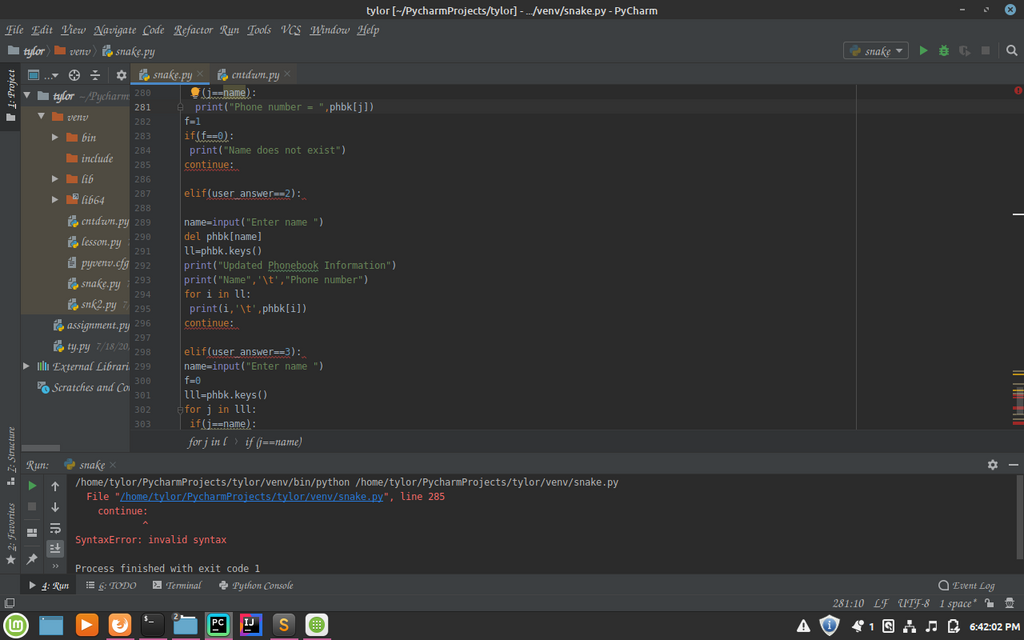
The good news is that syntax errors are usually easy to fix. The error message often tells you the exact line where the mistake occurred, making it easier to hunt down and correct.
Exceptions
The second type of error is an exception. An exception occurs when your code is syntactically correct, but something goes wrong while it's running. The instructions are valid, but the situation is impossible for the computer to handle.
Imagine telling a friend to take the third book from a shelf that only has two books. The instruction "take the third book" is grammatically fine, but it's impossible to execute. This is what happens with an exception. The program starts running, but hits a problem and stops.
Python has many built-in exceptions that describe specific problems. Here are some of the most common ones you'll encounter.
| Exception | Cause |
|---|---|
TypeError | Performing an operation on an unsupported data type, like adding a number and a string (5 + "cat"). |
NameError | Using a variable or function name that hasn't been defined yet. |
IndexError | Trying to access an item in a list or string using an index that is out of range. |
ValueError | A function receives an argument with the right type, but an inappropriate value, like int("hello"). |
ZeroDivisionError | Attempting to divide a number by zero. |
Consider this code:
# This code will raise a ZeroDivisionError

numerator = 10
denominator = 0

result = numerator / denominator
print("This line will never be reached.")
The syntax is perfect. But when Python tries to execute the division, it hits an impossible situation and raises a ZeroDivisionError. When an exception is not handled, it stops the program immediately. The script crashes, and Python prints a message called a traceback, which shows where the error happened.
Syntax errors prevent your program from starting. Exceptions stop your program while it's running.
Let's check your understanding of these different types of errors.
What is the primary difference between a syntax error and an exception in Python?
When does a SyntaxError occur?
Understanding the difference between syntax errors and exceptions is the first step toward writing more robust and reliable programs. Once you can identify them, you can start learning how to fix them.