Python Django Web Development
Introduction to Django
What Is Django?
Django is a powerful web framework that helps you build websites with Python. It was created in 2003 by two web developers, Adrian Holovaty and Simon Willison, while they were working at a newspaper. They needed to build complex, database-driven websites on tight deadlines, so they created a tool to automate the repetitive parts of web development. That tool became Django.
Django is a high-level Python web framework that follows the "batteries-included" philosophy.
The "batteries-included" philosophy means Django comes with almost everything you need right out of the box. It has built-in features for user authentication, site maps, content administration, and more. This lets you focus on writing your app instead of reinventing the wheel. Because it's written in Python, the code is clean, readable, and easy to maintain.

The MTV Pattern
Django is built around an architectural pattern called Model-Template-View, or MTV. This is Django's version of the more widely known Model-View-Controller (MVC) pattern. MTV separates the different concerns of a web application, which makes the code more organized and easier to manage.
Think of it like building with LEGOs. Each piece has a specific job, and they all fit together in a structured way. MTV provides the structure for your web application's pieces.
Here’s how the pieces fit together:
-
Model: This is your data layer. A model defines the structure of your data and how it's stored in a database. Each model maps to a single database table.
-
Template: This is the presentation layer. It's what the user sees. Templates are typically HTML files that mix static content with dynamic information passed from the view.
-
View: This is the business logic layer. A view receives a web request, interacts with the models to fetch data, and then renders a template with that data to send back a response.
This separation makes your project scalable. If you need to change how a page looks, you only edit the template. If you need to change your data structure, you work on the model. The view connects them, but each part has its own distinct responsibility.
Your First Django Project
Let's get a simple Django project running. The first step is to set up a clean development environment. We'll use a virtual environment, which is an isolated space on your computer for Python projects. This prevents different projects' dependencies from interfering with each other.
First, open your terminal or command prompt. Create a new directory for your project and navigate into it. Then, create a virtual environment. On macOS or Linux, use:
python3 -m venv env
On Windows, use:
python -m venv env
This creates a folder named env containing a copy of Python. To use it, you need to activate it. On macOS or Linux:
source env/bin/activate
On Windows:
env\Scripts\activate
Your command prompt should now show (env) at the beginning, indicating the virtual environment is active. Now you can install Django using pip, Python's package installer.
pip install Django
With Django installed, you can create a new project. The following command creates a directory called myproject with the basic files and folders Django needs.
django-admin startproject myproject .
Note the . at the end. This tells Django to create the project in the current directory, avoiding an extra nested folder. Your project structure will now look like this:
.
├── manage.py
├── myproject/
│   ├── __init__.py
│   ├── asgi.py
│   ├── settings.py
│   ├── urls.py
│   └── wsgi.py
└── env/
    └── ...
The most important files for now are manage.py, which is a command-line utility for interacting with your project, and myproject/settings.py, which holds your project's configuration. Now, let's start the development server.
python manage.py runserver
You'll see some output in your terminal. If you open a web browser and go to http://127.0.0.1:8000/, you should see a welcome page.
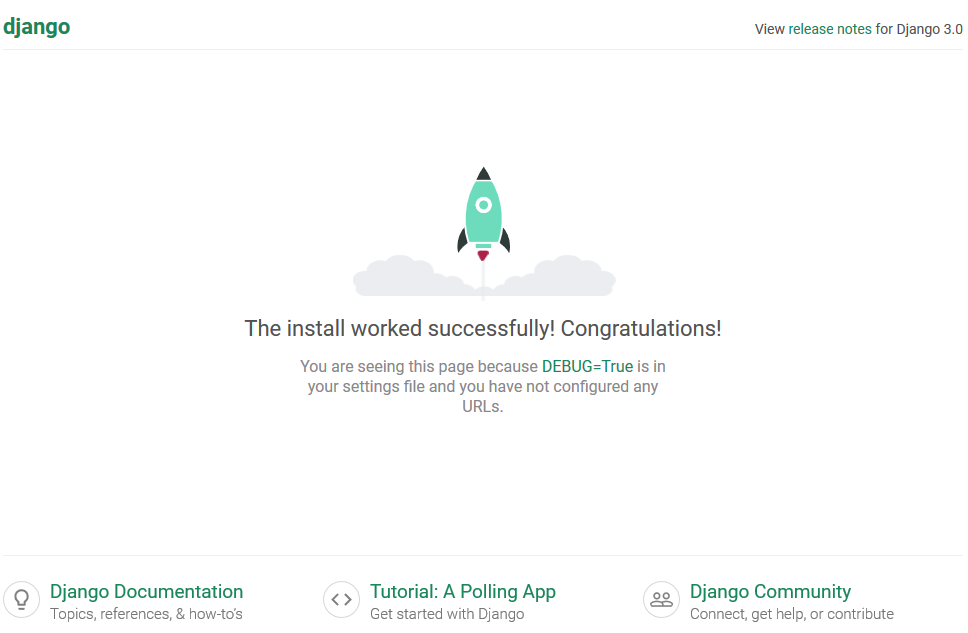
You now have a working Django project. This is the foundation upon which you'll build your web application.
What does Django's "batteries-included" philosophy primarily signify?
In Django's MTV architecture, which component is responsible for defining the structure of the application's data and interacting with the database?
You've just taken your first steps with Django, from understanding its core philosophy to setting up a live project. This groundwork is essential for building anything that follows.