Python Data Science Toolkit
Python Setup
Getting Your Tools Ready
Before you can start analyzing data, you need to set up your workshop. For data analysis with Python, this means installing the language itself, choosing a comfortable environment to write code in, and grabbing a few essential libraries. Think of it as gathering your hammer, nails, and workbench before you start building.
Installing Python
First things first, you need Python. It's a versatile programming language that's become a favorite in the data science community because of its straightforward syntax and powerful tools.
You can download the latest version directly from the official Python website, python.org. The site will automatically suggest the best version for your operating system, whether it's Windows, macOS, or Linux.

During installation, you'll see an option that says something like "Add Python to PATH." It's a good idea to check this box. It makes it easier to run Python from your computer's command line, which you'll need to do to install libraries.
Your Coding Environment
You could write Python code in a simple text editor, but a specialized environment makes life much easier. For data analysis, Jupyter Notebook is the standard. It runs in your web browser and lets you write and run code in small, manageable chunks called cells. This is perfect for experimenting with data, seeing your results immediately, and adding notes along the way.
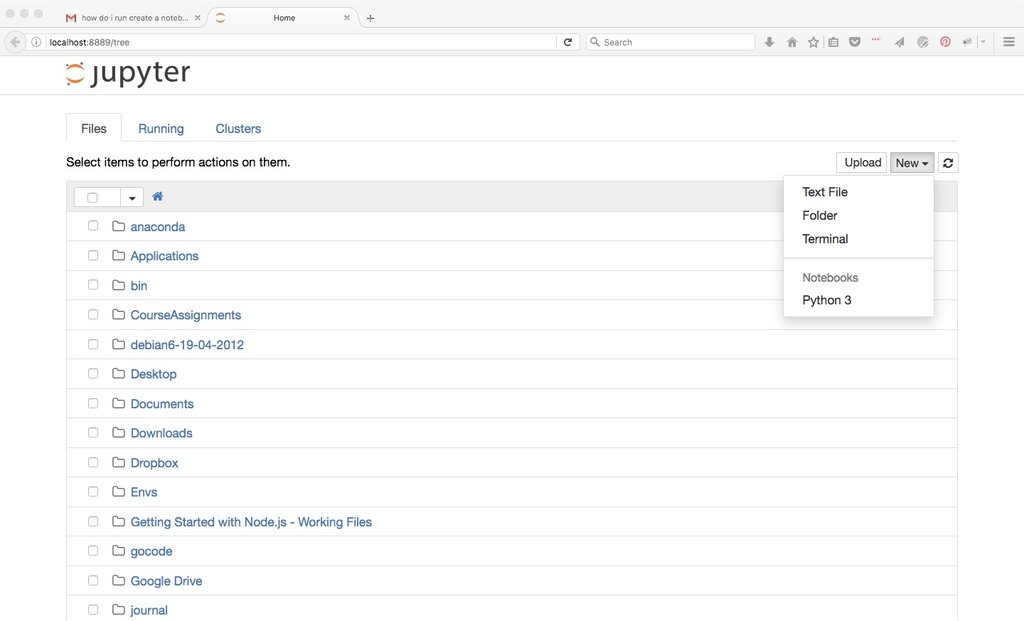
Once Python is installed, you have access to its package manager, pip. You can use pip to install Jupyter Notebook. Open your computer's command line or terminal and type the following command:
pip install notebook
After the installation finishes, you can start Jupyter anytime by typing this command into your terminal:
jupyter notebook
This will open a new tab in your web browser showing the Jupyter file manager, where you can create new notebooks and open existing ones.
Stocking Your Toolkit
Python's real power for data science comes from its libraries, which are collections of pre-written code that handle common tasks. Instead of writing everything from scratch, you can import a library and use its functions. For data analysis, there are three libraries you'll use constantly.
- NumPy is for working with numerical data, especially large arrays and matrices.
- pandas is for organizing and manipulating data in tables, known as DataFrames.
- Matplotlib is for creating charts and graphs to visualize your data.
These are the foundational tools for nearly any data project in Python.
If you want to learn Python for data science, you might want to focus on libraries like pandas, numpy, and matplotlib.
Just like with Jupyter, you can install these libraries using pip. You can install them one by one, but it's faster to do it all at once. Open your terminal and run this command:
pip install numpy pandas matplotlib
When installing Python from the official website, which option is highly recommended to check to make it easier to run Python from your computer's command line?
Which command would you use in your terminal to install the three foundational data analysis libraries (NumPy, pandas, and Matplotlib) all at once?
With Python, Jupyter, and these core libraries installed, your environment is ready. You now have the fundamental setup used by data analysts and scientists around the world.