Professional HTML Architecture
Semantic Architecture
Beyond the Box
You've likely used the <div> tag a lot. It’s the ultimate general-purpose container, a digital cardboard box you can put anything in. But if you build an entire house out of identical cardboard boxes, how does anyone know which box holds the silverware, which holds the books, and which one is the front door? This is the problem with div-heavy layouts.
Semantic HTML solves this by providing tags that describe the meaning and role of your content, not just how it looks. Think of it as labeling the boxes. Instead of a generic <div>, you use <header>, <footer>, <nav>, and <main>. This gives immediate context to browsers, search engines, and assistive technologies like without needing to inspect the content inside.
Using these semantic elements in your HTML code helps improve the structure and accessibility of your web content by providing clear cues to assistive technologies and search engines about the meaning and relationships between different parts of your content.
This structure forms a clear hierarchy, much like a book has a cover, a table of contents, chapters, and an index. For a website, the primary semantic containers create this top-level organization.
This structure is much more informative than a series of nested <div>s. It creates what's known as a document outline, a logical map of the page that both humans and machines can understand.
Structuring the Narrative
Within your <main> element, you'll use <section> and <article> to group related content. The distinction can be tricky, but a good rule of thumb is:
<article>is for self-contained content. Could it be distributed on its own and still make sense? A blog post, a news story, a user comment, or a product card are all great candidates for<article>.<section>is for grouping related content within a larger context. Think of it as a chapter in a book. A section might contain multiple articles, or just be a thematic grouping of information on a page, like a "Contact Us" or "Latest News" area.
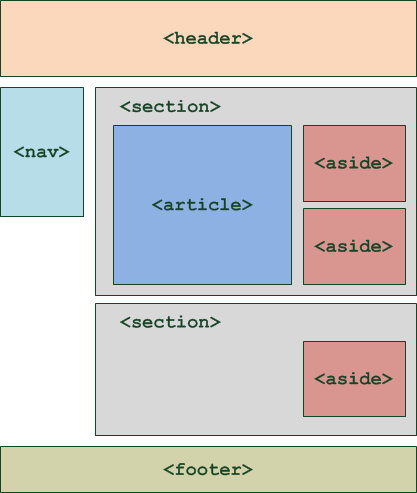
Another key element is the aside. This is for content that is tangentially related to the content around it. Think of a sidebar with related links, an author bio, or pull quotes. It's related, but if you removed it, the main content would still be complete.
From Wireframe to Markup
Let's translate a simple blog page wireframe into semantic HTML. The page has a site header, a main content area with a blog post and a sidebar, and a footer.
The corresponding HTML would not be a mess of divs. Instead, it would use specific tags that announce the purpose of each section. Notice how the blog post itself is an <article>, because it's a complete, standalone piece of content. The sidebar is an <aside>, and the entire central area is wrapped in <main>.
<body>
<header>
<!-- Site logo, main navigation -->
<h1>My Awesome Blog</h1>
<nav>
<ul>
<li><a href="/">Home</a></li>
<li><a href="/about">About</a></li>
</ul>
</nav>
</header>
<main>
<article>
<h2>My First Blog Post</h2>
<p>This is the first paragraph...</p>
<p>This is another paragraph...</p>
</article>
<aside>
<h3>About the Author</h3>
<p>Some info about me.</p>
<h3>Related Posts</h3>
<ul>
<li><a href="#">Another Post</a></li>
</ul>
</aside>
</main>
<footer>
<!-- Copyright info, contact links -->
<p>© 2024 My Awesome Blog</p>
</footer>
</body>
Finally, pay close attention to heading hierarchy (<h1>, <h2>, <h3>, etc.). There should only be one <h1> per page, representing the main title. Subheadings should follow a logical order without skipping levels (e.g., don't jump from an <h2> to an <h4>). This creates a clean, understandable outline for search engines and screen reader users, making your site easier to navigate and rank.
Using semantic tags isn't just a best practice; it's the foundation of a modern, accessible, and SEO-friendly website. It tells the story of your page's structure before a single word of content is read.
Now, let's see what you've learned about structuring a webpage semantically.
What is the main problem with building a web page layout using only <div> elements?
You are creating a product listing page. Each product is shown in a card with an image, title, price, and a short description. Each card is a self-contained unit that could be syndicated or reused elsewhere on its own. Which tag is most appropriate to wrap each individual product card?