Professional Ethical Hacking and Penetration Testing
Advanced Reconnaissance Techniques
Painting the Target
Think of reconnaissance as creating a detailed map before an expedition. A simple ping tells you a destination exists, but it doesn't show you the terrain, the obstacles, or the best paths forward. In ethical hacking, this map is your target profile, and building it is the first and most critical phase. The goal is to understand an organization's digital footprint so thoroughly that you can identify potential weaknesses before launching a single exploit.
This process is split into two main approaches: passive and active. Passive reconnaissance is like being a spy in a café, gathering intelligence by observing and listening without ever speaking to your target. Active reconnaissance is the opposite. It's like walking up to the target's building and checking which doors are unlocked. It’s direct, yields more specific information, and carries a higher risk of being noticed.
Information gathering, or reconnaissance, is the foundation of a successful penetration test.
Passive Intelligence Gathering
The internet is an ocean of publicly available information. The art of passive reconnaissance, or Open-Source Intelligence (OSINT), is knowing how to fish in it. You can uncover an incredible amount about a target—from technology stacks to employee email addresses—without ever sending a single packet to their servers. This keeps your activity off their radar.
One of the most powerful OSINT tools is one you use every day: Google. By using advanced search operators, often called Google Dorks, you can filter search results to find specific information, like login pages, exposed documents, or configuration files that were never meant to be public.
| Operator | Example Usage | Purpose |
|---|---|---|
site: | site:target.com | Restricts search to a specific website. |
inurl: | inurl:admin | Finds pages with a specific word in the URL. |
filetype: | filetype:pdf confidential | Searches for specific file types. |
intitle: | intitle:"index of" | Finds pages with a specific phrase in the title. |
Beyond Google, specialized search engines like catalog internet-connected devices, from servers and webcams to industrial control systems. It's like a Google for the Internet of Things, allowing you to search for devices based on banner information, location, or software version.
Automated tools can accelerate this process. The Harvester is a popular script that scours public sources like search engines and PGP key servers to gather emails, subdomains, hosts, and employee names related to a domain.
# Example: Using theHarvester to find information about a domain
# The -d flag specifies the target domain
# The -b flag specifies the data source (e.g., google, bing, linkedin)

theharvester -d target.com -b google
Active Probing
When you're ready to interact with the target, active reconnaissance begins. This is where you start knocking on digital doors to see what's open, what services are running, and what operating systems they use. The quintessential tool for this job is Nmap (Network Mapper).
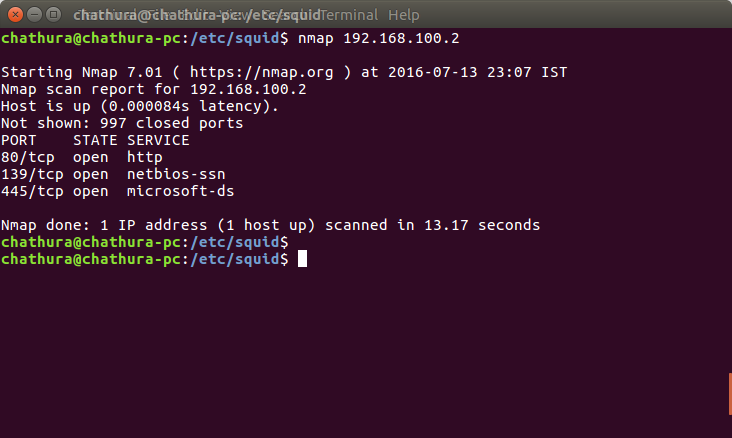
While a standard Nmap scan is effective, it's also loud. A full TCP connect scan (-sT) is easily logged by firewalls. Stealthier scans use parts of the TCP handshake to infer a port's state. A SYN scan (-sS), or half-open scan, sends a SYN packet and waits for a SYN/ACK response. If it gets one, the port is open, and Nmap immediately sends a RST packet to tear down the connection before it's fully established. This often bypasses older intrusion detection systems.
Your scan's speed is also a factor in its stealth. Nmap's timing templates (-T parameter) offer a simple trade-off: faster scans are easier to detect. A paranoid scan (-T0) sends packets incredibly slowly to evade detection, while an insane scan (-T5) prioritizes speed above all else. For most authorized penetration tests, the default (-T3) is fine, but knowing how to slow down is key for covert operations.
# A stealthy Nmap scan
# -sS: TCP SYN scan (stealth scan)
# -O: Enable OS detection
# -T2: Polite timing template (slower to avoid detection)
# --top-ports 1000: Scan the 1000 most common ports

nmap -sS -O -T2 --top-ports 1000 target.com
Nmap can also perform OS fingerprinting by sending a series of specific, non-standard packets to a target and analyzing the responses. Different operating systems implement their TCP/IP stacks in slightly different ways. Based on how a machine replies to these probes, Nmap can make a highly educated guess about its OS and version.
Another powerful active technique is DNS enumeration. Sometimes, a server is configured to allow a DNS zone transfer, which is essentially asking it for its entire phone book of subdomains and IP addresses. This is a misconfiguration that hands an attacker a complete map of the target's internal network structure. You can request a zone transfer using a tool like dig.
# Attempting a DNS zone transfer for a domain
# axfr is the option for a zone transfer request

dig axfr @dns-server.target.com target.com
With the intelligence gathered from both passive and active reconnaissance, you can build a comprehensive profile of your target. You'll know their public-facing servers, the services running on them, potential employee email formats, and even the operating systems they prefer. This detailed map is the foundation for all subsequent phases of an ethical hack.