Professional Computer Hardware Repair and Maintenance
Systematic Boot Diagnostics
The First Few Seconds
When you press the power button, the first moments in your computer's life are a frantic, silent sprint. Before you ever see a logo or a loading screen, the system's firmware awakens. This low-level software, stored on a chip on the motherboard, has one immediate job: to perform a Power-On Self-Test, or POST.
The POST is a rapid-fire health check. It verifies that critical components like the CPU, RAM, and graphics card are present and functioning correctly. It's the bouncer at the door, ensuring the essential hardware is ready for the night before letting the main act—the operating system—take the stage.
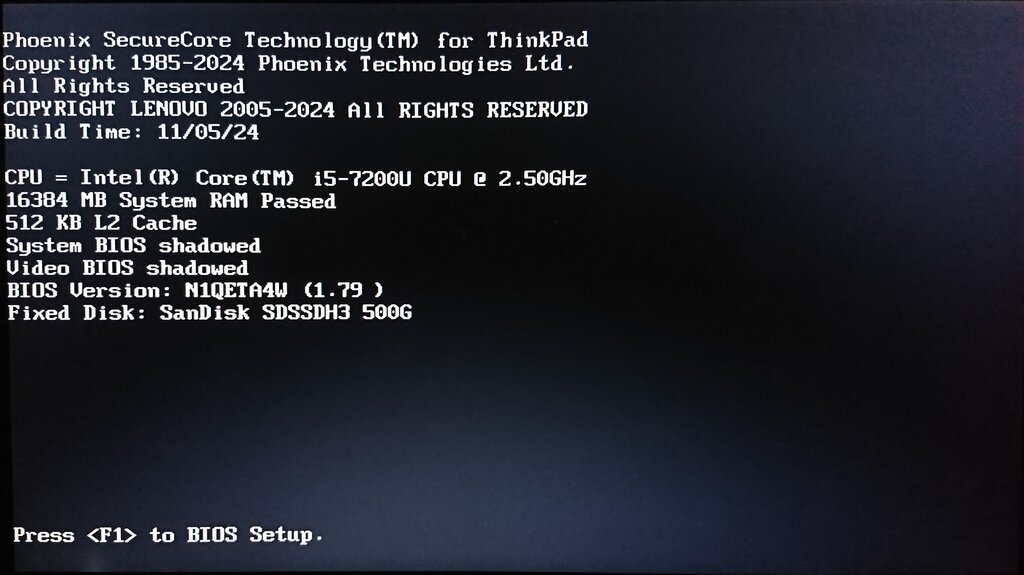
This all happens in the pre-boot environment, a world entirely separate from Windows, macOS, or Linux. If something goes wrong here, the operating system will never get a chance to load. The machine might power on, fans might spin, but the screen will stay blank. Diagnosing these failures requires interpreting the subtle clues the motherboard provides in these crucial first seconds.
Interpreting the Clues
The oldest and most basic form of diagnostic feedback is the humble beep code. If the system can't even initialize the video output to display an error message, it falls back on the small internal speaker. A single, short beep usually means all is well. A sequence of beeps, however, is a cry for help.
These aren't random noises. They are a specific language. For instance, on many systems, one long beep followed by two short beeps points directly to a problem with the graphics card. Three long beeps might indicate a RAM failure. The exact meaning varies by the firmware manufacturer ([{<AMI, Award, Phoenix>}]), so consulting the motherboard's manual is key.
Modern motherboards often provide more sophisticated feedback. Tiny surface-mounted LEDs, sometimes called "EZ Debug LEDs," can light up to indicate which component is being tested. If the boot process halts, the last lit LED—labelled CPU, DRAM, VGA, or BOOT—tells you exactly where the failure occurred. This visual cue is much faster than deciphering beep patterns.
| Beep Code Example (AMI BIOS) | Likely Problem |
|---|---|
| 1 short | System OK |
| 1 long, 2 short | Video (VGA) Error |
| 1 long, 3 short | RAM Error (Memory test fail) |
| 5 short | CPU Error |
| Continuous beeps | Power Supply or RAM Issue |
For the most detailed analysis, technicians use a physical that plugs into an expansion slot on the motherboard. This card has a small digital display that shows a two-digit hexadecimal code. As the POST process runs, it cycles through dozens of these codes, each representing a specific test. If the system hangs, the code frozen on the display corresponds to the exact test that failed, offering an unparalleled level of diagnostic precision. For example, a halt at code '2A' might mean a keyboard controller issue, while 'C1' could point to a memory detection problem.
The Critical Hand-off
Once the POST completes successfully, the firmware's job is almost done. Its final task is to locate a bootable device—like an SSD or a USB drive—and hand over control to the operating system's found on that device.
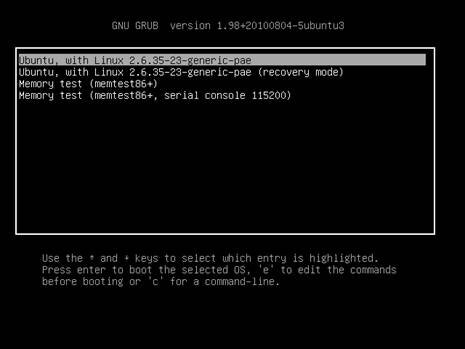
This hand-off is a common point of failure. If you see an error like "No bootable device found" or the system gets stuck on the manufacturer's logo screen, the problem lies in this transition. It's not a hardware failure in the POST sense; the CPU and RAM are fine. Instead, the firmware can't find or read the bootloader. This could be due to a corrupted bootloader, an incorrect boot order in the UEFI settings, or a failing storage drive.
Here's a key distinction: If you never see anything on the screen and only get beeps or diagnostic LEDs, the problem is with core hardware initialization during POST. If you see the manufacturer logo or error messages about boot devices, the POST has passed, and the problem is with the hand-off to the OS.
This is different from a software-induced boot loop. A boot loop occurs after the hand-off is successful. The bootloader starts loading the operating system, but a corrupt driver or a critical system file causes the OS to crash. The system then automatically restarts, the POST and hand-off succeed again, and the OS crashes again, creating a loop. This points to a problem within the operating system itself, not the underlying hardware or firmware.
What is the primary purpose of the Power-On Self-Test (POST)?
A technician is diagnosing a PC that won't boot. They plug in a card that displays a two-digit hexadecimal code, which freezes on 'C1'. What tool are they using and what does this indicate?
By understanding this sequence—from POST checks to the bootloader hand-off—you can systematically isolate the source of a startup failure, whether it's a faulty stick of RAM, a misconfigured UEFI setting, or a corrupted OS file.