Professional Audio Mixing and Mastering
Advanced Signal Routing
Beyond the Channel Strip
You know the basics: a signal comes into a channel strip, you adjust the fader, and it routes to your main output. This works perfectly for simple projects. But as your sessions grow with dozens of tracks, that straightforward path becomes a limitation. Managing a complex mix requires a more sophisticated approach to signal routing. It's not just about organization; it's about unlocking professional mixing techniques and creating a clean, dynamic sound.
Signal flow—the path audio takes from input to output—is a fundamental concept every engineer must master.
Advanced routing allows you to control large groups of tracks simultaneously, apply effects in more creative ways, and maintain clarity and punch in a dense arrangement. Let's move beyond the single fader and build a professional signal flow.
Organizing with Subgroups and VCAs
The first step in taming a large session is grouping related tracks. Instead of adjusting 12 individual drum faders, you can control them as a single unit. The two primary tools for this are subgroups (also called busses) and VCA faders.
A subgroup is an auxiliary track that you route other tracks through. For instance, you can send all your drum tracks to a "Drum Bus." This sums their audio, allowing you to apply a single EQ or compressor to the entire kit. It's a powerful way to make your drum sounds cohesive.
A VCA fader works differently. It acts like a remote control for a group of channel faders. It doesn't sum any audio; you can't place insert effects on a VCA track. Instead, when you move the VCA fader, it proportionally raises or lowers the faders of all assigned tracks. This preserves the relative balance you've set between, say, your kick and snare, while letting you adjust the overall level of the drum group.
| Feature | Group/Bus Fader | VCA Fader |
|---|---|---|
| Signal Path | Audio is summed and passes through the bus track. | No audio passes through. Acts as a remote control. |
| Inserts/FX | Yes, you can process the summed audio. | No, effects must be on the source tracks or a subgroup. |
| Use Case | Processing a group of instruments together (e.g., compressing all drums). | Controlling the volume of multiple tracks while maintaining their relative balance. |
So, which should you use? Often, both. You might route your drums to a subgroup for processing, and then assign that subgroup and your bass track to a VCA fader labeled "Rhythm" to control the entire rhythm section's level with one fader.
Creative Routing Architectures
Beyond organization, advanced routing opens up creative processing techniques. The two main architectures are serial and parallel.
Serial processing is like a chain: the signal passes through one effect, then the next, then the next. The entire signal is altered at each step. This is your standard insert-effects chain.
Parallel processing is different. You split the signal, process one path heavily, and then blend it back in with the original, unprocessed (or 'dry') signal. This gives you the power of extreme processing without sacrificing the clarity and punch of the original sound. A classic example is parallel compression on drums. You send a copy of your drum bus to an aux track, apply aggressive compression to crush the signal, and then subtly blend that crushed signal back in underneath the main drum bus. The result is a sound that feels fatter and more powerful, but still breathes.
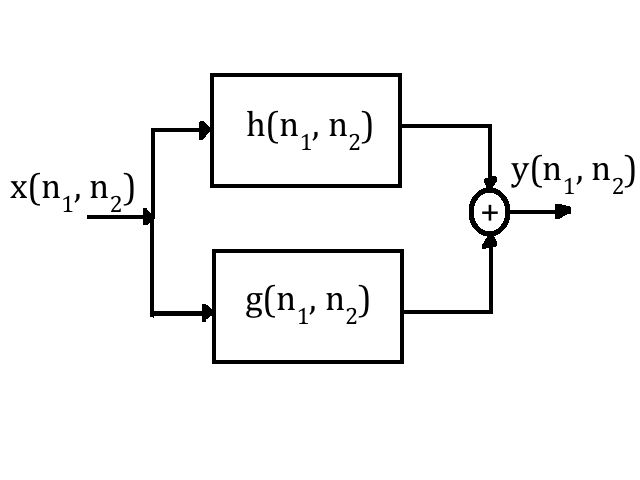
Another powerful technique is sidechaining. This is where the output of one track is used to control an effect on another track. The most common use is to create space in a mix. For instance, you can route your kick drum to the sidechain input of a compressor on your bass track. Now, every time the kick drum hits, the compressor briefly lowers the volume of the bass, preventing the two low-end instruments from fighting for the same frequency space. This creates a tighter, punchier low end where both elements can be heard clearly.
Mastering the Gain Stage
Every point in your signal path—every plugin input, every bus, every send—is a gain stage. Proper gain staging is the practice of managing the signal level at each of these points to ensure optimal quality.
The goal is simple: keep the signal strong enough to be well above the noise floor, but low enough to leave ample headroom and avoid digital clipping.
In a digital audio workstation, clipping occurs when a signal's amplitude exceeds the maximum level the system can represent, which is 0 dBFS (decibels Full Scale). This doesn't just create distortion; it creates harsh, unpleasant noise as the waveform is squared off. Unlike analog clipping, which can sometimes be musically pleasing, digital clipping almost never is. A red light on your channel or master fader is a warning sign that you're losing fidelity.
When you route multiple tracks to a subgroup, their levels combine. If ten tracks peaking at -12 dBFS are all sent to one bus, the bus's output level will be much higher and can easily clip. To prevent this, you need to manage the levels at every stage. Turn down the individual channel faders, reduce the send levels to your parallel effects, or lower the input gain on your plugins. Maintaining good gain staging throughout your complex routing ensures a clean, open mix with maximum dynamic range.
Time to check your understanding of these advanced routing concepts.
What is the key difference between a subgroup (bus) and a VCA fader?
The primary goal of parallel compression is to blend a heavily processed signal with the original 'dry' signal to enhance the sound without losing the original's dynamics.
By mastering these routing techniques, you gain complete control over your mix, allowing you to build complex, professional-sounding arrangements with clarity and precision.