Private VLANs Explained
Introduction to VLANs
Virtual Walls in Your Network
Imagine a large open-plan office. Everyone is connected to the same physical network switch. When one computer sends out a broadcast message, like a shout for help finding another device, every single computer in the office hears it. This is a standard Local Area Network, or LAN. For a small office, it works fine. But as the network grows, all that shouting becomes noise, slowing everyone down and creating security risks. What if the accounting team's computers are hearing broadcasts from the marketing team's devices?
A Virtual Local Area Network, or VLAN, solves this. It's like putting up virtual walls in that open office. Even though everyone is still plugged into the same physical hardware, you can group devices together logically. The accounting computers can be on their own VLAN, and the marketing computers on another. They are logically separated, as if they were on two completely different networks.
VLAN
noun
A logical grouping of network devices that are on the same or different physical LANs but are configured to communicate as if they were attached to the same wire.
This grouping isn't based on physical location. A user in accounting could move their desk to the other side of the building, plug into a different network port, and their computer would still be on the accounting VLAN. It's all managed through software on the network switches.
Taming Network Chatter
The key concept behind a VLAN is the broadcast domain. Think of a broadcast domain as a room. If you shout in that room, everyone inside it hears you. In a traditional LAN, the entire network is one big room. A single broadcast message from any device goes to every other device.
VLANs break that big room into smaller, soundproof rooms. Each VLAN is its own separate broadcast domain. A broadcast sent from a device in VLAN 10 will only be heard by other devices in VLAN 10. The switch won't forward it to devices in VLAN 20 or VLAN 30. This immediately cuts down on unnecessary network traffic, which improves performance.
This segmentation provides major benefits.
Security: Devices in different VLANs cannot communicate with each other by default. If malware infects a computer in the guest VLAN, it can't spread to the critical servers in the engineering VLAN. Communication between VLANs must be explicitly allowed by a router or Layer 3 switch, giving administrators tight control.
Flexibility: Network administrators can group users by department, project team, or security level, regardless of their physical location. This simplifies network management, especially in large or dynamic environments.
Performance: By reducing the amount of broadcast traffic each device has to process, the overall network performance improves.
How It Works
So how does a switch know which devices belong to which VLAN? It happens in two main ways: through port assignment and frame tagging.
Port-Based VLANs: The simplest method is to assign each port on a switch to a specific VLAN. If port 5 is assigned to VLAN 10, any device you plug into that port automatically becomes part of VLAN 10.
VLAN Tagging: But what if you need to connect two switches and have devices on both switches be part of the same VLAN? For this, we use VLAN tagging. When a data frame (a packet of information) leaves a switch to travel to another switch, a small digital "tag" is added to it. This tag identifies which VLAN the frame belongs to. The receiving switch reads the tag and knows to only send that frame to ports belonging to the same VLAN.
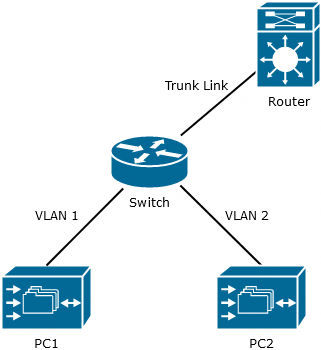
The protocol used for this is called IEEE 802.1Q. The link between the two switches that carries tagged traffic for multiple VLANs is called a trunk port. The ports that connect to end devices like computers and printers are called access ports. Access ports don't understand tags; they just belong to a single VLAN.
One of the first steps in a Zero Trust approach is network segmentation.
By understanding and implementing VLANs, you can transform a flat, chaotic network into an organized, efficient, and secure system. It's a foundational tool for any modern network administrator.