Practical Foundations of Programming
Logical Control Flow
Making Decisions in Code
So far, your code runs from top to bottom, one line after another, without any detours. But the real power of programming comes from making decisions. Your program needs to be able to look at a situation and decide which path to take, just like you might check the weather before deciding to bring an umbrella.
The foundation of all decision-making in code is boolean logic. It's a system built on a simple, powerful idea: a statement is either true or false. There's no in-between. In Python, these two states are represented by the keywords True and False. Every conditional statement you write will ultimately boil down to one of these two values.
Comparison and Logic
To get a True or False value, we need to ask a question. We do this with comparison operators. You can check if a user's age is greater than 18, if two strings are identical, or if a number is not equal to zero. Each comparison, or expression, evaluates to a boolean value.
| Operator | Meaning | Example (x=5) |
|---|---|---|
== | Equal to | x == 5 (True) |
!= | Not equal to | x != 3 (True) |
> | Greater than | x > 10 (False) |
< | Less than | x < 10 (True) |
>= | Greater than or equal to | x >= 5 (True) |
<= | Less than or equal to | x <= 4 (False) |
Often, one question isn't enough. You might need to check if a user is over 18 and a citizen, or if it's a weekend or a holiday. For this, we use logical operators: and, or, and not. These let you chain multiple boolean expressions together.
andis true only if both sides areTrue.oris true if at least one side isTrue.notflips the value;not TruebecomesFalse.
Python uses a clever trick called to make this process more efficient. It stops checking as soon as it knows the final answer.
# Let's assume these variables are set
is_logged_in = True
is_admin = False
has_premium = True

# 'and' requires both to be True
if is_logged_in and is_admin:
    print("Welcome, Admin!")

# 'or' requires at least one to be True
if is_admin or has_premium:
    print("You have special access.")

# 'not' inverts the value
if not is_admin:
    print("This is a standard user account.")
Conditional Statements
Now we can use these boolean expressions to control which parts of our code run. The most basic tool for this is the if statement. It's simple: if the condition is True, run the code block that follows. If it's False, skip it.
This brings us to a crucial, defining feature of Python: indentation. Where other languages use curly braces {} to group code, Python uses whitespace. The code that belongs to an if statement must be indented one level deeper. This isn't just a style suggestion; it's a syntax rule that Python strictly enforces. This design choice is a core part of the , which values readability and simplicity.
temperature = 30

# The condition `temperature > 25` evaluates to True
if temperature > 25:
    # This line is indented, so it's part of the 'if' block
    print("It's a hot day!")
    print("Don't forget to stay hydrated.")

print("Code continues here, outside the 'if' block.")
What if you want to do something else when the condition is false? That's where else comes in. An else block catches every case where the if condition wasn't met.
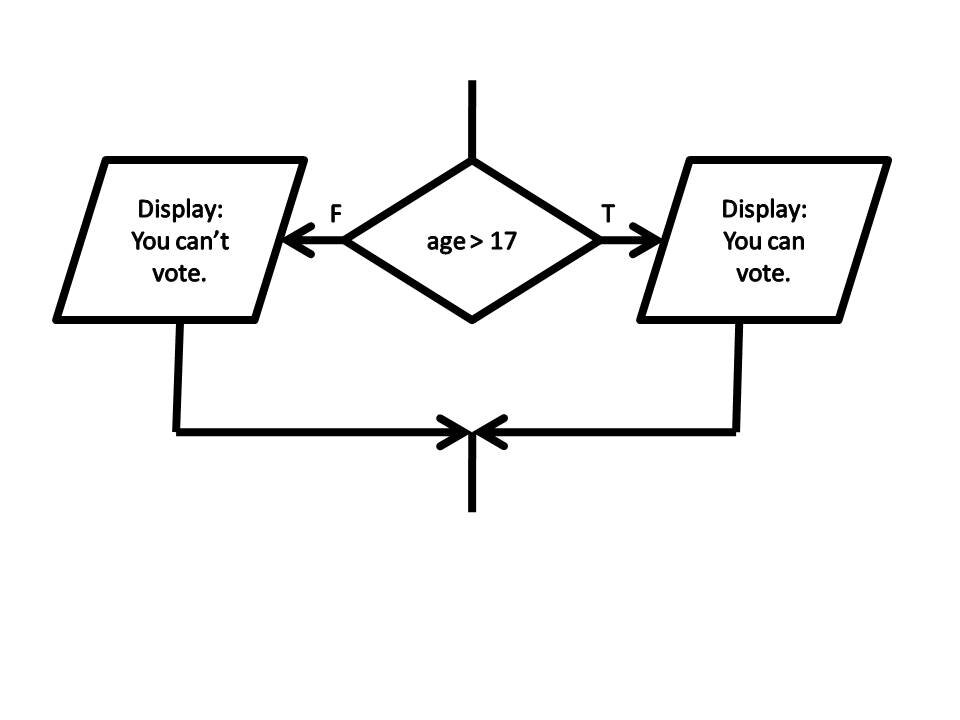
But what about more than two options? You could check for a grade of 'A', 'B', 'C', and so on. For this, Python gives us elif, which is short for "else if." It lets you check multiple conditions in a sequence. Python will check each condition from top to bottom and run the first one it finds that is True. Once a condition is met, it skips the rest of the chain, including the final else.
score = 85

if score >= 90:
    print("Grade: A")
elif score >= 80:
    print("Grade: B") # This block runs
elif score >= 70:
    print("Grade: C")
else:
    print("Grade: Needs Improvement")
Complex Decisions
You can create even more detailed logic by nesting conditional statements inside one another. For example, after checking if a user is logged in, you could have another if statement inside that block to check if they are an administrator.
This allows you to build complex decision trees. However, be careful. Nesting too deeply can make code very difficult to read and debug, a problem sometimes called the because of how the code indents to a point.
is_logged_in = True
user_role = "admin"

if is_logged_in:
    print("Welcome!")
    # This is a nested conditional
    if user_role == "admin":
        print("Loading admin dashboard...")
    else:
        print("Loading standard user dashboard.")
else:
    print("Please log in to continue.")
Let's test your understanding of these control flow concepts.
What is the boolean value of the following Python expression?
(True and False) or (not False)
In Python, what is used to define a block of code that belongs to an if statement?
By combining comparison operators, logical operators, and conditional statements, you can make your programs react intelligently to different data and inputs.