Practical Data Science and Machine Learning Workflows
Data Pipeline Engineering
From Scripts to Pipelines
You've likely written scripts to load and clean data. They work, but they can quickly become messy. A series of operations on a DataFrame often looks like a chain of nested function calls or a sequence of temporary variables. This gets hard to read and debug as complexity grows.
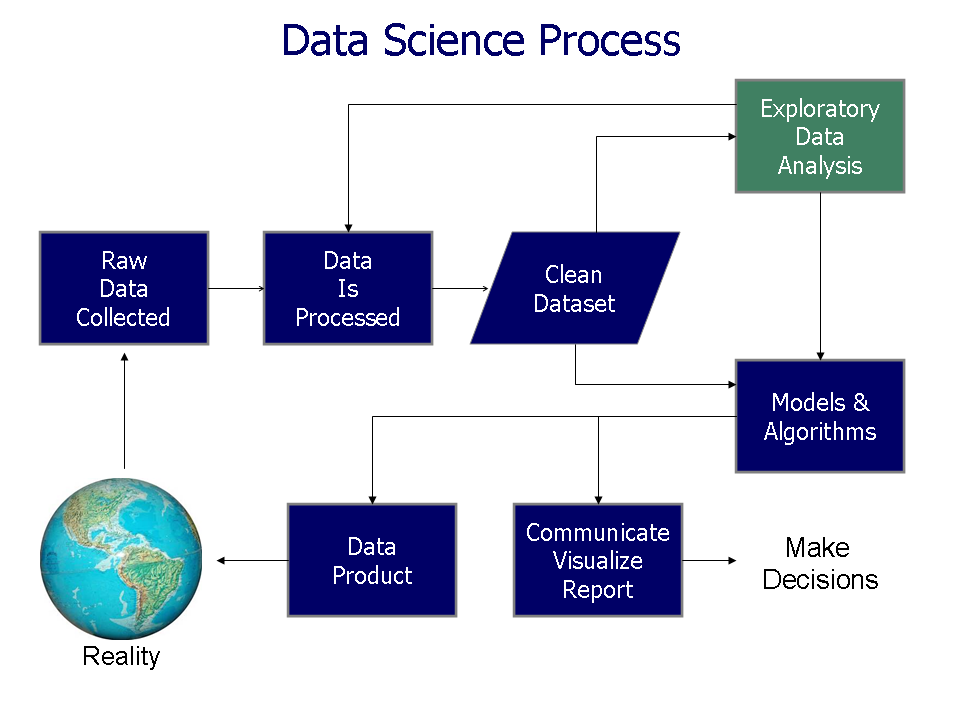
A data pipeline is a more formal, robust way to handle this process. It's a series of automated steps that move data from a source, transform it, and load it into a destination. Think of it less like a one-off script and more like an assembly line for data.
A data engineer builds the pipelines, storage, and processing systems to transform that raw mess into clean, structured, reliable data that analysts, scientists, and AI models can actually use.
To make our code cleaner and more pipeline-like, we can use the Pandas pipe() method. It allows you to chain together your custom functions in a readable, linear way. Instead of writing function3(function2(function1(df))), you can write:
df.pipe(function1).pipe(function2).pipe(function3)
This reads from left to right, just like a pipeline flows. Each function must accept a DataFrame as its first argument and return a DataFrame.
import pandas as pd

def remove_negative_prices(df):
    return df[df['price'] > 0]

def calculate_sales_tax(df, tax_rate=0.08):
    df['price_with_tax'] = df['price'] * (1 + tax_rate)
    return df

def categorize_products(df):
    df['category'] = 'default'
    df.loc[df['price'] > 100, 'category'] = 'premium'
    return df

# Create a sample DataFrame
data = {'product': ['A', 'B', 'C'], 'price': [120, -5, 80]}
df = pd.DataFrame(data)

# Apply the functions using pipe()
clean_df = (
    df.pipe(remove_negative_prices)
      .pipe(calculate_sales_tax, tax_rate=0.09) # Pass extra args
      .pipe(categorize_products)
)

print(clean_df)
Notice how we can pass additional arguments to functions within pipe(), like the tax_rate. This method organizes your data transformations into a clear, maintainable sequence.
Connecting to Data Sources
Real-world data isn't always in a neat CSV file. More often, it's in a database or available through a REST API. A robust pipeline needs to extract data from these sources efficiently.
For SQL databases, libraries like SQLAlchemy provide a standardized way to connect to various database systems (PostgreSQL, MySQL, SQLite, etc.). You can execute a query and load the results directly into a Pandas DataFrame.
from sqlalchemy import create_engine
import pandas as pd

# Connection string format: dialect+driver://username:password@host:port/database
DATABASE_URL = "postgresql://user:password@host:5432/mydatabase"

engine = create_engine(DATABASE_URL)

query = "SELECT user_id, order_date, total_amount FROM orders WHERE status = 'completed';"

with engine.connect() as connection:
    df_orders = pd.read_sql(query, connection)
Extracting data from REST APIs involves making HTTP requests. The requests library is the standard tool for this in Python. You'll typically get a response in JSON format, which can be easily parsed and loaded into a DataFrame.
Handling Large Datasets
What happens when a dataset is too large to fit into your computer's memory? Loading a 50 GB file into a machine with 16 GB of RAM will fail. The solution is to process the data in smaller pieces, or chunks. This is called incremental loading.
Instead of loading the entire dataset at once, we load a manageable chunk, process it, and then move to the next one. Python's generators are perfect for this. A generator is a special type of function that yields items one by one, rather than returning them all at once. This keeps memory usage low.
Generator
noun
A function that returns an iterator that produces a sequence of values when iterated over. Generators are useful for working with large data streams or sequences without loading everything into memory at once.
Here's how you can create a generator to read a large CSV file in chunks using Pandas.
# Generator function to read a large file
def read_large_csv(file_path, chunk_size=10000):
    for chunk in pd.read_csv(file_path, chunksize=chunk_size):
        # 'yield' makes this a generator
        yield chunk

# Usage
file_generator = read_large_csv('very_large_dataset.csv')

for data_chunk in file_generator:
    # Process each chunk individually
    processed_chunk = (
        data_chunk.pipe(remove_negative_prices)
                  .pipe(calculate_sales_tax, tax_rate=0.09)
    )
    # For example, append the processed chunk to a database table
    # processed_chunk.to_sql('processed_data', engine, if_exists='append')
This pattern is essential for scalability. It also forms the basis for handling backfills, where you need to process a large amount of historical data that has accumulated over time.
Automating the Pipeline
Manually running extraction and transformation scripts is not sustainable. A true data pipeline is automated. Tools like dlt (Data Load Tool) simplify this process. It helps you build pipelines that can automatically adapt to changes in the source data, a concept known as schema management.
Imagine a new column is added to your source API. A rigid script would break. dlt can detect this new column, add it to the destination table, and continue the pipeline without interruption. This is called schema evolution.
Here is a conceptual example of using dlt to load data from an API endpoint into a DuckDB database. dlt handles the creation of the pipeline, schema inference, and loading.
import dlt
import requests

@dlt.resource(write_disposition="append")
def get_user_data():
    # This generator fetches data page by page from an API
    for page in range(1, 5):
        response = requests.get(f"https://api.example.com/users?page={page}")
        response.raise_for_status()
        yield response.json()['data']

# Configure a pipeline
pipeline = dlt.pipeline(
    pipeline_name="user_data_pipeline",
    destination="duckdb",
    dataset_name="users"
)

# Run the pipeline
load_info = pipeline.run(get_user_data())

print(load_info)
In this example, dlt inspects the data yielded from get_user_data, infers a schema (column names and types), creates a users table in a DuckDB database if it doesn't exist, and loads the data. If you run it again and the API adds a new field like "last_login_ip", dlt will automatically add that column to the table.
By combining structured functions with pipe(), handling data incrementally with generators, and using tools like dlt for automation, you move from writing fragile scripts to engineering robust, scalable data pipelines.
Ready to test your knowledge on building data pipelines?
What is the primary advantage of using the Pandas pipe() method for data transformations?
When processing a 50 GB file on a machine with only 16 GB of RAM, the best approach is to load the entire dataset into a single Pandas DataFrame.
Building effective data pipelines is a core skill in data engineering, enabling the reliable flow of information that powers analytics and machine learning.