Practical Cybersecurity and Defense Strategies
Advanced Network Defence
Beyond the Perimeter
A strong perimeter firewall is a good start, but it's not enough. Modern network defence assumes that attackers will eventually get inside. The real challenge is limiting what they can do once they're in. This is the principle of 'defence in depth' — creating multiple layers of security that work together.
The first step is to move away from a flat network, where every device can communicate with every other device. Instead, we architect our network into logical zones. Think of it like a medieval castle. It has a strong outer wall, but it also has internal walls, gates, and guarded towers. If an enemy breaches the main gate, they don't get the keys to the entire kingdom.
The diagram shows a common setup. The Public Zone, often called a Demilitarised Zone (DMZ), contains servers that need to be accessible from the internet, like a web server. The Private Zone holds the critical assets: application servers, databases, and internal user machines. The firewall enforces strict rules, allowing only specific, necessary communication between these zones.
But we can go deeper. Even within the private zone, the application server probably doesn't need to talk to the HR department's printer. This is where micro-segmentation comes in. By creating even smaller, more granular zones—sometimes around a single application or even a single server—we can drastically reduce an attacker's ability to move around.
This enforces the principle of least privilege at the network level: if two systems have no legitimate reason to communicate, they must be prevented from doing so.
Analysing the Traffic
Zoning is about controlling traffic flows, but what about the content of that traffic? To spot sophisticated attacks, you need to look inside the packets themselves. Deep packet inspection allows us to analyse the data portion of a packet, not just its header information (like source/destination IP addresses and ports).
Two indispensable tools for this are Wireshark and tcpdump.
Wireshark provides a graphical interface, making it easy to filter, search, and visualise network conversations. It decodes hundreds of protocols and is excellent for detailed, interactive analysis.
tcpdump is a powerful command-line tool. It's lightweight, scriptable, and perfect for capturing traffic on remote servers or as part of an automated monitoring setup. You can use it to quickly grab data for later analysis in Wireshark or for on-the-spot checks.
# Capture the first 100 packets on interface eth0
# that are destined for port 443 (HTTPS)

sudo tcpdump -i eth0 -c 100 'dst port 443'

# -i: specify network interface
# -c: count of packets to capture
# '...': the capture filter
An analyst using these tools isn't just watching data go by. They're hunting for anomalies: a packet with an unusual flag set, a DNS query to a suspicious domain, data being sent over a protocol that doesn't normally carry it, or the unique signature of a known malware's command-and-control traffic. It's digital forensics at the network level.
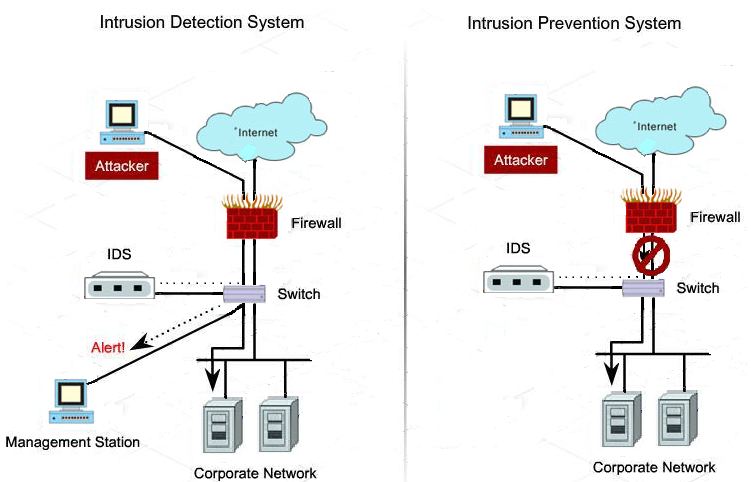
This manual analysis is powerful, but it doesn't scale. To monitor an entire enterprise network in real-time, we automate this process using Intrusion Detection Systems (IDS) and Intrusion Prevention Systems (IPS).
An IDS is like a burglar alarm. It sits off to the side, monitoring a copy of the network traffic. When it spots something suspicious—a known attack signature or anomalous behaviour—it sends an alert. It is passive; it detects, but it does not stop.
An IPS is like an inline security guard. It sits directly in the path of the network traffic. It analyses packets as they pass through and can actively block or drop malicious traffic before it reaches its destination. The upside is real-time protection. The downside is that if the IPS fails or is misconfigured, it can block legitimate traffic and cause an outage.
Choosing Your Tools
The core of your zoning and prevention strategy is often a firewall. A key architectural decision is whether to use a hardware appliance or a software-based solution. The choice isn't as simple as one being better than the other; it's about trade-offs.
| Feature | Hardware Firewalls | Software-Defined Firewalls |
|---|---|---|
| Performance | Often higher throughput due to dedicated hardware (ASICs). | Performance depends on the underlying host server. Can be scaled by adding more compute resources. |
| Environment | Best for physical data centres and network perimeters. | Ideal for virtualised and cloud environments. Enables micro-segmentation between virtual machines. |
| Flexibility | Less flexible. Configuration is tied to the physical device. | Highly flexible and scalable. Policies can be deployed and updated via code and automation (Infrastructure as Code). |
| Cost | High initial capital expenditure (CapEx). | Lower initial cost, often a subscription or pay-as-you-go model (OpEx). |
| Management | Managed via a dedicated graphical or command-line interface. | Managed centrally through an orchestrator or cloud console. Integrates well with automation tools. |
Modern networks rarely use just one type. A common hybrid approach involves a powerful hardware firewall at the network edge to handle high-volume traffic from the internet, combined with software-defined firewalls inside the cloud or virtual environment to enforce granular micro-segmentation rules between applications.
By layering logical zones, deep packet visibility, and a mix of hardware and software enforcement points, you create a resilient network that is far more difficult for an attacker to compromise and navigate.
What is the primary principle behind 'defence in depth'?
A network security device that sits in the direct path of traffic and can actively block malicious packets before they reach their destination is known as an: